
Estimates & pricing
Fuel surcharge
How MoveBoard adds fuel to a quote — by distance range, as a percent, or per mile — and how to change it on one order.
- 4 min read
- Checked against MoveBoard
- For owners & admins, sales
On this page
The fuel surcharge is its own row in Quote Details. MoveBoard works it out from your settings for the move type, and the office can replace it on an order with a percent or a flat amount.
Choose how fuel is charged
- Open Settings › Pricing & calculator › Fuel surcharge.
- Pick the move type at the top, then Hourly or Long Distance in the card's corner. Each combination has its own settings.
- Under How fuel is charged, pick one way and fill it in (below).
- Turn on Charge Fuel Surcharge Per Truck if a move with two or more trucks should pay fuel once per truck.
- Press Save.
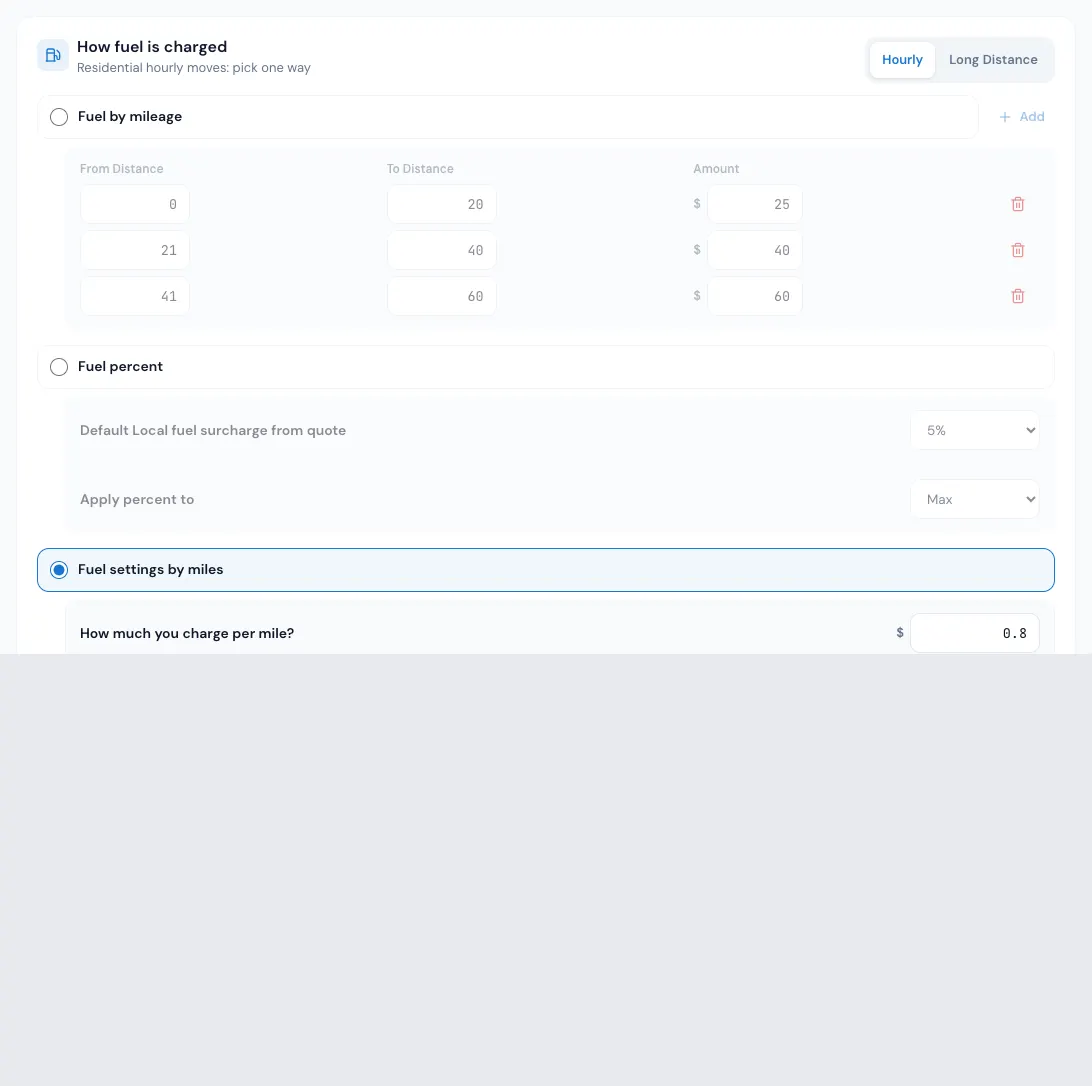
Fuel by mileage (hourly moves)
A table of distance ranges, each with a dollar amount. Add a row with From Distance, To Distance and Amount. MoveBoard takes the customer stop that is furthest from your company address, finds the range that distance falls in, and charges that amount. If the distance falls in no range, there is no fuel charge. Leave no gaps between your ranges.
Fuel percent
A percent of the move: pick it in Default Local fuel surcharge from quote. Apply percent to decides which figure it is a percent of when the quote is a range: Both (the low and the high end each get their own fuel), Min, Max or Avg. What the percent is taken of follows Fuel surcharge is a percent of on the same page: the moving charges (labor, travel, additional services and materials — the starting choice), or labor and travel only. See Fuel surcharge settings.
Fuel settings by miles
A rate per mile: type How much you charge per mile? and Start charge from distance. Below that amount of distance there is no charge; above it, every mile is charged. Pick which distance is measured (A is the origin, B the destination, C your company address):
| Way | Distance |
|---|---|
| Way 1 | One leg: C to A or B to C (Direction: Shortest, Longest, From C to A, From B to C) |
| Way 2 | C to A plus B to C |
| Way 3 | The whole trip: C to A, A to B and B to C |
| Way 4 | A to B only |
A company that works in kilometres sees kilometres in these boxes, and the distances are measured in kilometres. See Kilometres, cubic feet and pounds.
Change the fuel on one order
You need the permission to edit the fuel surcharge amount. Without it, the Fuel Surcharge label tells you "You don't have a permission to edit this field" and the pop-up doesn't open.
- Open the order and click Fuel Surcharge in Quote Details.
- Pick one: - Company Setting — what your settings work out (the ? next to it explains how it was worked out). - Percent of Moving Charges — type a percent. It is taken of the same base as your Fuel surcharge is a percent of setting, and the pop-up names it next to the box — (moving charges: $…) or (labor and travel: $…) — with the total, for example 8% of labor and travel. - Flat Charge — type a dollar amount.
- Press Save in the pop-up, then SAVE on the order.
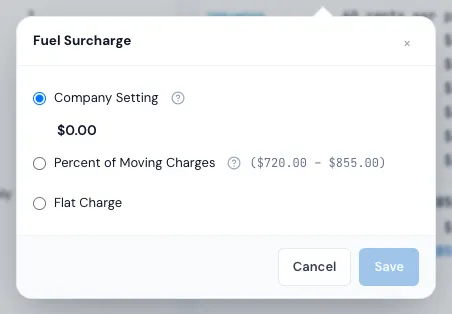
A replaced amount shows a set manually tag next to the row; a typed percent also shows its words there (8% of moving charges). Pick Company Setting again to go back to the calculated fuel.
On a long-distance order, a fuel typed on the order wins over the long-distance fuel from your tariff — on the quote and on the bill of lading.
Good to know
- A flat rate quote includes fuel only when Add Calculated Fuel Surcharge to Flat Rate Price is on. See Flat rate local moves.
- When an address or stop changes, the fuel is worked out again.
- Once the contract is signed and sales are locked, or the job is completed, the fuel pop-up is read-only.
If something goes wrong
- You do not have permission to change the fuel surcharge. — the order's save was refused because you don't have the fuel permission. Ask an admin, or save without changing fuel.
- Fuel is $0 with Fuel by mileage — the furthest stop's distance doesn't fall into any of your ranges. Add a range that covers it.
Related guides
- Estimates & pricingHow MoveBoard prices a moveThe chain behind every hourly quote — size, crew, speed, labor time, travel, minimums, add-ons and taxes — with a worked example.
- Estimates & pricingFlat rate local movesQuote a local move as one fixed price built from its size and distance, instead of hours times a rate.
- Estimates & pricingKilometres, cubic feet and poundsChoose miles or kilometres, cubic feet or pounds, and how many pounds a cubic foot weighs — and what changes when you switch.
- Booking & paymentsChange the deposit or fuel amount on an orderType your own deposit or fuel surcharge on one order — who may, and how to go back to your rules.
- OrdersQuote Details cardEvery line of the price — deposit, charges, fees, discount, taxes, total, payments and balance — and how to change each one.
Still stuck? A person will help.
Open a ticket from Support inside MoveBoard, or email us — we usually reply within one business day.