
Operations · Box deliveries
Sell the boxes. Book the move.
Sell moving boxes and packing supplies on your own website, in every customer's portal and from the order. A box calculator suggests what they need, they pay by card, and your team delivers on a booked window. Box buyers who aren't customers yet arrive as new leads.
- line to put the store on your website
- 1line to put the store on your website
- starter boxes, supplies and bundles
- 18starter boxes, supplies and bundles
- places customers can buy
- 3places customers can buy
What it fixes
The day before Box deliveries, and the day after.
Customers buy boxes at a hardware store, and you lose the sale and the early contact.
A store on your website and in the portal, in your colours, with your prices.
Box orders come in by phone and somebody writes them on a sticky note.
Every order arrives paid, as a New box delivery to schedule.
The driver drops a pallet at the wrong door and nobody knows what was left.
A load list to tick on the phone, and delivery photos sent to the customer.
How it works
Box deliveries, screen by screen.
01 / On your website
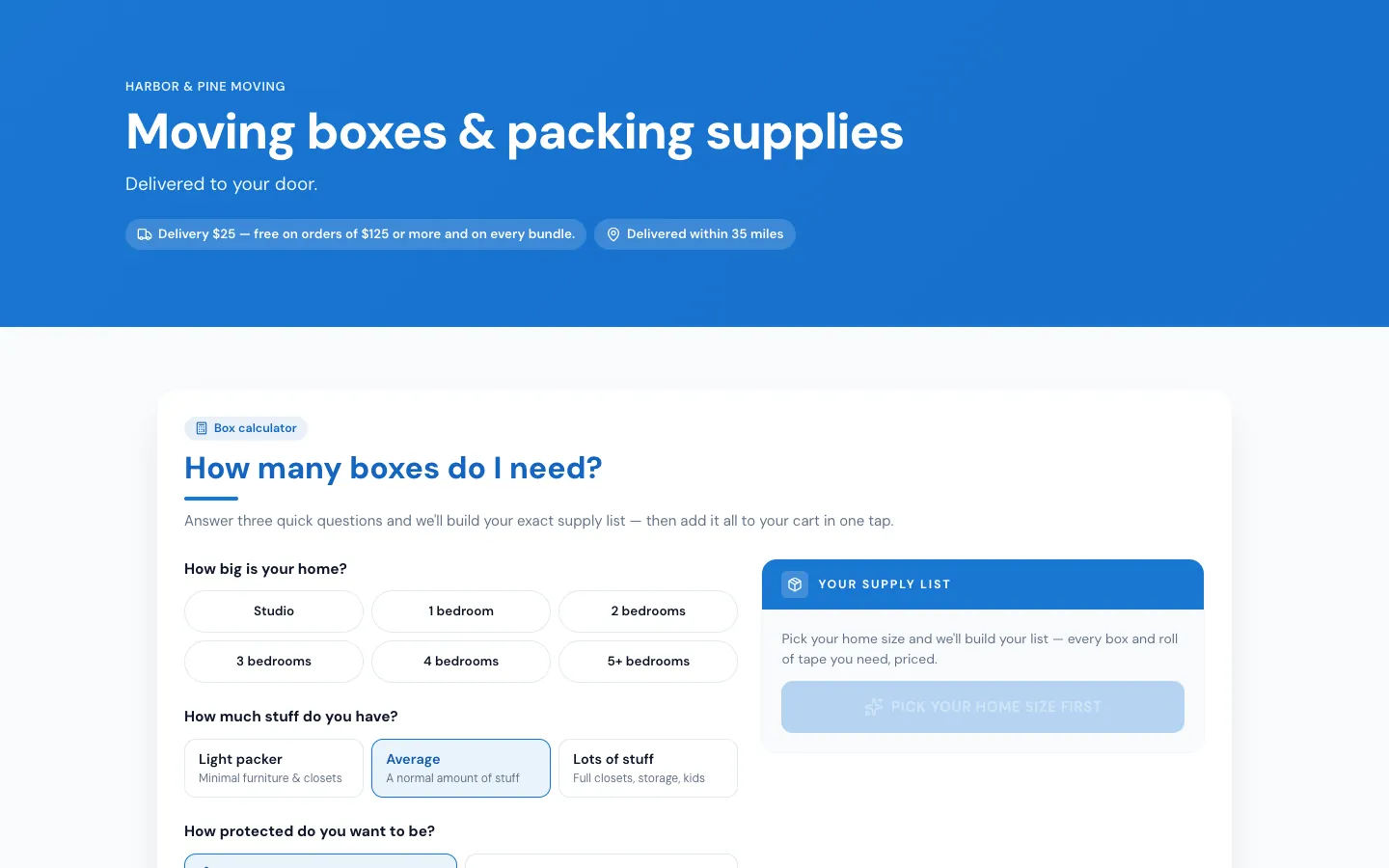
Your own store, one line of code.
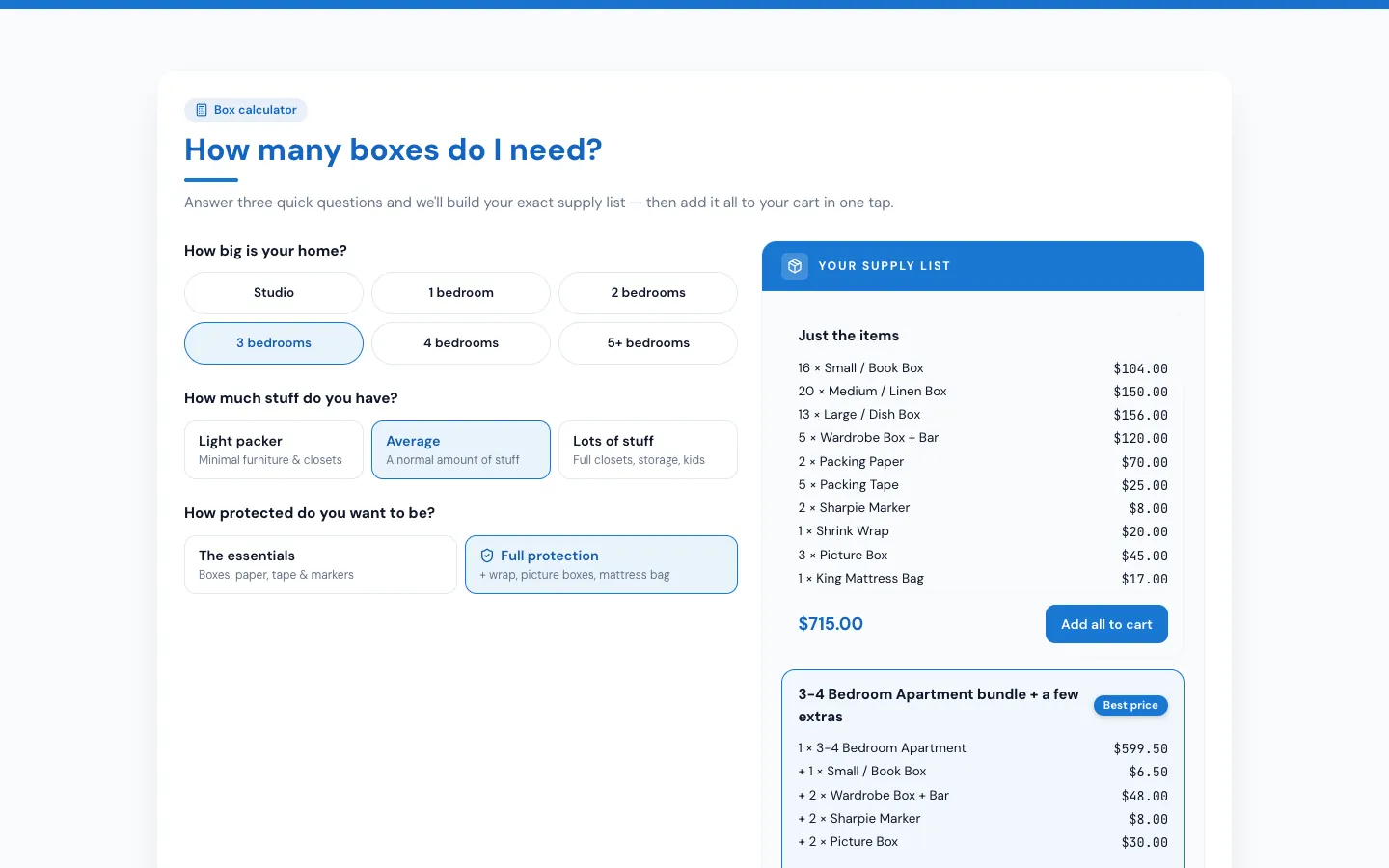
Copy one line from the Store page settings and paste it into your website. The store fits your page and grows to its full height, under your own header. It has the box calculator, your bundles, boxes and supplies with your photos, delivery details and your questions, then a three-step checkout.
- Delivery address checked against your delivery area
- Prices worked out by MoveBoard, with delivery, sales tax and your card fee
- Cards go straight to Authorize.net
- New buyers become a new lead with the source Box store
02 / In the portal
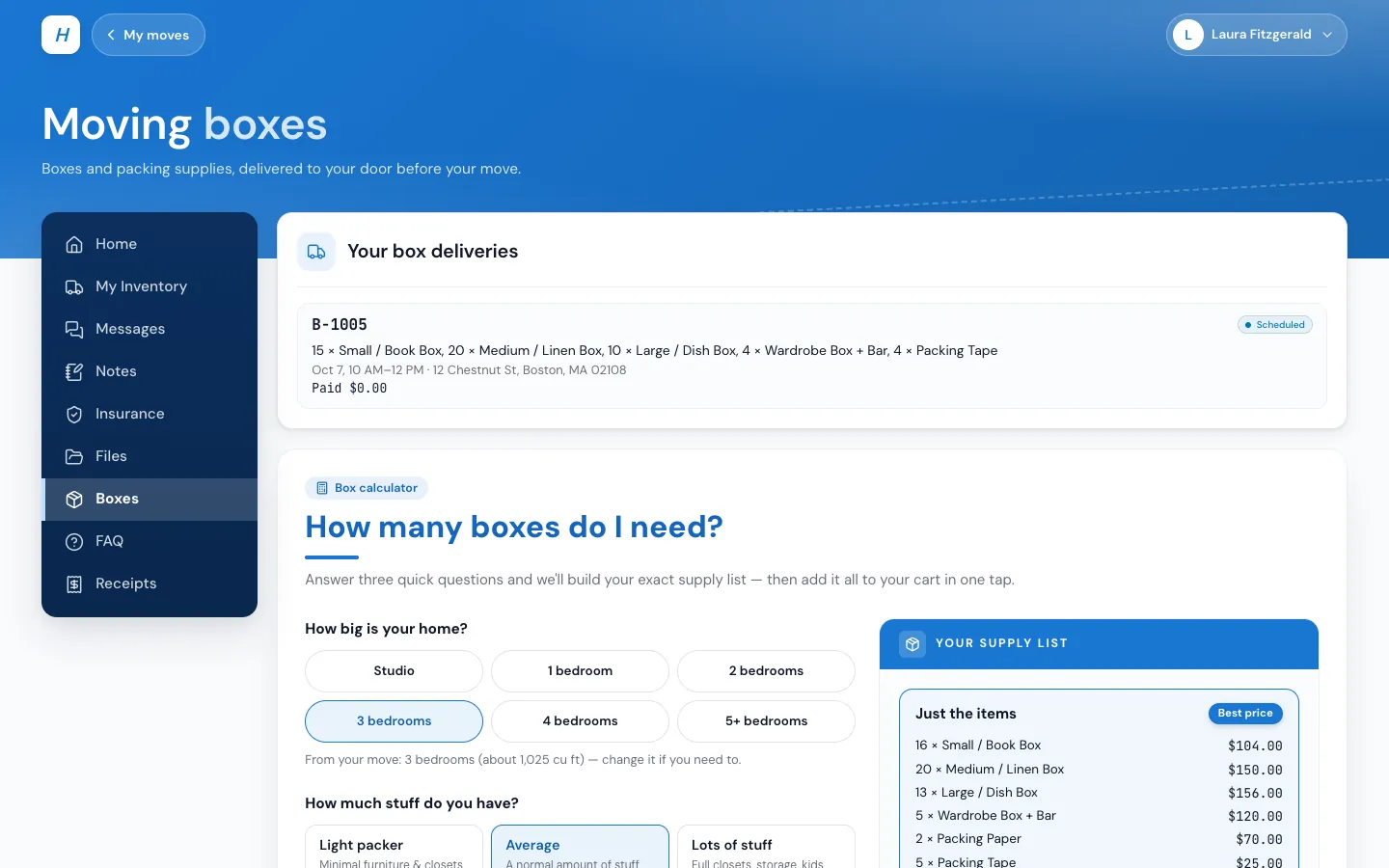
A Boxes page for every move.
While box delivery is on, every customer's portal shows Boxes. The calculator starts from the move itself: the inventory's cubic feet, or the move size, with a picture box for each TV and mirror and a mattress bag for each mattress when they pick full protection. They pay with their card on file or a new one.
- The delivery address starts as the move's first address
- Their box deliveries listed with the status of each
- Box money is never part of the move's total or balance
03 / The office books it
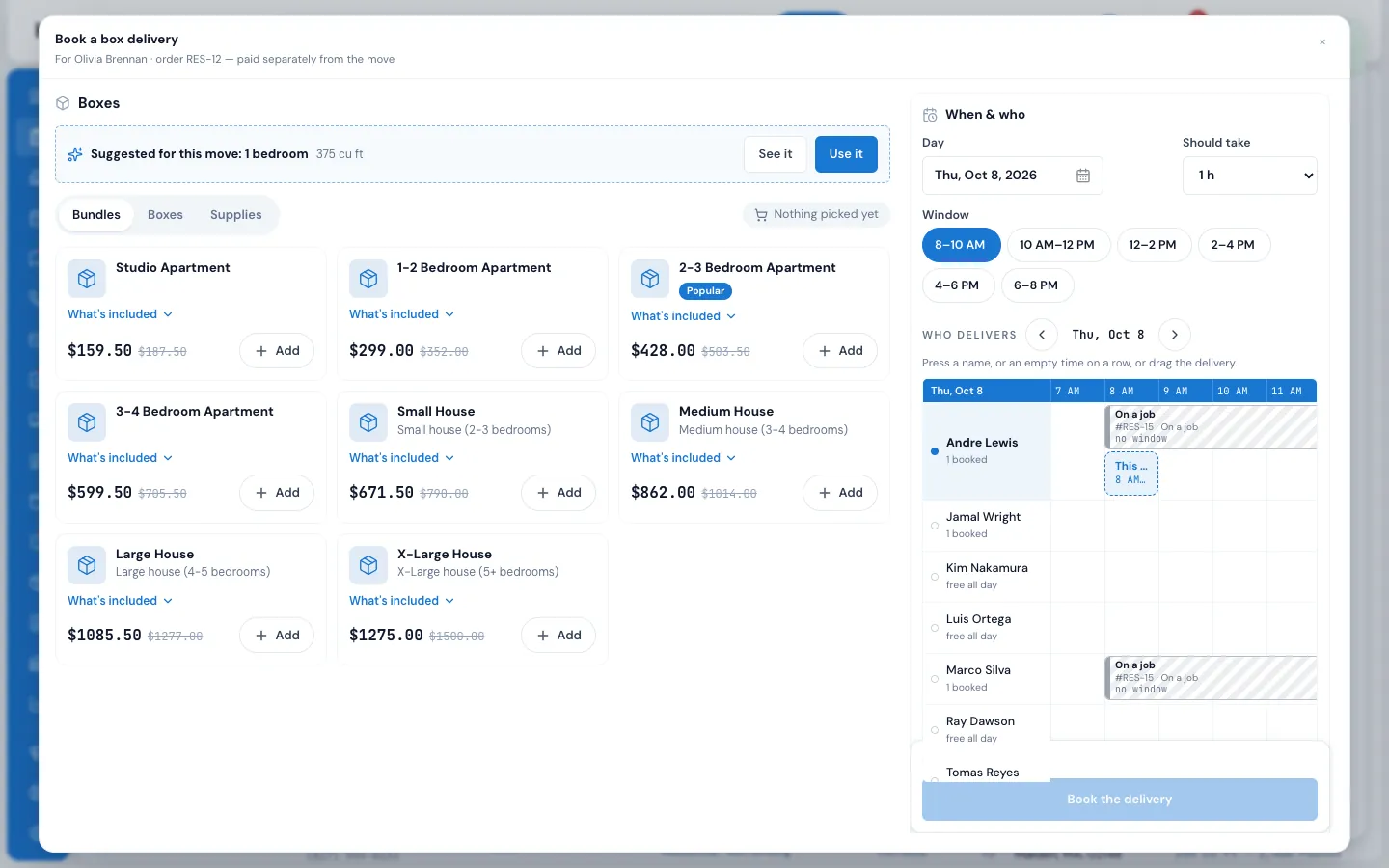
A window, a person, a charge.
Book a box delivery from the order: the suggestion for the move, bundles, boxes and supplies, then the day, a delivery window and who delivers on a small schedule. Windows, how many deliveries each takes, delivery days and lead time all come from your settings.
- Usually delivered by: people with the Box Delivery responsibility first
- Delivery fee, free delivery from an amount, bundles ship free, a smallest order
- Extra boxes charged later, refunds handled on the delivery
04 / On the crew's phone
Loaded, delivered, photographed.
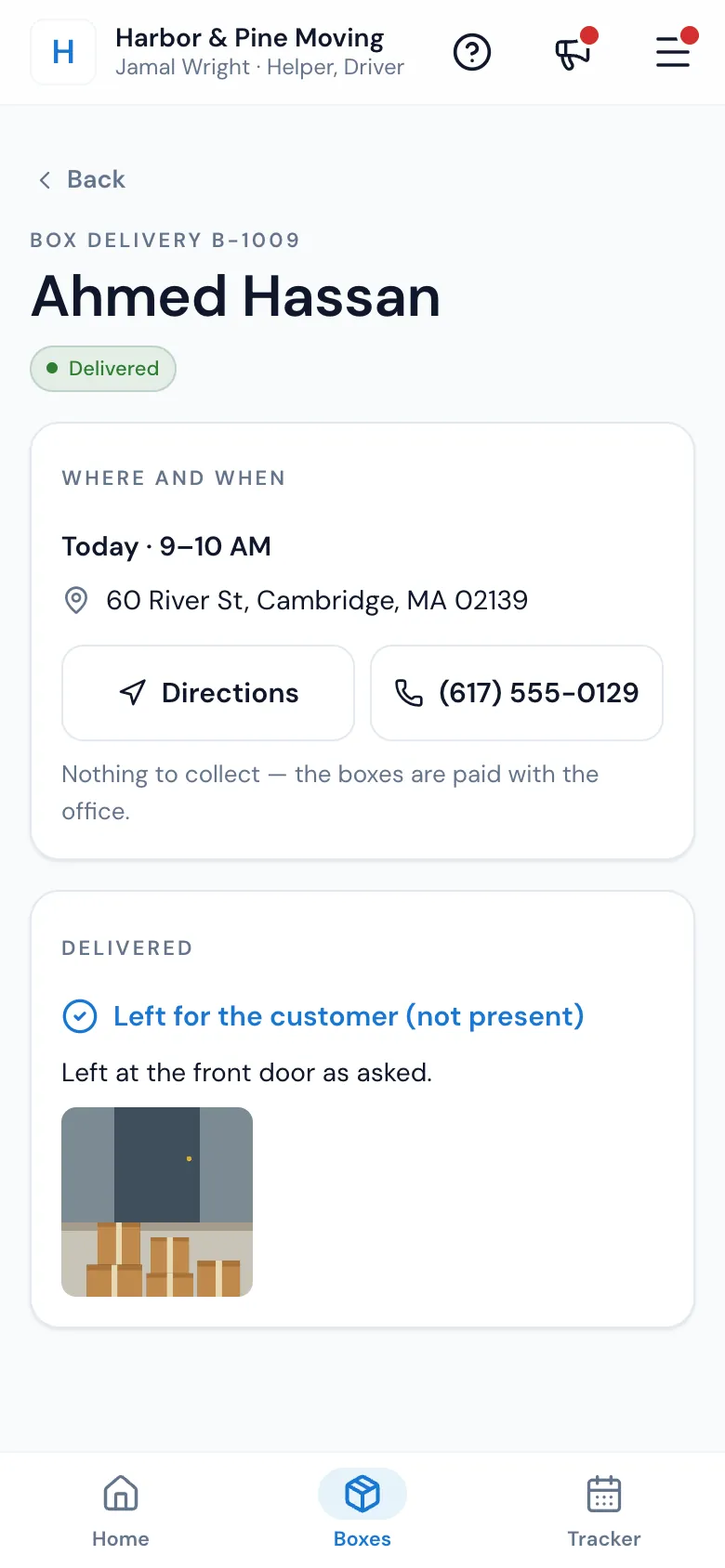
The person delivering sees their box deliveries in the Mover's Portal, ticks each line of the load list at the warehouse, and marks it Delivered with a photo, or the customer's signature when they're home. The customer gets a Delivered message with the photos.
- Told when a delivery is given to them, moved or cancelled
- A reminder the day before, to them and to the customer
- Every message editable in the Template Builder
05 / The numbers
What boxes really earn you.
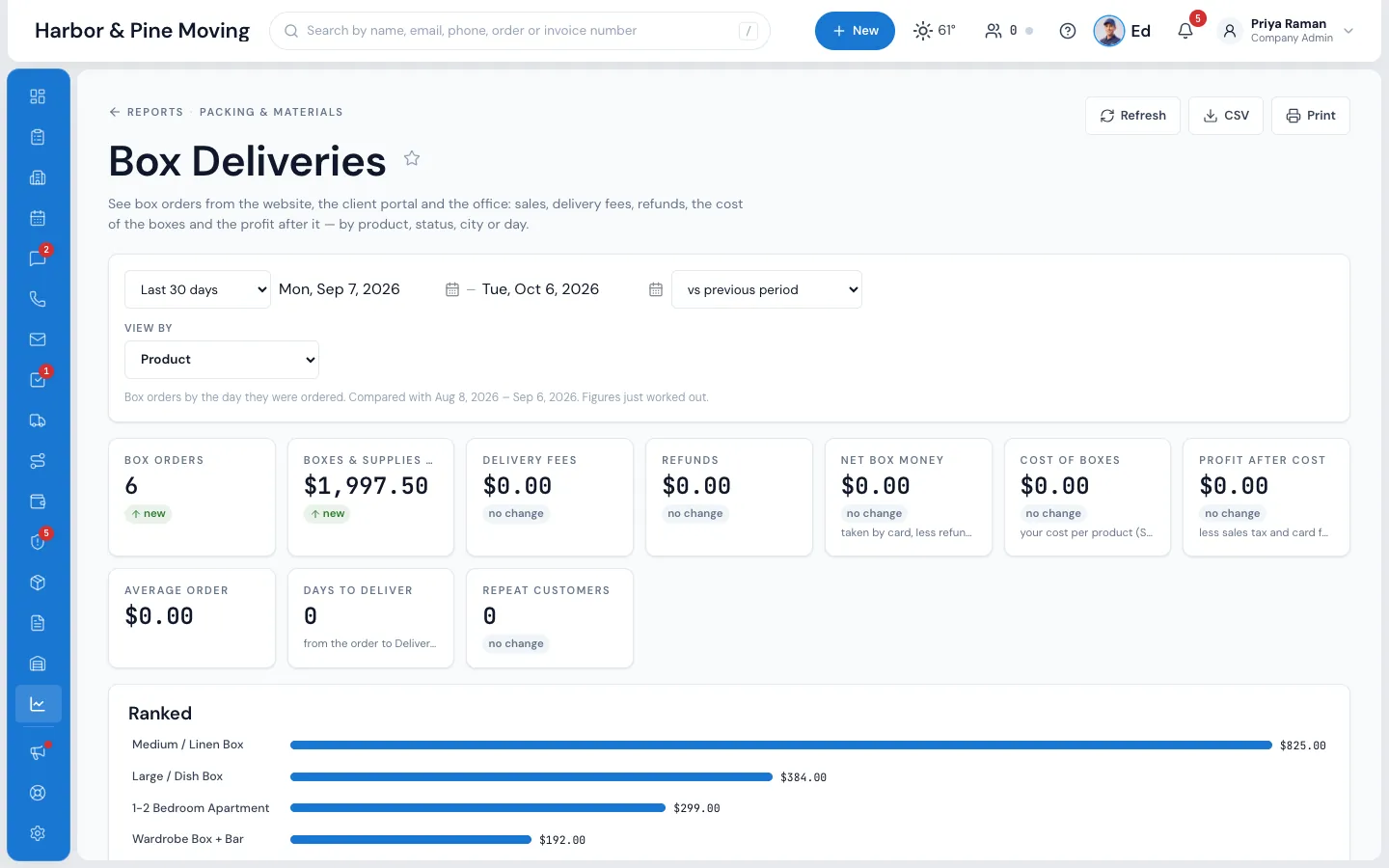
Set what each item costs you, and MoveBoard works out your profit on box sales. The Box Deliveries report shows orders, boxes and supplies sold, delivery fees, refunds, net box money, the average order and repeat customers, with the best sellers ranked.
- Your own catalog: add, price, hide and reorder items
- Bundles with one price and a crossed-out full value
- Prices from your list, or from your packing materials
“Tons ease of booking and allowing my clients to feel welcomed and transparency for them.”
By the numbers
1
Line of code puts the store on your website
Paste it between your own header and footer. The store matches your portal colours and grows to its full height.
Where can customers buy boxes?
In a store on your own website, on the Boxes page of their customer portal, and from the office, which can book a box delivery from the order.
How are box orders paid?
By card at checkout, with delivery, sales tax and your card fee shown first. Cards go straight to Authorize.net, and a declined card places no order. Box money is kept separate from the move's total and balance.
What happens when someone who isn't a customer buys boxes?
MoveBoard adds a new customer and a new lead with the lead source Box store, so sales can follow up about their move. A buyer with an open move has the delivery linked to it.
Can I limit where we deliver?
Yes. Set the farthest delivery in driving miles, measured from your office or another address such as your warehouse, plus ZIP codes you always deliver to. Addresses too far away see your own words with your phone number.
Do I have to build the catalog from scratch?
No. The first time you switch box delivery on, MoveBoard fills a starter catalog of 10 boxes and supplies and 8 bundles. Change, hide or delete any of them and add your own photos.
Is box delivery on by default?
No. It's off for every company until you switch it on in the Box delivery settings.
Works with
Box deliveries hands the work to the next screen.
See your company on MoveBoard.
A live demo built around your own kind of moves: your service area, your pricing, your crews.