
Moving company CRM: Built for movers, every lead to booked.
MoveBoard is a moving company CRM built for movers. Leads from your website, the AI Receptionist, Angi and the customer portal land on your Orders page the moment they arrive, get a salesperson by your rules, and move through Follow Up, Can Book, Reserved and Booked, with the customer's whole history one double-click away.
- workflow stages, from new lead to booked
- 5workflow stages, from new lead to booked
- statuses, each with its own rule
- 17statuses, each with its own rule
- to see who has their quote open
- 15sto see who has their quote open
Workflow · 68 orders
Orders new leads
18
New lead
9
Follow up
6
Can book
4
Reserved
31
Booked (BTM)
What does a moving CRM do?
A moving CRM is customer relationship management software made for moving companies. It captures every lead with the move date, addresses and size, prices the quote from your own rates, reminds salespeople to follow up, and keeps one record from the first call to the booked job, the crew's bill of lading and the final invoice.
What it fixes
What a CRM for movers fixes, on day one.
Leads sit in an inbox, a voicemail and three lead websites.
Website forms, the AI receptionist, Angi and the portal post straight into New.
Two salespeople call the same lead, and nobody calls the next one.
Assignment rules give every lead one owner, by service, source, size, price and hours.
A returning customer gets a new salesperson and a cold welcome.
MoveBoard recognises them and sends the new lead back to the rep they had.
How it works
How the moving CRM works, from new lead to booked.
01 / Every lead source
Six ways in, one moving CRM.
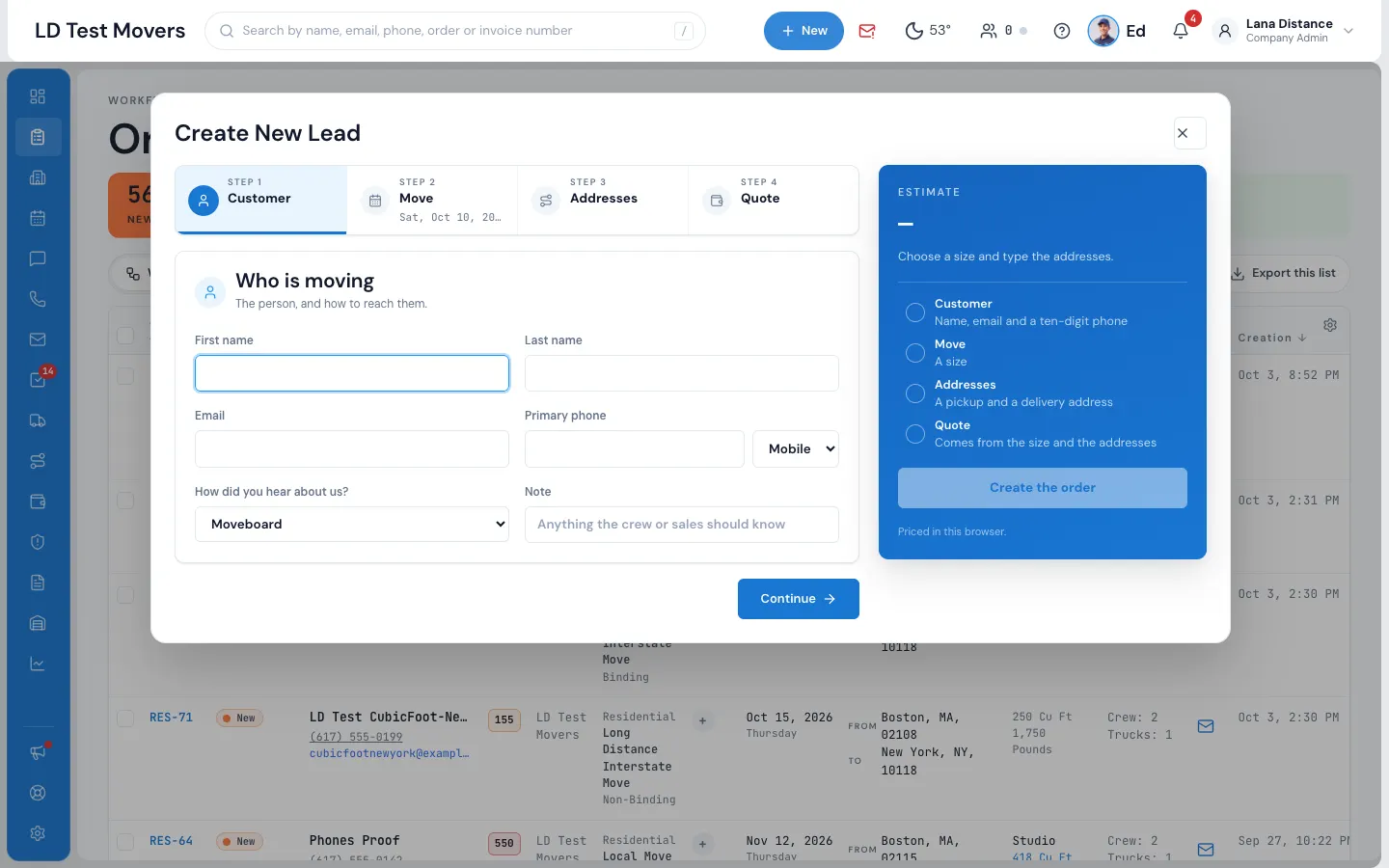
Every new lead becomes an order in New on your Orders list, with no refresh needed, and your office gets the New lead notification. It can come from your website's quote form, the AI receptionist, a lead provider such as Angi, the customer portal's Request a new move, a file you import, or the office's + New › New Lead, which prices the move as you type.
- The source is recorded on every order, and locked for lead providers
- A provider that sends the same lead twice is refused the second time
- Google ad click IDs and landing pages kept with the lead
- Matching customers offered as you type a new lead by hand
02 / Statuses, new to booked
New lead to Booked, in five stages.
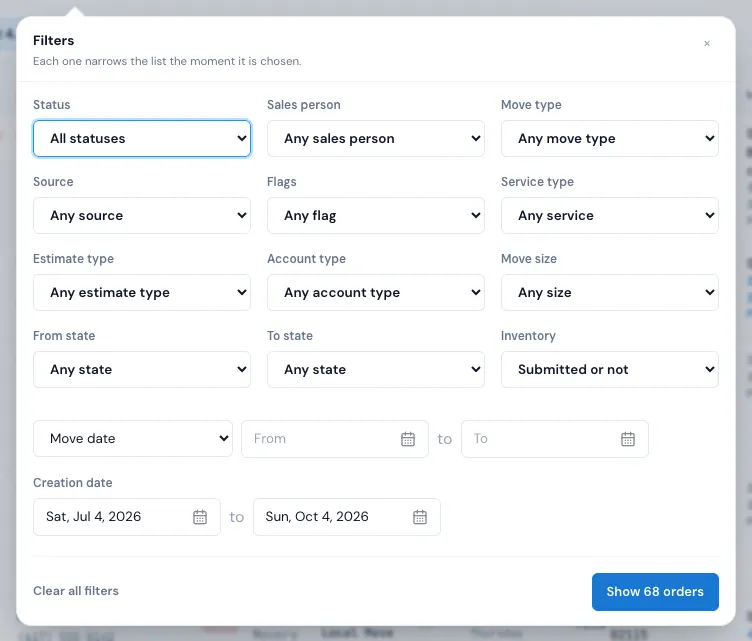
The Workflow view opens on new leads, with New lead, Follow Up, Can book, Reserved and Booked across the top and their counts. The List view shows every status at once with filters for status, salesperson, move type, source, flags, service, estimate type, account type, size, states, inventory and any date.
- Sort by newest, move date, latest activity, largest quote or booked date
- Tick up to 100 orders to change status or assign them at once
- Hide the columns you don't need; your choice is kept
- Double-click any row to open the order in its own window
- A Zillow button on every address opens the home on Zillow, to see its photos, bedrooms and size before you quote
03 / Lead assignment
Rules that hand out leads to your movers' sales team.
A lead that arrives on its own goes to the salesperson of a linked move-out order, then to a returning customer's own rep, then to whoever's rules fit: their move types and services, lead sources, size and price ranges, and working hours right now. When several fit, the one who has waited longest gets it.
- A lead the office makes is theirs, unless the customer has a rep
- When nobody fits, the order says why and links to the fix
- The Order Log says how: by rotation, returning customer, and so on
- Change the salesperson any time, even after the job is booked
Settings · Sales & orders
Lead assignment, Priya Shah
Services and move types · block 1 + Add
Lead sources
Size ranges (cu ft)
0 – 1,200
Price ranges ($)
0 – and up
Working hours
04 / Follow-ups, tasks and scoring
Most moves are won on the second call.
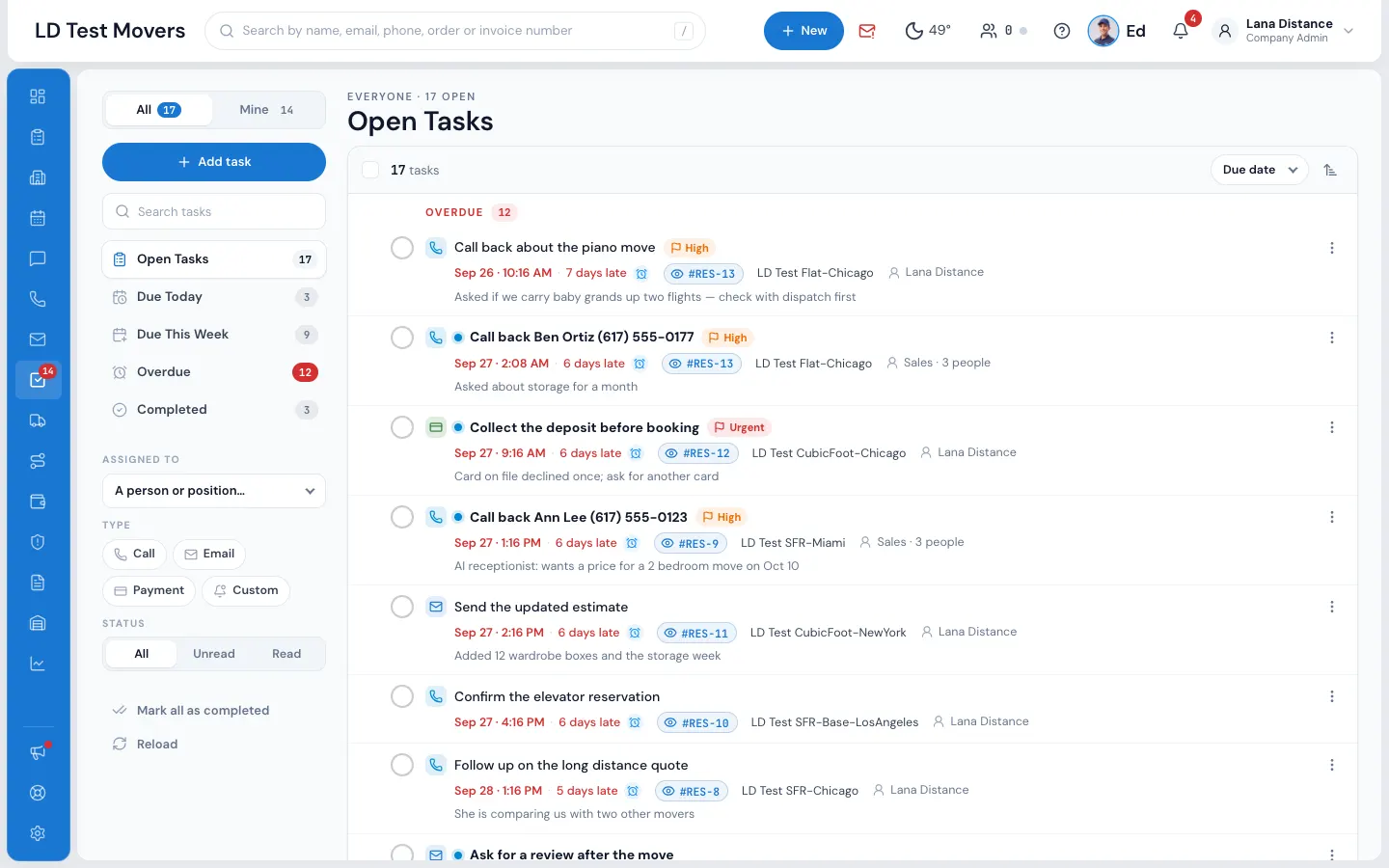
Tasks remind you to call, email or collect: Due Today, Due This Week and Overdue, with reminders that chime and snooze. Write a message on an order and switch on Create a follow-up to add the task as it goes. Move a lead you're chasing to Follow Up and the whole team can see it's being worked.
- Tasks for one person, several, or a whole position like All Sales
- Automatic follow-up emails and texts a set time after a status
- Leads turn Warm and Hot as customers open your email and portal
- Five lost statuses that tell your reports why a lead slipped
- A lost lead isn't locked: move it back when the customer calls
05 / Customers online
Call while they're looking at the quote.
The people icon in the top bar counts the customers who have their portal open right now. Each card shows their order, move date and status, and whether they're building their inventory this minute. A customer who walks away drops off within about a minute, so the list is exact.
- A green dot beside the name on the Orders list, too
- Open the order or its conversation straight from the card
- Refreshes itself every 15 seconds
Customers Online 3
Rachel Stoneactive now
building inventory · 34 items
#RES-1188Move Oct 21New
Marcus Lee2 min ago
#RES-1179Move Oct 19Can Book Online
Aisha Khanactive now
#LD-2249Move Nov 8Follow Up
Refreshes itself every 15 seconds
Call, text and email
Every call, text and email on the lead.
A CRM for movers has to keep the conversation where the move is. With RingCentral connected, calls ring in the browser with the customer's name and orders, and every call, recording and voicemail lands on the order. Two-way texts from your business number, portal messages and emails from your own Google or Microsoft mailbox sit in one conversation per order.
- Reply with a text or a portal message from the same box, with your templates
- See whether each text was delivered
- Write with AI in the message box: draft, shorten, fix spelling or change the tone
Quote to booked
From quote to Order for Service, deposit and Booked.
When the office has priced the move and given it its trucks, set the order to Can Book Online and the quote email and text go out. The customer opens their portal, reads and accepts your Order for Service, signs it and pays the deposit in one go. The order turns Booked, your team hears Booked online, and the job is on the calendar and the dispatch board.
Moving CRM vs generic CRM
Why a moving CRM, not a generic CRM?
A generic sales CRM tracks contacts and deals. It doesn't know a move date, a truck, a crew size or a price level, so the quote, the booking, the schedule and the bill of lading end up in other tools and get typed again.
In MoveBoard the lead is the order itself. It is priced from your rates as it arrives, booked by the customer online, scheduled on the dispatch board, closed on the crew's phone and paid into payroll and reports, without copying anything from one system to another.
Best CRM for movers, compared Software for small moving companies
Switching
Switching to MoveBoard from another moving CRM.
Most companies switch in a week or two: set MoveBoard up, bring the data in, then switch on a quiet day. Export your orders as .csv or .xlsx and import them on Settings › Sales & orders › Import orders. Exports from SmartMoving, Moveworx, Supermove, Granot and HomeAdvisor are recognised by their column names.
Data migration, onboarding and training are free on both plans. Cards on file, signed documents, photos and old message history don't come over in an import, so keep your old exports for your records.
“We don't lose customer anymore, everything is keep on software platform that is easy to use and easier to follow up with customer.”
By the numbers
17
Statuses, each with its rule
From New to Booked, with five lost reasons, and the statuses MoveBoard sets itself when a customer changes their date or another booking takes their truck.
Can I look up the customer's home?
Yes. Every address on an order has a Zillow button that opens that address on Zillow in a new tab, so you can see the house, its photos, bedrooms and square feet before you quote. Only the address is sent; nothing comes back into MoveBoard.
Can I import leads from my current CRM?
Yes. Export your orders from your current software as .csv or .xlsx and bring them in on Settings › Sales & orders › Import orders. Exports from SmartMoving, Moveworx, Supermove, Granot and HomeAdvisor are recognised by their column names. Data migration is free on both plans, and our team helps you do it.
How does lead capture work from my website?
You put MoveBoard's quote forms on your website with one line of code. When a visitor fills one in, a New order lands on your Orders list with the customer, move date, addresses, size and service, priced by the same calculator your office uses and handed to a salesperson by your rules.
Can I customize the lead statuses?
MoveBoard comes with 17 statuses built for the moving sales process: New and four New variants, Follow Up, Can Book Online, Reserved, Booked, Postponed, Cancel, five lost reasons and Archived. It sets several on its own, like New-Date when a customer changes their date. To mark anything else, add your own coloured order flags.
Does the CRM work with the rest of the MoveBoard platform?
Yes. A lead is the order itself: when it books, the same order goes to the calendar and dispatch, the crew's bill of lading, invoices, payroll and reports. Nothing is typed twice.
How much does the MoveBoard moving CRM cost?
The CRM isn't sold separately: it is part of MoveBoard. Professional is $289 a month with 3 office users and unlimited crew members; Enterprise is $399 a month with unlimited office users and several branches. Both are month to month, with no setup fee, and onboarding, training and data migration are free.
Is MoveBoard just a CRM, or full moving company software?
Both. The moving CRM is where a lead starts, and the same order carries on to online booking, the calendar and dispatch, the crew's bill of lading on their phone, invoices, payroll and more than 70 reports.
Why choose MoveBoard as my moving company CRM?
Because it's built around how movers sell: leads priced from your own rates the moment they arrive, rules that hand them out fairly, a customer portal where they book and pay, and one order that carries the move from the first call to the final invoice.
Does the moving company CRM include lead scoring?
Yes. About 20 customer actions, such as opening your email, signing in to their portal, changing their inventory or asking for a certificate of insurance, add the points you set. Each lead shows Cold, Warm or Hot on the Orders list and in the order window.
Can I see which lead sources actually turn into booked moves?
Yes. Every lead records its source: your form's How did you hear about us?, the AI receptionist, a provider such as Angi, or what the office picks. The Leads by Source report shows bookings, conversion and revenue by source, and Lead Acquisition Costs adds what each source costs you.
Works with
The moving CRM hands each lead to the next screen.
See your company on MoveBoard.
A live demo built around your own kind of moves: your service area, your pricing, your crews.