
Crew & foreman portal for movers: Your crew's day, on their phone.
The Mover's Portal is MoveBoard for your foremen, drivers and helpers. It opens in the phone's browser, with nothing to install. They confirm their days, text the customer an arrival time, work the job from one screen, ask for time off, and keep working when the signal drops.
- apps to install: it runs in the browser
- 0apps to install: it runs in the browser
- phone signed in per person
- 1phone signed in per person
- and today's jobs are saved to the phone again
- 30 minand today's jobs are saved to the phone again
Thursday, October 15th, 2026
Welcome, Marco!
The office is waiting for your answer
Fri, Oct 16 · Start At: 7:00 AM
1
Today
4
Assigned
38
Completed
Today's jobs
Order ID: RES-1146Assigned
Residential Local Move · 8:00 – 9:00 AM
What it fixes
The day before Mover's Portal, and the day after.
Dispatch phones every mover the night before to check they're coming.
Each mover presses CONFIRM, and their name turns green on the Crew Schedule at once.
Customers call the office asking where the crew is.
EN ROUTE texts the customer the arrival time first; if it can't go out, the crew and the office are told to call.
A basement with no signal, and the morning's signatures are gone.
Today's jobs are saved on the phone, and every change to the bill waits there until it can be sent.
How it works
Mover's Portal, screen by screen.
01 / The schedule
Confirm the day, ask for a day off.
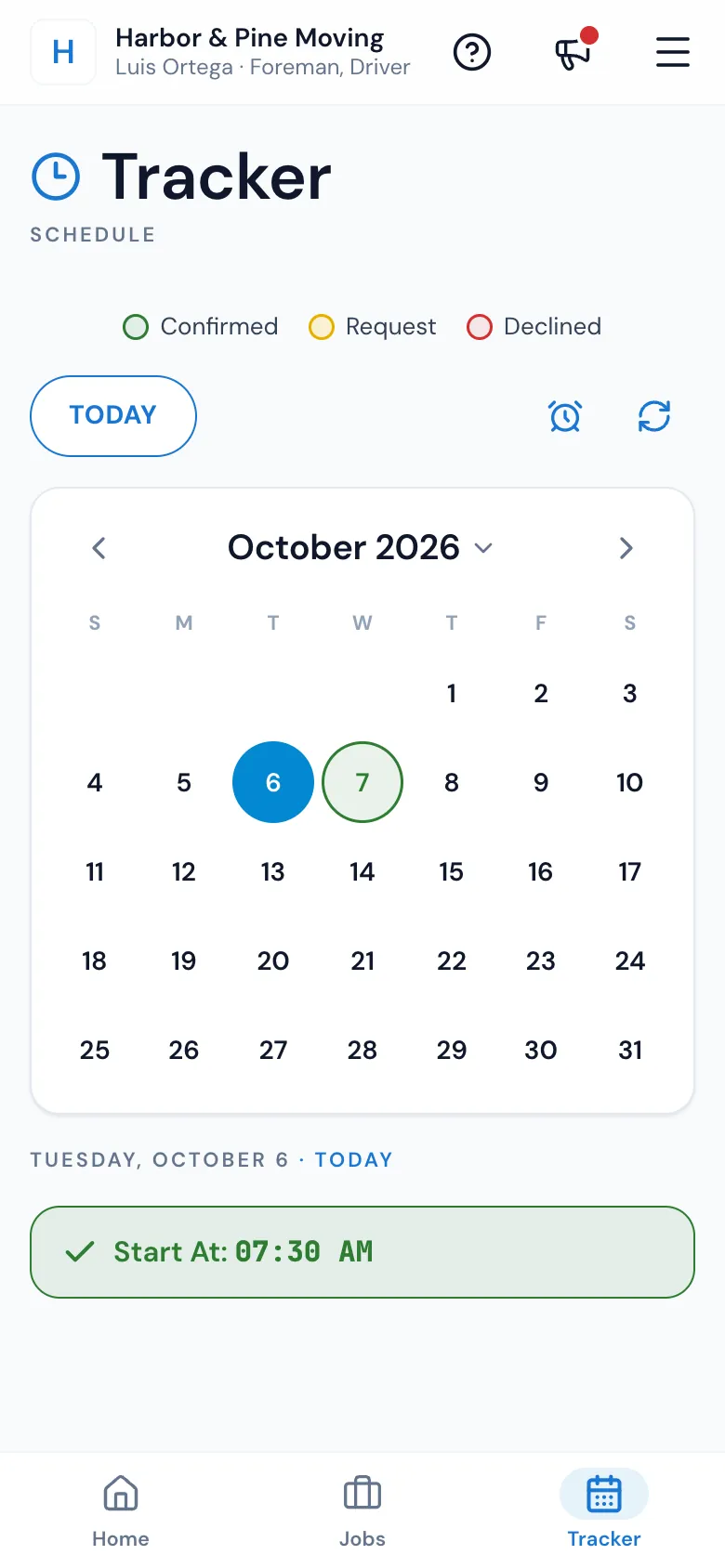
When dispatch sends a crew, everyone on it gets a text with the Mover's Portal address. They answer on Home or on the Tracker with CONFIRM, or DECLINE if your company allows it, and the Crew Schedule shows it at the same moment. The Tracker circles each day: green confirmed, yellow waiting, red declined, grey off.
- Before answering, a mover sees only the day and the start time
- Ask for a whole day, a morning, an afternoon or certain hours off
- The office approves or declines right on the Crew Schedule
02 / Before you leave
Everything about the job, then the ETA text.
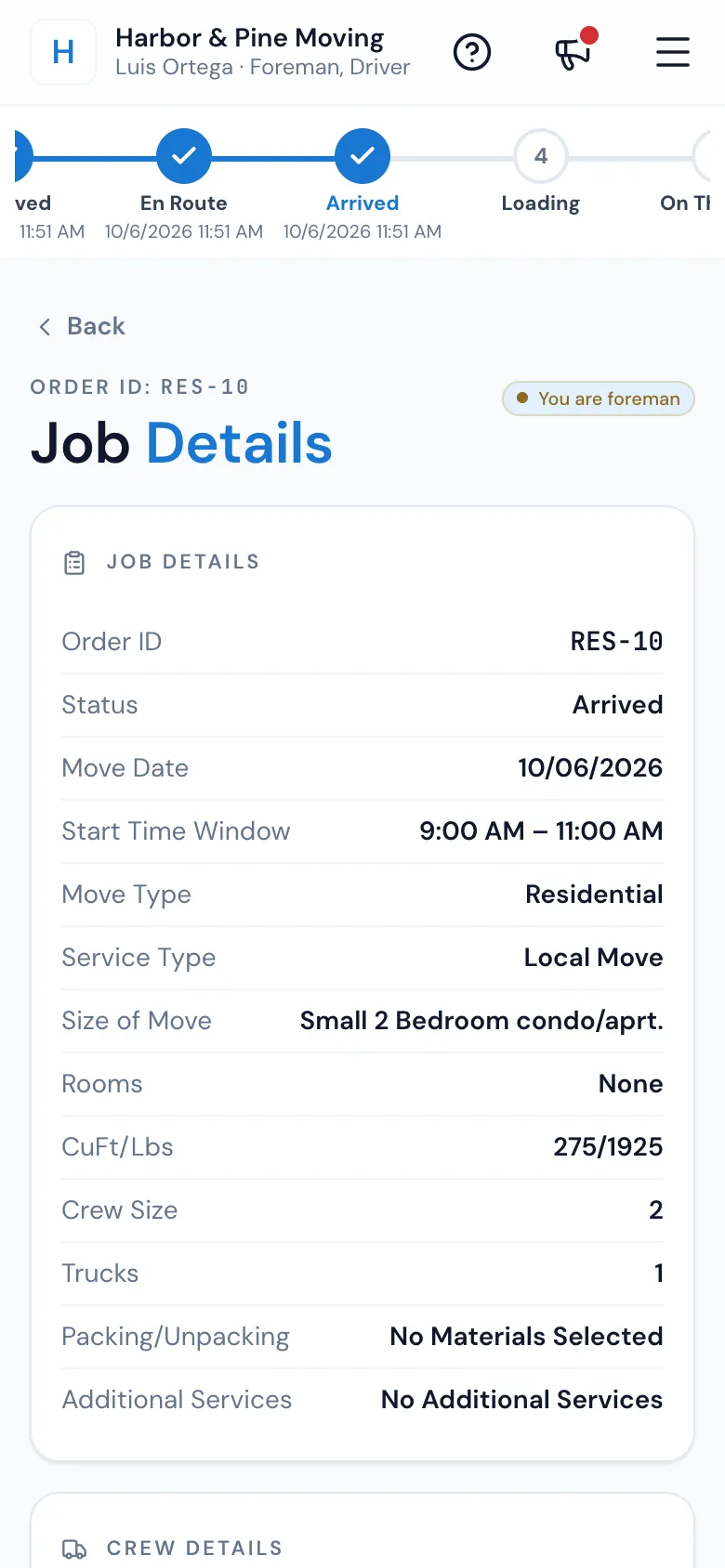
A foreman's job opens on Job Details: the move, the size and cubic feet, the crew and trucks, the materials sold, the customer and the office's notes. EN ROUTE opens the arrival time, filled in from the drive, and Send SMS texts the customer from your Movers on the way template before the job moves to En Route.
- Tap CuFt/Lbs for the customer's inventory, item by item
- Tap an address for Google Maps, Waze or Apple Maps
- No text out? Everyone on the crew sees Call the customer
03 / At the door
One screen for the whole job.
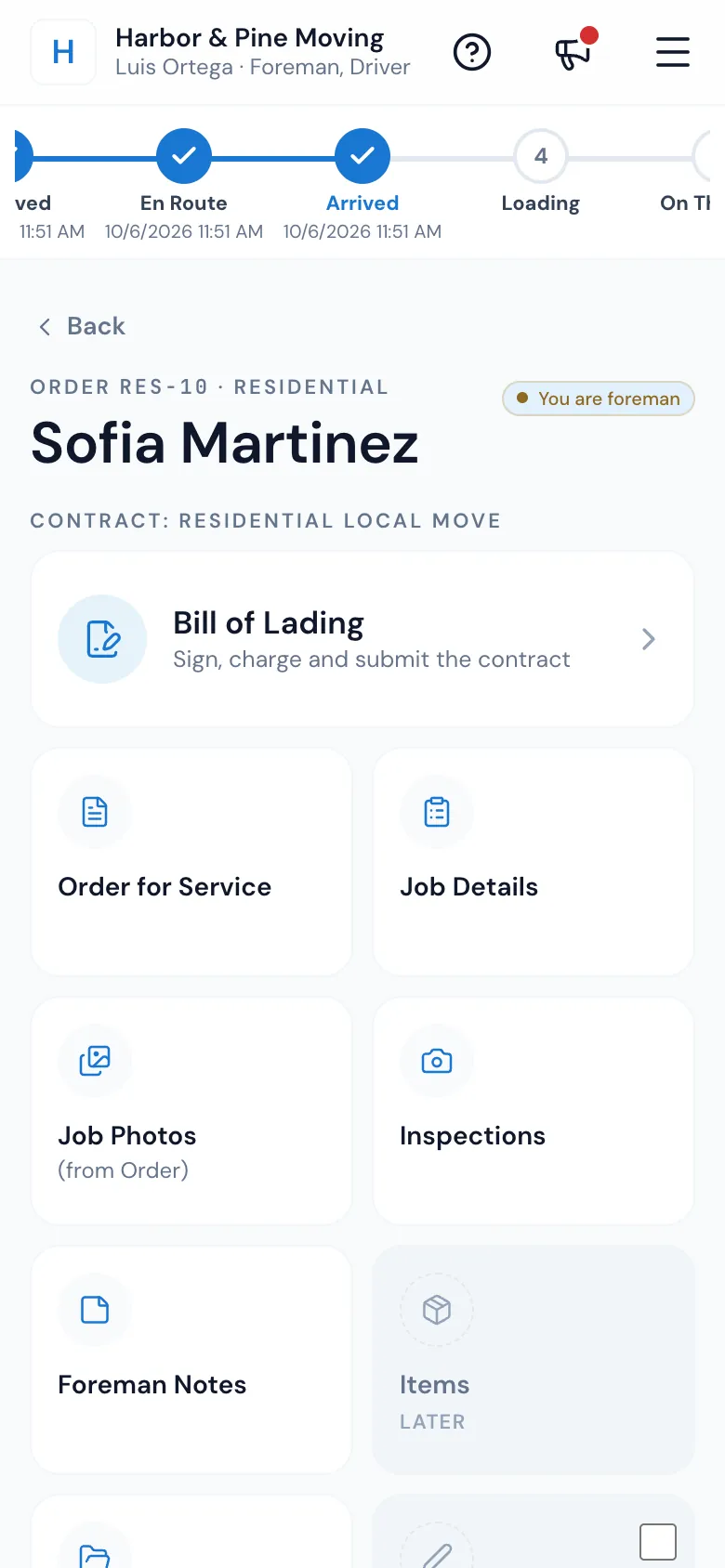
ARRIVED opens the job on its tiles, with the status chain across the top. The Bill of Lading comes first: times, signatures, materials, payment and the submit. Around it are the Order for Service the customer signed, Job Details, the office's Job Photos, Inspections, Foreman Notes, Release Forms, the Storage Agreement and Change Orders.
- A green edge and a tick when a tile is done
- The job opens where the crew left off
- The customer pays on the bill: card through Stripe or Authorize.net, cash or check
04 / Photos and forms
Proof of the condition, taken on site.
An inspection is a set of photos marked Pre-move, During Move or Post Move, with any damage, its type and where it is. The camera stays open to shoot many in a row, and photos upload in the background. The customer signs release forms for risky work and change orders for anything added, right on the phone.
- Pins on a photo mark the damage
- Photos not uploaded yet stay on the phone
- The office sees a green icon on the job's card
Back
Inspections
New Inspection
Image Taken
Damage Occurred
Type Of Damage: Scratch · Location: Dresser top
05 / Drivers on a trip
The road, stop by stop.
A driver or crew on a long-distance trip gets a Trips tab: the stops by day, each with Navigate, Call and the customer's Bill of lading. Once the office starts the trip, each stop is marked Arrived, Done or Skip. Expenses go in with a photo of the receipt, paid by company card, their own money or their advance.
- Loads for other companies say what to collect before unloading
- Advance given to you shows on the trip
- A route the office changes shows up within a minute
Trip #T-0412 · In Transit
Boston to Florida run
Day 5 · Tue, Oct 20
Delivery · LD-2238 Next
Lina Park · 210 Bay Rd, Savannah, GA
Oct 19 – Oct 22 · 1,000 cu ft · 7,000 lbs
Delivery · RES-1139
Greg Moss · Jacksonville, FL
Expenses
+ AddFuelCompany card$412.60
TollsMy advance$38.25
Advance given to you$600.00
06 / No signal
Built for basements and back roads.
The phone saves today's jobs at sign-in, when the signal comes back and every half hour. With no signal, a red bar says what's showing, Ready offline marks the jobs that will open, and every change on the bill is kept and sent in order. A submit with no signal goes as soon as the signal is back.
- Weak signal — tap to retry, instead of a blank screen
- Updates to the Mover's Portal never interrupt a job
- The ETA text, ARRIVED and card payments wait for signal
Jobs you are foreman on
Jobs
Order ID: RES-1146Arrived
Residential Local Move · Oct 15 · 8:00 – 9:00 AM
Ready offline
Order ID: LD-2241 PickupAssigned
Residential Long Distance · Oct 15 · 1:00 – 2:00 PM
Ready offline
Order ID: RES-1152Assigned
Commercial Local Move · Oct 16 · 7:00 – 8:00 AM
Not saved offline
“Time relief, organization, all in one location of client files!”
By the numbers
30
Minutes between saves of today's jobs to the phone
Also at sign-in and whenever the signal comes back, so today's jobs open in a basement.
Do crew members need to download an app?
No. The Mover's Portal opens in the phone's browser; the address is in the texts the office sends about their jobs. They can add it to the home screen so it opens like an app.
How do crew members sign in?
With your Company ID, their email or username, and their password. The phone stays signed in, one phone per person at a time, and a forgotten password is reset by email.
What does the foreman get on the job?
Job Details with directions and the office's notes, the ETA text, the Bill of Lading (times, signatures, materials, payment and submit), the signed Order for Service, Job Photos, Inspections, Foreman Notes, Release Forms, the Storage Agreement and Change Orders.
Can I see which crew members confirmed their shift?
Yes. On the Crew Schedule each name turns green when they confirm and red when they decline, the moment they answer. Dispatch can set the answer for them or press Resend.
Does the crew portal work without internet?
Yes, for the job. Today's jobs are saved on the phone to read, and every change on the bill of lading is kept and sent when the signal is back. The ETA text, ARRIVED, confirming a day and card payments need signal.
Do regular movers get the same access as the foreman?
No. Drivers and helpers see Home and the Tracker: their days, start times and time off. Foremen also get the Jobs tab and every job screen, and anyone on a long-distance trip gets the Trips tab.
Can the foreman collect the final payment on site?
Yes. PAY on the bill of lading charges a card on file or a new card through your Stripe or Authorize.net account, or records cash, a check or your own payment types, and the customer signs for it.
Works with
Mover's Portal hands the work to the next screen.
See your company on MoveBoard.
A live demo built around your own kind of moves: your service area, your pricing, your crews.