
Instant online moving quotes: Your website, quoting while you sleep.
Put MoveBoard's quote forms on your own website with one line. A visitor fills in their move and sees a price worked out by the same calculator your office uses, or a we'll-be-in-touch card if you'd rather talk first, and lands on your Orders list as a New order with their portal link already sent.
- forms: Short, Long and Single page
- 3forms: Short, Long and Single page
- line of code to install
- 1line of code to install
- rates ever sent to the visitor's browser
- 0rates ever sent to the visitor's browser
Harbor & Pine Moving
Your price in a minute. No call needed.
Tell us about your move and see your estimate now. Book it online when you are ready.
Your estimate
2 Bedroom · Somerville, MA → Medford, MA · Wed, Oct 21
Estimated total
$1,037 – $1,226
3 movers · 1 truck · 4:30 – 5:30 hours
Hourly rate
$189.00
Travel time
0:45
Arrival window
8 – 9 AM
Deposit to book
$200.00
Book my move
What it fixes
The day before Online quotes, and the day after.
Visitors leave because "call for a quote" means waiting until Monday.
They see their price on the spot, any hour, and can book it from their portal.
The price on your website and the price your office gives don't match.
Both come from the same calculator, your rates and your price calendar.
Bots and repeat clicks fill your list with junk leads.
A quote limit per visitor and a hidden spam trap keep them out.
How it works
Online quotes, screen by screen.
01 / Three forms
Short, long, or all on one page.
The Short form asks a few steps: the move, then the customer's details. The Long form asks more, such as size, rooms, entrances and parking, for a sharper quote. The Single page form puts everything on one page. Each ends on your Thank-you page, and visitors only see what you offer online.
- Your move types, the services you show customers, your sizes and rooms
- Your arrival windows and the price calendar's days; blocked days refused
- An inventory option on the form, if you want it
- A texting consent line with your privacy and terms links
Step 1 of 3
Where are you moving?
Moving from (ZIP)
02143
Moving to (ZIP)
02155
Move date
Wed, Oct 21, 2026
Size of move
2 Bedroom
Service
Continue
Dates in black are not available
02 / Design it by clicking
Click any word, change it.
Settings › Website & forms › Quote forms shows the real form in a frame, with every step on sample data, on desktop or phone. Click a word to reword it, a field to switch it off or make it required, a colour to change it. The Theme panel holds your brand, font, corners, width and logo.
- Reword for every form, or this form only, and reset to default
- Undo takes back the last change, even one already saved
- Save puts it live on your website at once
Settings · Website & forms
Quote forms, click to change
Where are you moving?
Continue
Theme
BrandClient portal colours
FontDM Sans
CornersRound
Form width560 px
Website backgroundOn a white page
Your logo over the formOn
UndoChanges not saved — Save puts them live on your websiteSave
03 / Show a price, or not
Your call, service by service.
Settings › Customer experience › Quote display decides, for each move type and service, whether the form shows the visitor a price. Where it doesn't, they read your own thank-you words while the quote is prepared. Either way the lead lands priced on your list, and the figures never reach their browser.
- Show prices for local moves and hide them for long distance, for example
- The same page decides what the customer's portal shows before booking
- A preview of the thank-you words before you save
Settings · Customer experience
Quote display, service by service
While the price is being prepared, the form says
“Thanks, Rachel! Your mover is preparing your quote and will be in touch today.”
04 / Install in a minute
One line, then test it.
The Install tab gives you the one MoveBoard line to paste at the end of every page. Then paste a form's tag where it should appear, or link any button to a pop-up address and the form opens on the same page. Test my website opens your page the way a visitor's browser does and checks the code is there.
- Step-by-step guides for WordPress, Wix, Squarespace and Webflow
- A floating menu with Get a Quote and the customer's login, if you want it
- With it, customers' portal links open right over your own site
Quote forms · Install
On your website, in one line
1 · Add MoveBoard to your website
<script src="…/forms.js" data-company="harborpine" async></script>
Copy the MoveBoard line
2 · Put a form where you want it
Paste a form's tag where it should appear, or link a button to its pop-up address.
3 · Test my website
harborpine.com/get-a-quoteFound
Guides for website builders: WordPress · Wix · Squarespace · Webflow
05 / Already asked? Already filled
Your site asked for the ZIPs. The form already has them.
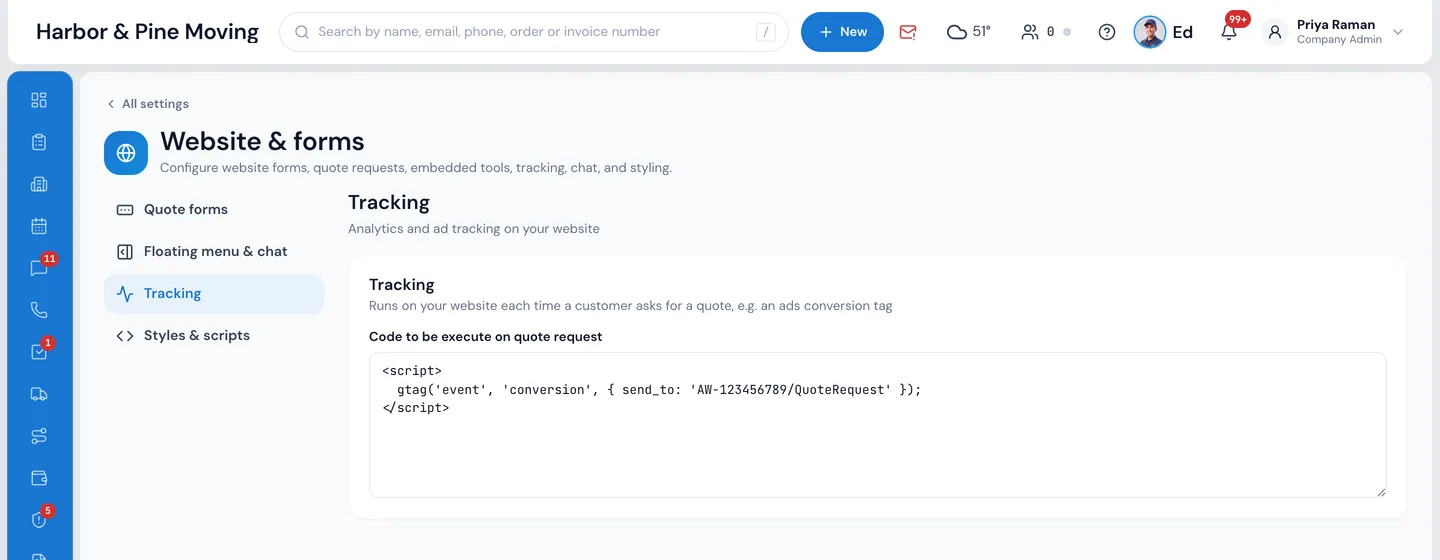
If your own website already asks for the ZIP codes, the move date or the customer's name, the quote form opens with them filled in, so nobody types twice. Your developer passes them on the form's tag, from the page's script, or for ZIPs, date and size in the link. And your tracking code, such as an ads conversion tag, runs on your website each time a customer asks for a quote.
- From and to ZIP, city and state, move date, size, service, name, email and phone
- A value that doesn't fit is dropped, and the visitor can change everything
- Settings › Website & forms › Tracking holds the code that runs on each quote request
“Online booking, instant pricing for the customer. One of the best input for the long distance tariff. User friendly.”
By the numbers
24/7
Your website takes priced quote requests
Every form becomes a New order on your list the moment it's sent, with its source, its price and a salesperson picked by your rules.
Can the quote form open with what my website already asked?
Yes. ZIP codes, city and state, the move date, size, service and the customer's name, email and phone can be passed to the form from your page, so it opens filled in. ZIPs, date and size can also come in the link; keep names, emails and phones out of links.
Can I track quote requests as ad conversions?
Yes. Paste your tracking code, such as an ads conversion tag, in Settings › Website & forms › Tracking, and it runs on your website each time a customer asks for a quote.
How does the instant pricing actually work?
You set your rates once in Settings › Pricing & calculator: the rates grid, price calendar, crew and truck rules, travel, fuel and minimums. When a visitor fills in the form, MoveBoard prices their move on its side with the same calculator your office uses, and sends back only the result.
Can I customize the quote form to match my brand?
Yes. The Theme panel sets your brand colours (taken from your client portal), colours, font, corners, form width, background and your logo over the form, and you can reword any text on any form. It installs with one line on your site, then a tag where each form goes or a button that opens it as a pop-up.
What if the customer's move details change after getting a quote?
The customer can change their date, size, addresses and inventory from their portal. Each change is saved on the order and the price is worked out again straight away; your settings decide whether the order goes to New-Info for the office to check.
Do customers have to fill out the full inventory?
No. Choose the Short, Long or Single page form; each quotes from the size of the move. You can show an inventory option on the form, and customers can build their full inventory later in their portal, which updates the quote.
Can I show a price range instead of an exact number?
Hourly quotes are a range by design, from your labor spread. On the customer's portal you pick Range, Estimate or Hourly. On the forms you choose per move type and service whether the price shows at all; where it doesn't, the visitor reads your thank-you words and you follow up.
Does the form handle long-distance, overnight, and storage moves?
Yes. The forms offer the services you mark to show to customers, such as local, long distance, overnight or moving and storage, and each lead is priced by your settings for that service, long-distance tariffs included.
Works with
Online quotes hands the work to the next screen.
See your company on MoveBoard.
A live demo built around your own kind of moves: your service area, your pricing, your crews.