
Moving software for small moving companies: Big-company tools, small-company price.
MoveBoard is moving software for small moving companies: the leads, quotes, online booking, dispatch and the crew's bill of lading in one place. Professional is $289 a month with 3 office users and unlimited crew members, month to month, with free setup, training and data migration.
- a month, Professional
- $289a month, Professional
- for crew members
- $0for crew members
- setup fee, no contract
- $0setup fee, no contract
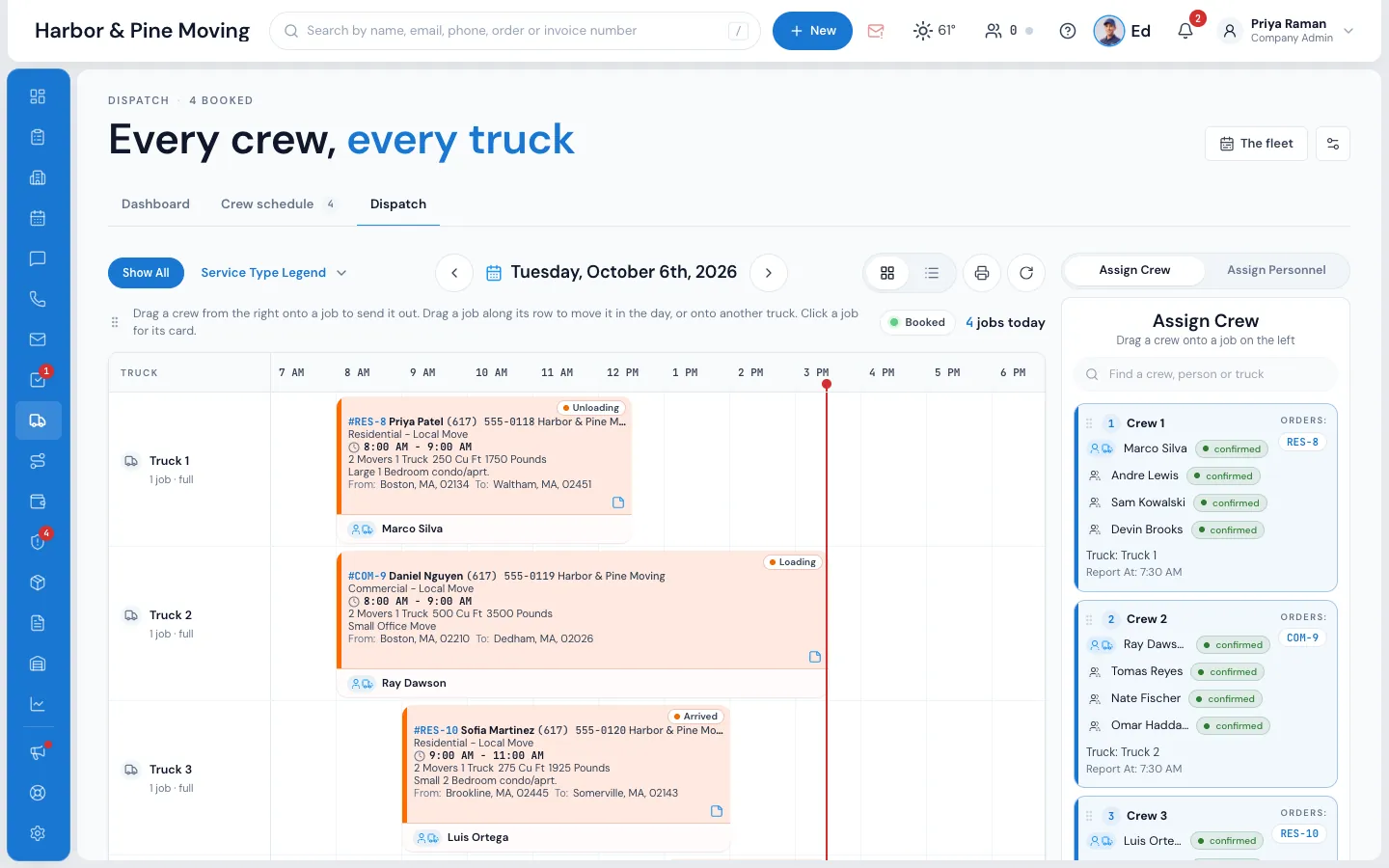
What does a small moving company need from software?
A small moving company needs software that does the office work for a few people: capture every lead, price it from your own rates, let the customer sign and pay the deposit online, put the crew on the right truck, and get the bill of lading signed on a phone. MoveBoard does all of it on one $289 plan.
Who it's for
Made for small movers who do it all.
One to a few trucks
Local moves most days, some long distance, maybe a little storage. You need the work done right, not a big IT project.
The owner still answers the phone
Leads come in while you're on a job. Your website form, Angi and the AI Receptionist put them on your Orders page, form and AI Receptionist leads already priced.
An office of one to three
Professional includes 3 office users signed in at a time, and every foreman, driver and helper on top, free.
Coming off paper or spreadsheets
A whiteboard for the schedule, paper bills of lading, deposits taken by phone. MoveBoard replaces each of them from the first booked job.
The Professional plan
Everything a small mover needs, for $289 a month.
Every MoveBoard screen is on Professional. Enterprise adds unlimited office users, more branches, advanced reporting and API access.
Compare the plans- 3 office users and unlimited crew members
- The moving CRM: every lead from your website, phone and lead providers
- Quotes priced from your own rates, on your website forms and in the office
- Online booking: the customer signs your Order for Service and pays the deposit
- Calendar and dispatch board, with crew texts and arrival windows
- The Mover's Portal and electronic bill of lading on the crew's phones
- Invoices, payments, payroll, commissions and tips
- 500 texts a month included
- Ed, the AI assistant, in every plan
- Free onboarding, training, data migration and unlimited support
What it replaces
Six tools a small moving company can stop juggling.
A whiteboard and a group chat for tomorrow's crews
One dispatch board; each mover gets a text and confirms from their phone
Paper bills of lading that come back folded, or not at all
The bill signed on the foreman's phone, the PDF kept on the order
Quotes worked out on a calculator, a little differently each time
Every quote priced the same way from your rates, crews, trucks and fuel
The contract by email and the deposit by phone, days apart
The customer signs and pays the deposit online in one step
Leads in an inbox, a voicemail and two lead websites
Every lead on one Orders page, with its source and a salesperson
Payroll added up from paper timesheets on Sunday night
Hours, tips and commissions worked out from each job's closing
Getting started
Your first 30 days on MoveBoard.
Most companies switch in a week or two, in four steps. Our team does the onboarding with you, free.
- 01
Set up MoveBoard
Company details, your team, trucks, your rates and minimums, your Order for Service and bill of lading words, card processing and email. Ask for your texting number early: carrier approval takes days.
- 02
Bring your jobs in
Export upcoming jobs from your spreadsheet or current software as .csv or .xlsx and import them; the Validate Data step shows exactly which cells to fix. Or type a few dozen in by hand: it teaches the team the order window.
- 03
Switch on a quiet day
Replace the quote forms on your website, point your lead providers to MoveBoard, send everyone their sign-in, and run the day's dispatch in MoveBoard.
- 04
Check the first weeks
Each morning: new leads on Orders, today's jobs on Dispatch, crews confirmed. Each evening: bills of lading submitted and closings reviewed. At the end of the week, the Reports hub.
The step-by-step guide is in the help center: Switching to MoveBoard.
The real monthly cost
What a small mover actually pays.
The plan price is on the website. The only other costs are the ones you use: extra texts, the optional AI Receptionist, and your own card processor's fees.
| What | Cost | Note |
|---|---|---|
| MoveBoard ProfessionalMonth to month, no contract | $289 a month | Month to month, no contract |
| Crew membersUnlimited, on every plan | $0 | Unlimited, on every plan |
| Setup, onboarding, training, data migration and supportIncluded on both plans | $0 | Included on both plans |
| Putting the quote forms and portal on your websiteOur team installs them for you | $0 | Our team installs them for you |
| Texts past the included amountPaid from a prepaid balance | Usage | Paid from a prepaid balance |
| AI Receptionist (optional)Calls paid from a prepaid balance | Usage | Calls paid from a prepaid balance |
| Card processingDeposits go to your own Stripe or Authorize.net account | Your processor's fee | Deposits go to your own Stripe or Authorize.net account |
Growing
When to move up to Enterprise.
Stay on Professional while 3 people or fewer work in the office at the same time. Move to Enterprise, $399 a month, when you need more:
- More than three people signed in to the office at once: Enterprise has unlimited office users
- A second location: additional branches are $99 a month each, with their own prices, trucks and people
- Advanced reporting, API access and a dedicated account manager
- 1,000 texts a month included instead of 500
Both plans are month to month, so you move up when the business does.
Questions
Small moving company software questions.
Is MoveBoard too much software for a two-truck moving company?
No. Small companies use the same screens bigger ones do, and the parts you don't need stay out of the way. Professional is $289 a month with 3 office users and unlimited crew members, so the price doesn't grow every time you hire a mover.
Do my movers cost extra?
No. Foremen, drivers and helpers are unlimited on both plans. They use the Mover's Portal, which opens in their phone's browser from the link in their text, and their sign-ins never count toward your office users.
What does "3 office users" mean on Professional?
It is how many people can be signed in to the office side at the same time in your branch. Add as many people as you like; when a 4th person needs to work at the same moment, someone else has to sign out first. Enterprise has no limit.
Can I switch from spreadsheets or another moving software?
Yes. Export your jobs as .csv or .xlsx and import them on Settings › Sales & orders › Import orders. Exports from SmartMoving, Moveworx, Supermove, Granot and HomeAdvisor are recognised by their column names, and a spreadsheet with common headings is matched by itself. Data migration is free, and our team helps you do it.
Is there a contract or a setup fee?
No. MoveBoard is month to month with no long-term contract and no setup fee. Onboarding, training, data migration and support are free.
When should a small mover move up to Enterprise?
When more than 3 people need to work in the office at the same time, or you open a second branch. Enterprise is $399 a month with unlimited office users and several branches (each extra branch $99 a month), plus advanced reporting, API access and a dedicated account manager.
Do I need a website to use MoveBoard?
No, but it helps: MoveBoard's quote forms and customer portal go on your own website with one line of code, and our team installs them free. If you don't have a website yet, Elromco can build one for you.
See your company on MoveBoard.
A live demo built around your own kind of moves: your service area, your pricing, your crews.