
Real-time moving job tracker: Every stage of the move, as it happens.
MoveBoard's job tracker follows each job from the foreman's phone: Received, En Route, Arrived, Loading, On The Way, Unloading, Payment and Completed, each with the minute it happened. The office sees it on the board and the Dashboard without a phone call, drawn against the hours you sold.
- steps the foreman's phone moves through
- 8steps the foreman's phone moves through
- between updates while the crew is out
- 30 sbetween updates while the crew is out
- timeline per day of the move
- 1timeline per day of the move
Dispatch · Crew status log · #RES-1146
Robert Hale, Cambridge to Quincy
- 7:58 AMReceivedWork
- 8:24 AMEn RouteTravel
- 8:52 AMArrivedWork
- 9:05 AMLoadingWork
- 12:31 PMOn The WayTravel
- 1:18 PMUnloadingWork
Crew locations on a map aren't offered yet. Every step comes from the foreman's phone.
What it fixes
The day before Job tracker, and the day after.
"Where's the crew?" means calling the foreman, who's carrying a dresser.
The job's step and the time it was reached, on the board, the Dashboard and the order.
The customer calls the office to ask when the truck is coming.
The foreman's En Route text tells them, with the minutes, before the truck leaves.
You learn the job ran three hours over when the bill comes back.
Labor past the estimate turns red on the tracker while it's happening.
How it works
Job tracker, screen by screen.
01 / The foreman's phone
The crew taps through the move, the office watches.
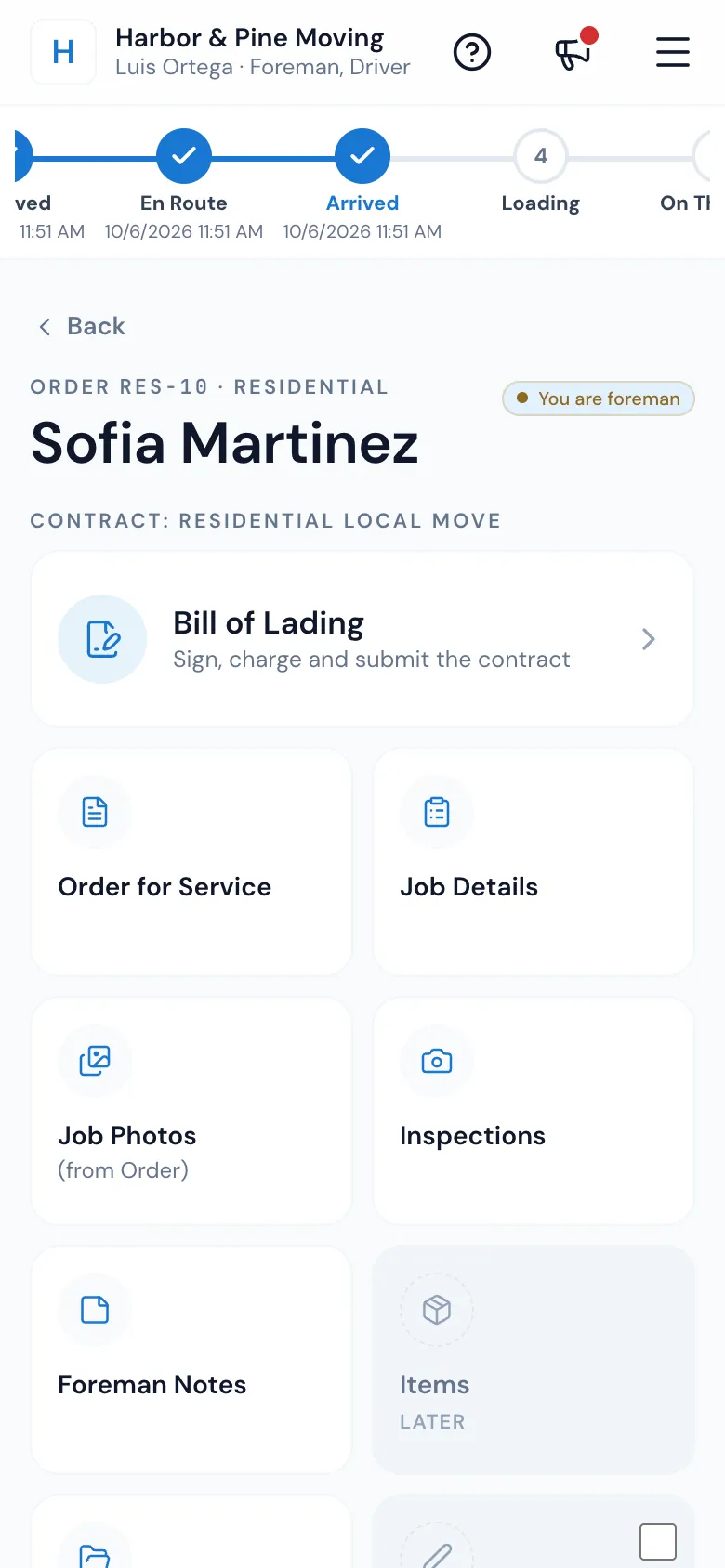
Each step comes from the foreman's work in the Mover's Portal. Opening the job marks it Received. Sending the customer's ETA text moves it En Route. ARRIVED at the door, then Loading, On The Way and Unloading move along with the customer's signatures and the foreman's taps. Payment when the customer has paid, Completed when the bill of lading is submitted.
- The status chain across the top of the foreman's job screen, with the time of each step
- Only someone on the crew can mark a job arrived
- No signal in the basement? Bill of lading changes are kept on the phone and sent when it's back
02 / En Route
The customer hears first, then the truck leaves.
Pressing EN ROUTE opens the Arrival Time Notification with the address and the driving time filled in from Google. The foreman nudges the minutes, presses Send SMS, and the customer gets your Movers on the way text. Only then does the job move to En Route.
- If the text fails twice, the crew and the office are asked to call the customer
- Your own words, from the Movers on the way template
- Sent from your texting balance, like any other text
Harbor & Pine Moving
Arrival Time Notification
Heading to
48 Elm Street, Cambridge, MA 02139
Will arrive in
The text goes first, then the job moves to En Route.
03 / The office
Every job of the day, on one screen.
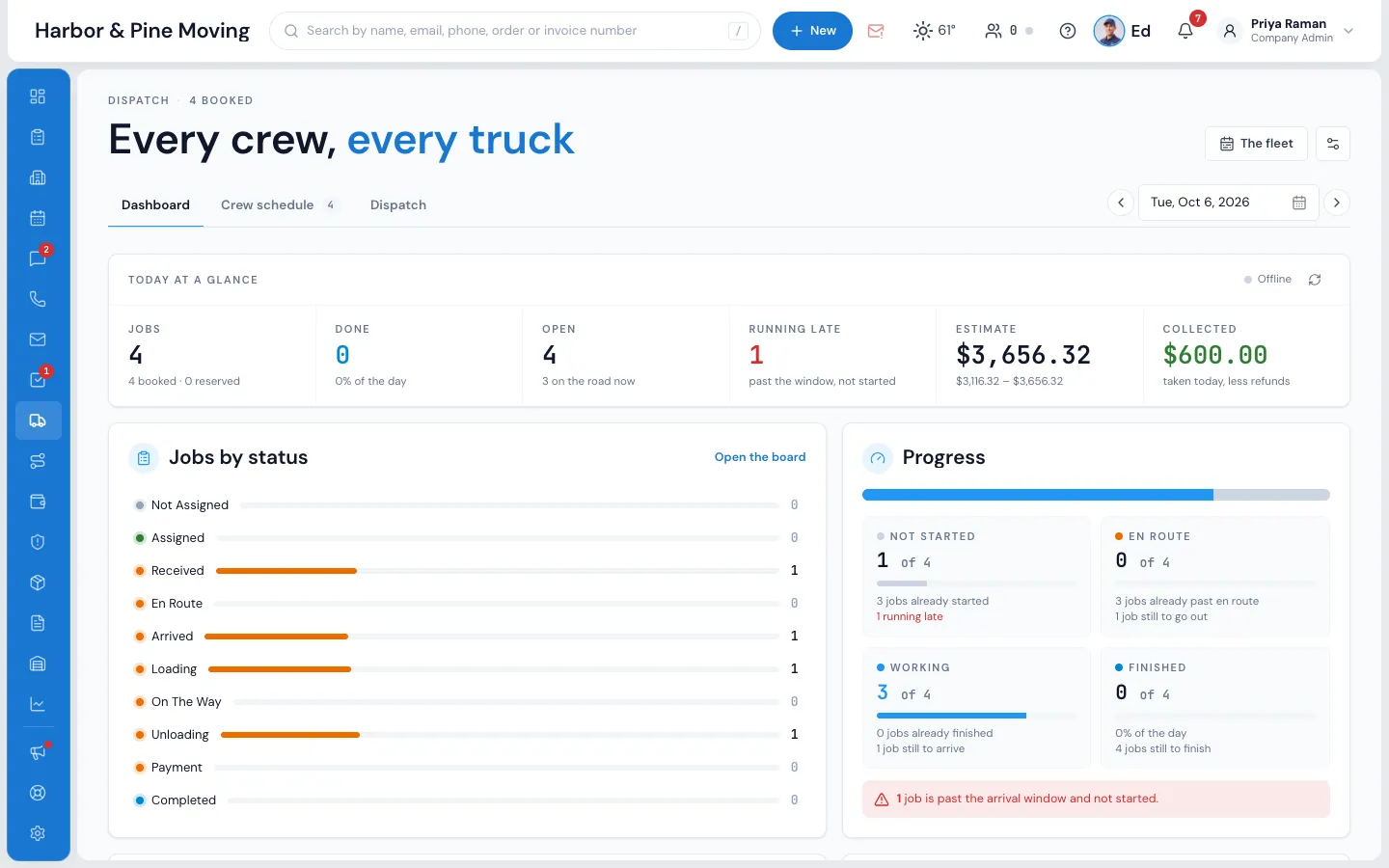
The Dispatch Dashboard counts every job as not started, en route, working or finished, and updates the moment a crew moves one along. A job whose arrival window has ended without the crew starting shows as running late. On the board, each job card carries its step; press it for the Crew status log.
- Jobs by status, from Not Assigned to Completed
- Running late, counted for you
- The crew's answers and the trucks out, beside it
04 / Against the estimate
The hours you sold, and the hours it took.
In the order window, right under the closing bar, the job tracker draws each day as a timeline: travel in yellow, labor in green inside the frame of the labor you estimated, and red once it runs past. Blue marks show each step the crew reported. Hover any piece for its times.
- Extra travel, charged beyond what was sold, in orange
- Breaks show as Time off
- One timeline per day on a multi-day move
- Crew expects to finish by 5:00 PM, until the customer signs the time
Order #RES-1146 · Closing · job tracker
Sold 5 h 30 min, worked 6 h 20 min
2:35 PM – 3:25 PM · 50 min
Crew expects to finish by 5:00 PM
05 / When the phone hasn't moved it
Set the step from the office.
If a foreman's phone hasn't moved a job along, the office can. Click the job on the board for its Status card, or press the status pill on its Job Assignments card: Where has this job got to? offers every step. Not Assigned and Assigned follow the crew, and a completed job only changes after it's reopened.
- The same steps and words as the foreman's phone
- The board, the Dashboard and the order show it straight away
Dispatch · Job assignments · #RES-1150
Where has this job got to?
The foreman's phone moves it
- Received when the foreman opens the job
- En Route with the customer's ETA text
- Arrived at the door
- Payment once the customer has paid
Phone out of signal? Press the step the job has reached. Not Assigned and Assigned follow the crew.
“My customers can book their move online, the bill of lading is on an iPad, and payroll is done automatically. I don't understand how I worked before this software.”
By the numbers
30 s
Between updates, on their own
While a crew is out, the order's tracker brings in their new steps every 30 seconds, and the bars and the red now line move by themselves.
Do my crews need to manually update each stage?
Mostly it follows what they already do. Opening the job marks it Received, sending the ETA text moves it En Route, ARRIVED is one press at the door, and Loading and Unloading move with the customer's signatures. Payment follows the customer paying, and submitting the bill of lading completes the job.
Can my office staff see all active jobs at once?
Yes. The Dispatch Dashboard shows every job of the day as not started, en route, working or finished, with jobs running late, and each card on the board shows its step. Nobody has to refresh.
How does the under/over estimate comparison work?
The tracker draws the labor you estimated as a green frame. Labor inside it is green; labor past it is red, Over estimate. The Crew status log lists labor estimated, labor actual and how far over the estimate the job ran.
Does the tracker work for long-distance moves?
Yes. Every job on the board has the same steps, local or long distance, and a move over several days has one timeline per day.
Can my customers see the job tracker too?
Not the tracker itself. When the foreman leaves, the customer gets a text with the crew's arrival time in minutes, and their portal shows their move's status and details. There is no live map of the truck.
How is tracker time different from the labor time on the eBOL?
The tracker records when the foreman reached each step. The electronic bill of lading counts only the times the customer signed. Until the customer signs, the tracker shows the crew's own word, such as Crew expects to finish by 5:00 PM.
Works with
Job tracker hands the work to the next screen.
See your company on MoveBoard.
A live demo built around your own kind of moves: your service area, your pricing, your crews.