
Moving company invoicing software: Invoices that get paid from a link.
Make an invoice from the sold quote, the closing or a blank page, send it by email or text, and the customer pays from their own link, with a tip for the crew if they like. The payment lands on the invoice and the order at once, and the Invoices page shows what's paid, what's open and what's late.
- kinds: Order, Closing and Custom
- 3kinds: Order, Closing and Custom
- statuses, from Draft to Paid
- 5statuses, from Draft to Paid
- link to pay, by email or text
- 1link to pay, by email or text
Invoices · Sep 6, 2026 – Oct 6, 2026
Your invoices, last 30 days
Total invoices
$18,940.00
23 invoices
Paid invoices
$11,700.00
17 paid
Unpaid invoices
$7,240.00
6 with a balance
What it fixes
The day before Invoices, and the day after.
The final bill is retyped from the closing into another program.
A Closing Invoice fills itself from the closing's figures.
Customers mail a check two weeks late because paying online is a hassle.
They press Pay now on their link and pay by card in a minute.
Nobody notices an invoice is overdue until month-end.
It turns Overdue, shows on the dashboard, and your reminders go out until it's paid.
How it works
Invoices, screen by screen.
01 / Make it from the order
Filled in before you start.
Open the order's Invoices and press +. An Order Invoice fills from the sold quote, a Closing Invoice from the closing's figures, and a Custom Invoice starts blank. Check who it's for, the dates, the lines with a discount per line, tax, and Include Order Payments to take off what's already paid. Save it as a draft, or send it.
- Due on a date, or due on receipt
- Notes and terms the customer sees
- The card fee shown on the total when you charge it on invoices
- Mark as paid if it's already settled
New invoice Closing InvoiceRES-1176
Send To
Dana Ruiz · dana.ruiz@example.com
Date of Issue
Oct 6
Due Date
Oct 20
Include Order Payments− $1,000.00
Balance due$1,115.00
Notes Visible for Clients: Thank you for moving with Harbor & Pine!
Save As DraftProceed To Send Invoice
02 / The customer pays
Pay now, tip the crew.
The customer gets a link by email or text that opens the invoice without signing in, with a PDF to keep. They press Pay now, can pay part of it, add a tip for the crew on a moving invoice, see the card fee if you charge one, and confirm. The receipt follows by email and sits in their portal.
- My Invoices in the portal lists every invoice sent to them
- Your team hears Customer paid online, if they have it on
- Turn Pay invoice off in the portal designer to take payments yourself
- Someone else paying on move day? Send to pay sends them the bill of lading to pay from a link
Harbor & Pine Moving
Pay Invoice #1203
Total$2,115.00
Paid$1,000.00
Balance due$1,115.00
Add a tip for your crew?
The whole tip goes to the crew who moved you.
Credit card fee$36.45
Total$1,251.45
Confirm & Pay $1,251.45
03 / Take it yourself
Card, cash, check, or your own way.
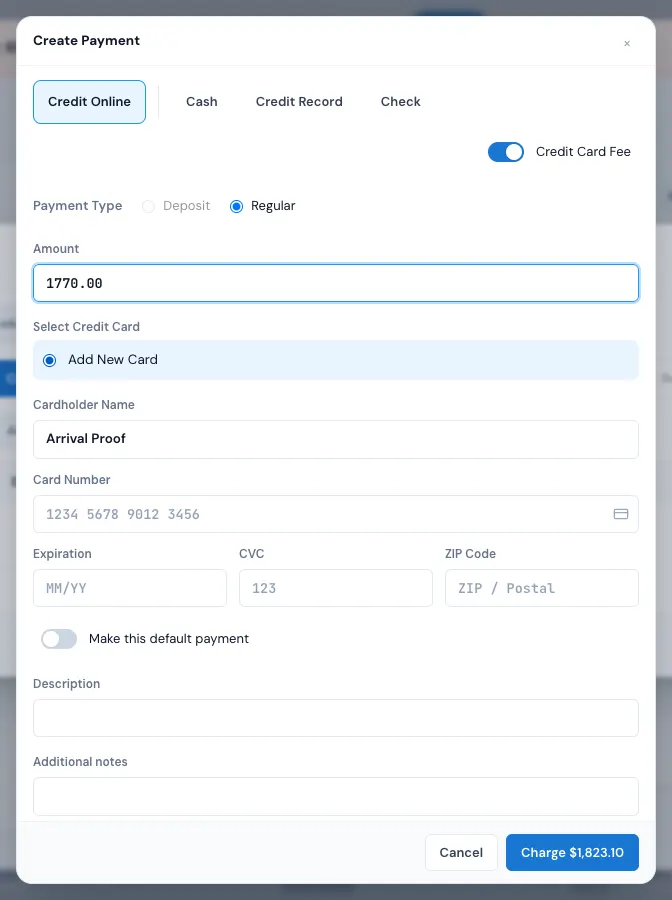
Pay an invoice from the office and the Payments window opens just for it. Charge a card on file or a new one, or record cash, a check, a card charged elsewhere, or your own payment types like Zelle or Venmo. A part payment is fine; the balance shows what's left.
- Refund all or part of a payment; void a card charge that hasn't settled
- Mark a check pending until it clears
- Send a receipt by email and text from the payment's row
04 / The Invoices page and reminders
Late invoices don't hide.
Invoices in the menu totals what was invoiced, paid and unpaid for any dates, with filters for type, status, branch and balance, and search by number, customer or order. Tick invoices to change status, flag, send, print or export them. Your invoice reminders repeat while an invoice is unpaid, and stop the moment it's paid.
- Draft, Sent, Partially Paid, Overdue and Paid
- Your own coloured flags, like Disputed
- The dashboard's overdue line opens the late ones
- A CSV export for your bookkeeper
Communication · Automation timeline
Reminders that stop when it's paid
Invoice reminderafter 3 days
Recurring every 3 days, up to 10 more times
Only if the invoice is still unpaid and isn't overdue
Invoice overdue reminderafter 1 day
Recurring every 7 days
Only if the invoice is still unpaid and overdue
Invoice #1201 · Victor Chen
Sent Mon · reminder Thu · paid Sat — Sunday's repeat finds it paid, and stops.
“Mostly time, it's saves you all headache, everything is digital, invoices, booking and everything else.”
By the numbers
4 PM
When invoice reminders go out
On your branch's clock, again on your schedule while the invoice is unpaid, and never once it's paid.
Which card processor do I need?
Your own Stripe account or your own Authorize.net merchant account, so payments go straight to you under your business name. Each branch chooses which one new cards go through. Cash, checks and your own payment types are recorded without either.
Can I customize the invoice template?
Yes. Your logo and company details are on every invoice, and on each one you set the lines, a discount per line, tax, the due date, and notes and terms the customer sees. The receipt that follows a payment has its own email, text and attachment you can change in Settings › Payments & billing › Payment receipts.
What happens if a customer doesn't pay on time?
Past its due date with money still on it, the invoice turns Overdue in red and shows in the dashboard's Action needed. The Invoice reminder and Invoice overdue reminder rules email the customer on your schedule, repeating until it's paid.
Can I issue partial payments or split payments?
Yes. The customer can pay part of an invoice from their link, and the office can take any amount, by card, cash, check or your own payment types. Each payment is its own line, and the balance shows what's left. An automatic payment plan isn't offered yet.
Can I send the invoice by text message instead of email?
Yes. When you send an invoice, the customer gets a link to it by email or text. The link opens the invoice without signing in, and the payment is recorded on the invoice and the order either way.
Can I refund a payment without leaving MoveBoard?
Yes. Tick the payment in the Payments window and press Refund. A card charged through MoveBoard is refunded to the card through the processor that took it, Stripe or Authorize.net, in full or in part, never more than what's left on it; other methods are recorded as refunds. A card charge that hasn't settled yet can be voided instead.
See your company on MoveBoard.
A live demo built around your own kind of moves: your service area, your pricing, your crews.