
Google Ads conversion tracking for movers: Tell Google which clicks became moves.
Google Ads only sees the form fill. MoveBoard tells it the rest: when an order that came from an ad is booked, it sends a "Booked move" with the job's value back to that branch's Google Ads account, and takes it back if the move is canceled. Smart Bidding learns which searches bring paying moves, not just leads.
- sign-in with Google to connect
- 1sign-in with Google to connect
- hold before sending, so cancellations never count
- 24 hhold before sending, so cancellations never count
- the only way an email or phone leaves
- SHA-256the only way an email or phone leaves
Settings · Integrations · Google Ads
From an ad click to a booked move
Ad click
gclid kept with the quote form
Quote form
The lead lands in MoveBoard
Booked
Order 1176 · $1,250.00
Hold
24 hours, in case it's canceled
Booked move
Sent to the branch's account
Order log: Sent to Google Ads as a booked move · $1,250.00
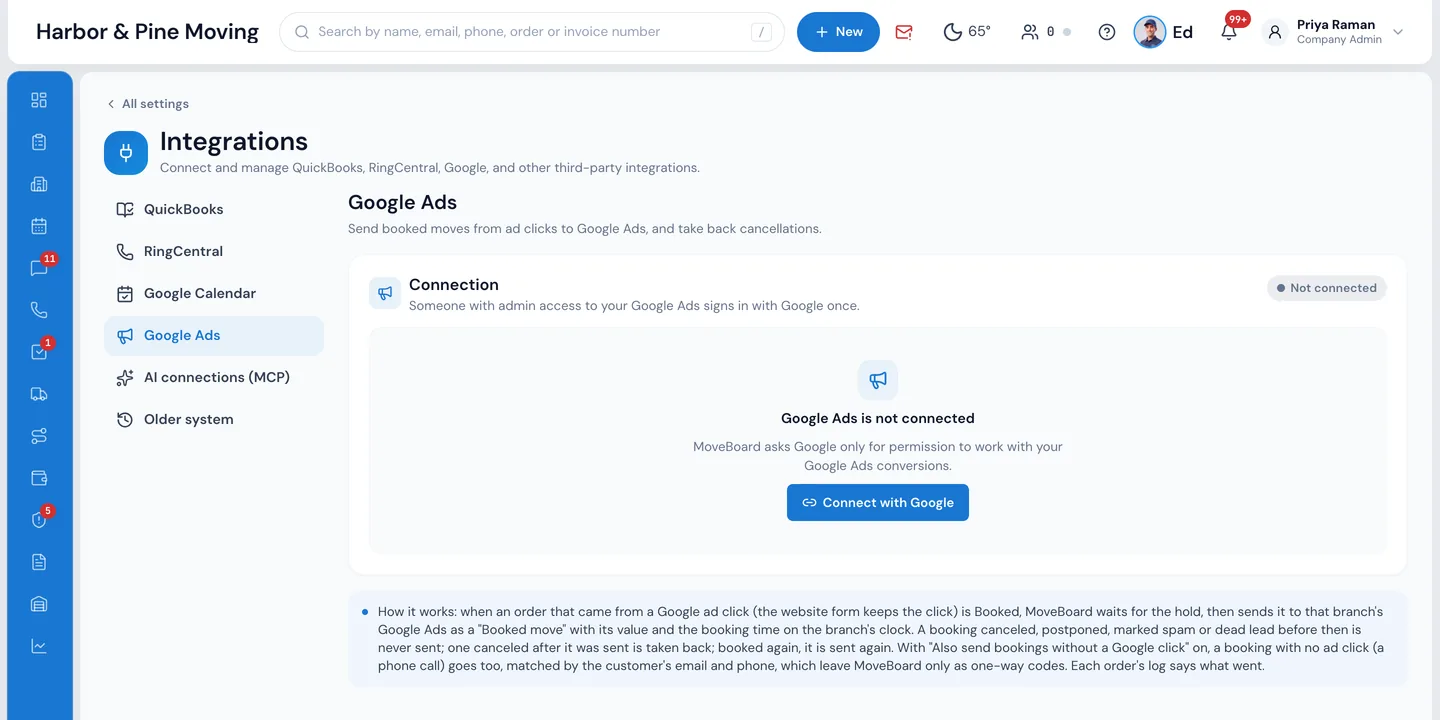
One Google sign-in per company; each branch links its own Google Ads account. No developer token or agency needed.
What it fixes
The day before Google Ads, and the day after.
Google Ads counts every form fill the same, so bidding chases cheap leads that never book.
Each booked move goes back with its value, so bidding learns which clicks turn into paying jobs.
A move booked and then canceled still counts as a win in Google Ads.
MoveBoard holds each booking before sending, and takes back one canceled after it was sent.
Uploading conversions means spreadsheets, click IDs and a developer.
Connect with Google once, link each branch's account, and MoveBoard sends every hour by itself.
How it works
Google Ads, screen by screen.
01 / Connect
Sign in with Google once.
Someone with admin access to your Google Ads presses Connect with Google in Settings › Integrations › Google Ads. MoveBoard asks Google only for permission to work with your Google Ads conversions. Then each branch links its own Google Ads account, including accounts under a manager account, in US or Canadian dollars.
- No developer token, no manager account required
- Each branch sends to its own account, or none
- Disconnect any time; nothing more is sent
02 / The conversion
One conversion: Booked move.
Press Make "Booked move" and MoveBoard creates the conversion action in the branch's Google Ads, or pick one you already have. It's made as a secondary conversion: it reports from day one, and your bidding only changes when you make it primary in Google Ads. Google asks for a 6-hour wait before a new conversion takes uploads, and the status shows it.
- Counted once per click, with a 90-day click window
- The order ID is the transaction ID, so Google never counts it twice
- Already sending bookings another way? Say Yes, and MoveBoard won't send
Branches
Each branch sends to its own Google Ads account (or none).
Made as a secondary conversion: it reports, but your bidding doesn't change until you make it primary in Google Ads.
03 / What is sent
The value, the time, and nothing personal in plain text.
When an order from an ad click is booked, MoveBoard waits for the hold, then sends the Booked move: the click ID kept by your quote form, the value, the branch's currency and the booking time on the branch's clock. The value is the middle of the quote range, or the order total once the move is closed, your choice. Names and addresses are never sent.
- Hold before sending: 6, 12, 24, 48 or 72 hours
- Canceled, postponed, spam or dead lead during the hold: never sent
- Canceled after sending: taken back; booked again: sent again
- Every order's log says what went: Sent to Google Ads as a booked move · $1,250.00
What MoveBoard sends
Changes here take effect on Save.
Another tool already sends bookings?
Not sureYesNo
Value
Middle of the quote rangeOrder total
Hold before sending
6 hours12 hours24 hours48 hours72 hours
Send booked moves to Google Ads
Also send bookings without a Google click (matched by the customer's phone and email)
The email and phone leave MoveBoard only as one-way codes (SHA-256): Google can match them, nobody can read them back.
04 / Phone bookings
Booked on the phone, still credited.
Plenty of ad clicks end in a phone call, not a form. Switch on Also send bookings without a Google click and MoveBoard sends those booked moves too, matched by the customer's email and phone. Both leave MoveBoard only as one-way SHA-256 codes: Google can match them to someone who clicked an ad, and nobody can read them back.
- Off until you switch it on, and only for bookings after that
- Sent only once Google confirms the account accepted its customer data terms
- US and Canadian numbers, as +1; emails trimmed and lower-cased before hashing
Check without sending
Google's test mode: nothing is counted.
05 / What you see
Google's own numbers, not ours.
Check without sending runs your bookings through Google's test mode, so you see how each would go before anything counts. Once it's on, the Last 30 days card shows what was sent, how many Google matched, what was taken back and any problem, from Google's own upload report, with each refused order and Google's reason.
- A warning when Google matches fewer than half of the bookings
- Problems retried by themselves, and listed with the order
- Read again from Google any time
Last 30 days
Sent and matched are Google's own numbers from its upload report, not MoveBoard's count.
Sent
86
MoveBoard sent 86
Matched by Google
71
83%
Taken back
4
canceled after sending
Problems
1
listed below
1139Booked more than 90 days after the ad click; Google can't count it.
Read again from Google
“Online booking, instant pricing for the customer. One of the best input for the long distance tariff. User friendly.”
By the numbers
90
Days from the ad click
A move booked up to 90 days after the click is still credited to the ad that brought it, sent once its hold is over.
What does MoveBoard send to Google Ads?
One conversion, "Booked move", for each order from an ad that gets booked: the click ID your quote form kept, the job's value, the branch's currency, the booking time and the order ID as the transaction ID. With the phone-and-email switch on, it also sends the customer's email and phone as SHA-256 codes. Names and addresses are never sent.
Does it send leads or calls as conversions?
No. It sends booked moves only, because that's what you want Google to bid for. A move booked over the phone from an ad is credited through the email-and-phone match, if you switch it on. MoveBoard doesn't place call-tracking numbers.
Which value is sent?
Your choice in Settings: the middle of the quote range (a binding or flat-rate quote uses its one price), or the order total, the closing total once the move is closed and the top of the quote before that.
What if a move is canceled?
A booking canceled, postponed, marked spam or dead lead during the hold is never sent. One canceled after it was sent is taken back from Google Ads. If it's booked again later, it's sent again.
Will it change my bidding right away?
No. Booked move is made as a secondary conversion, so it reports without changing bidding. When you're happy with the numbers, make it primary in Google Ads and Smart Bidding starts using it.
Where does the click ID come from?
From MoveBoard's quote forms on your website: they keep the ad's click ID (gclid, gbraid or wbraid) with the visit and put it on the order when the lead comes in. Your cookie consent setting for the forms applies.
Is the customer's data safe?
Email and phone leave MoveBoard only as one-way SHA-256 codes, and only to accounts where Google confirms the customer data terms are accepted. Google can match them to a click; nobody can read them back. Nothing else about the customer is sent.
Works with
Google Ads hands the work to the next screen.
See your company on MoveBoard.
A live demo built around your own kind of moves: your service area, your pricing, your crews.