
Moving dispatch software: Every crew, every truck, one board.
MoveBoard's Dispatch board puts a row per truck and the hours across, with every booked job laid over the hours it runs. Build the day's crews, drag a crew onto a job, move a job to another truck or time, and the movers get their text. The crew answers from their phone and their names turn green or red while you watch.
- every drag snaps to the half hour
- ½ hevery drag snaps to the half hour
- press texts every mover not told yet
- 1press texts every mover not told yet
- tabs: Dashboard, Job Assignments, Crew Schedule, board
- 4tabs: Dashboard, Job Assignments, Crew Schedule, board
What it fixes
The day before Dispatch, and the day after.
The day lives on a whiteboard, and only the dispatcher can read it.
Every truck, job, crew and arrival window on one board the whole office sees.
Fifteen phone calls the night before to tell the crew where to be.
Send Notification texts everyone their crew and report time, and they confirm from their phone.
Two jobs promised the same truck at the same hour.
A booked truck can't be booked twice. A busy person gets a warning before you go ahead.
How it works
Dispatch, screen by screen.
01 / Crew schedule
Build the day's crews, then send them.
On the Crew Schedule each crew is a card: the foreman's spot first, then drivers and helpers dragged in from Personnel, a report time and the trucks. Nothing goes out while you build. Press Send Notification and everyone not told yet gets their text, with a link to their schedule in the Mover's Portal.
- Green dot: free today. Grey: already on a crew or off
- Answers in colour, live: Confirmed, Declined, Send / Resend
- Change the report time and everyone on the crew can be texted the new time
- Each person's safety stars come from damage claims on the jobs they worked
Dispatch · Crew schedule
Every crew, every truck
Add a spot
Add a spot
Personnel
Available: 1 Foreman · 2 Helper · 0 Driver
Send Notification02 / The board
Drag a crew onto a job, or a job onto a truck.
Drag a crew from Assign Crew onto a job card: the job turns orange, its status becomes Assigned and the new people get their New Job Assignment text. Drag a job by its six-dot handle along its row to change the time, or onto another row to change the truck. Click a job to pick people one by one in Assign Personnel, double-click to open the order.
- Card colours: Booked, Reserved, Crew on it, Completed
- A gold note icon when there's a dispatch or foreman note
- The bill of lading and the crew's inspections one press away
- Print the day sorted by truck for the yard, or by move time for the office
Dispatch · Thu, Oct 15
Every crew, every truck
#RES-1146 Robert Hale (617) 555-0164
Residential · Local Move · 3 Movers 1 Truck · 2 Bedroom
From: Cambridge, MA 02139 · To: Quincy, MA 02169
Marco Silva
#RES-1150 Megan Cole
Residential · Local Move · 2 Movers 1 Truck
#RES-1146 Crew: 3/3
03 / Arrival windows
TBD jobs get a truck, customers get the time.
Jobs booked before you know the truck, or with a TBD arrival window, wait on the Job Assignments tab. Drag one onto a truck at the hour it should start and its window follows your company's arrival windows. Type an exact start window, or pick a later end in half-hour steps, then tell the customer.
- The envelope on a card emails and texts that customer the new window
- Send to all customers does the whole day at once
- The envelope comes back if the job moves again
- Every truck and time change listed in the Job assignments log
Dispatch · Job assignments
Every crew, every truck
TBD / Unassigned jobs
Send to all customers
Job assignments log
04 / Dashboard
The whole day in numbers.
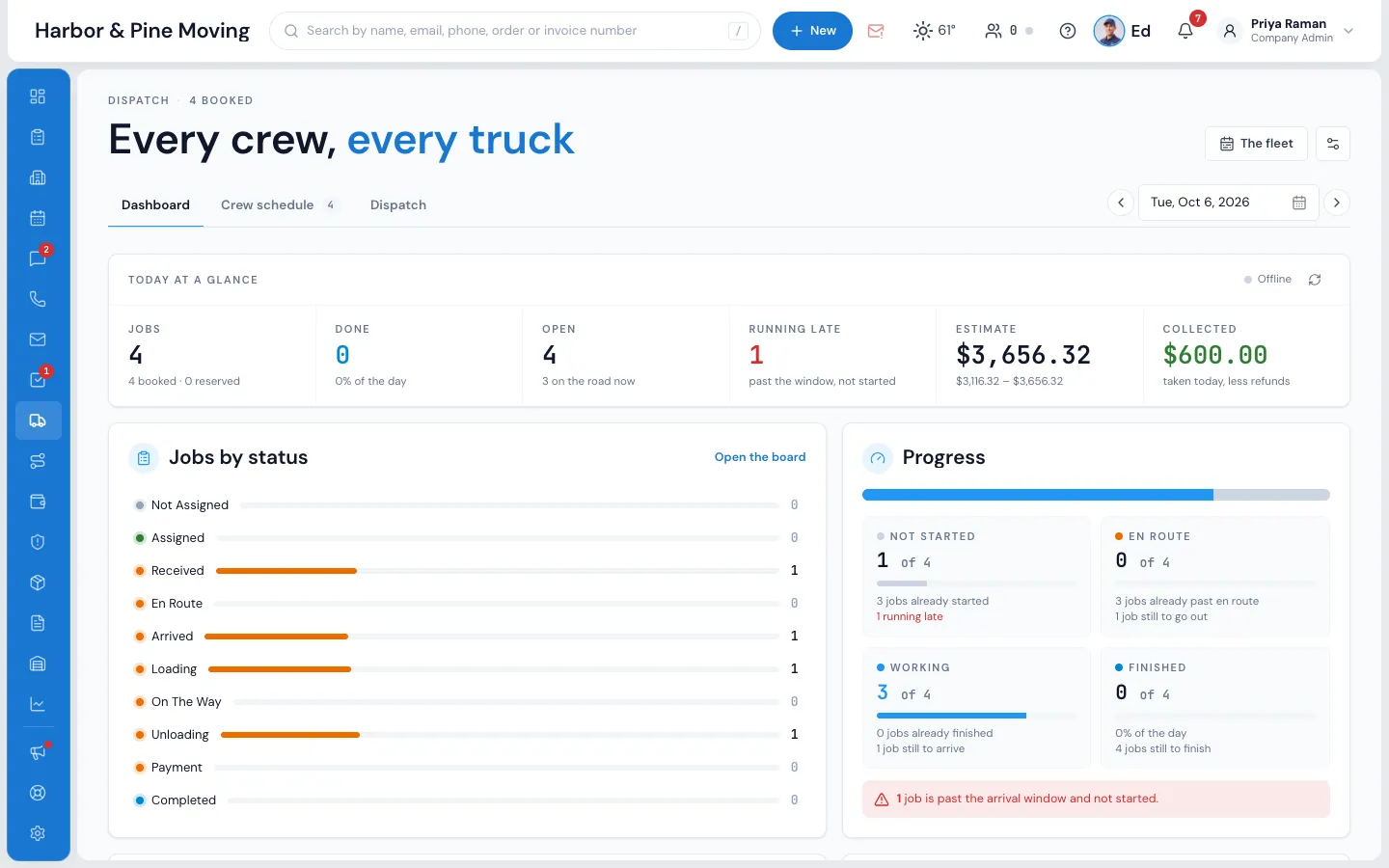
The Dashboard tab updates itself the moment a crew moves a job along: jobs by status, which jobs are not started, en route, working or finished, and who is running late past the end of their arrival window. Crews and trucks out, the jobs with no crew or no truck, and the crew's answers.
- Running late: the window has ended and the crew hasn't started
- Estimate, collected by cash, card and check, balance due and tips
- Money figures only for admins and people given the permission
- Open Dispatch on the tab you like, on every computer and phone
05 / The fleet
A month of trucks, and the days they're off.
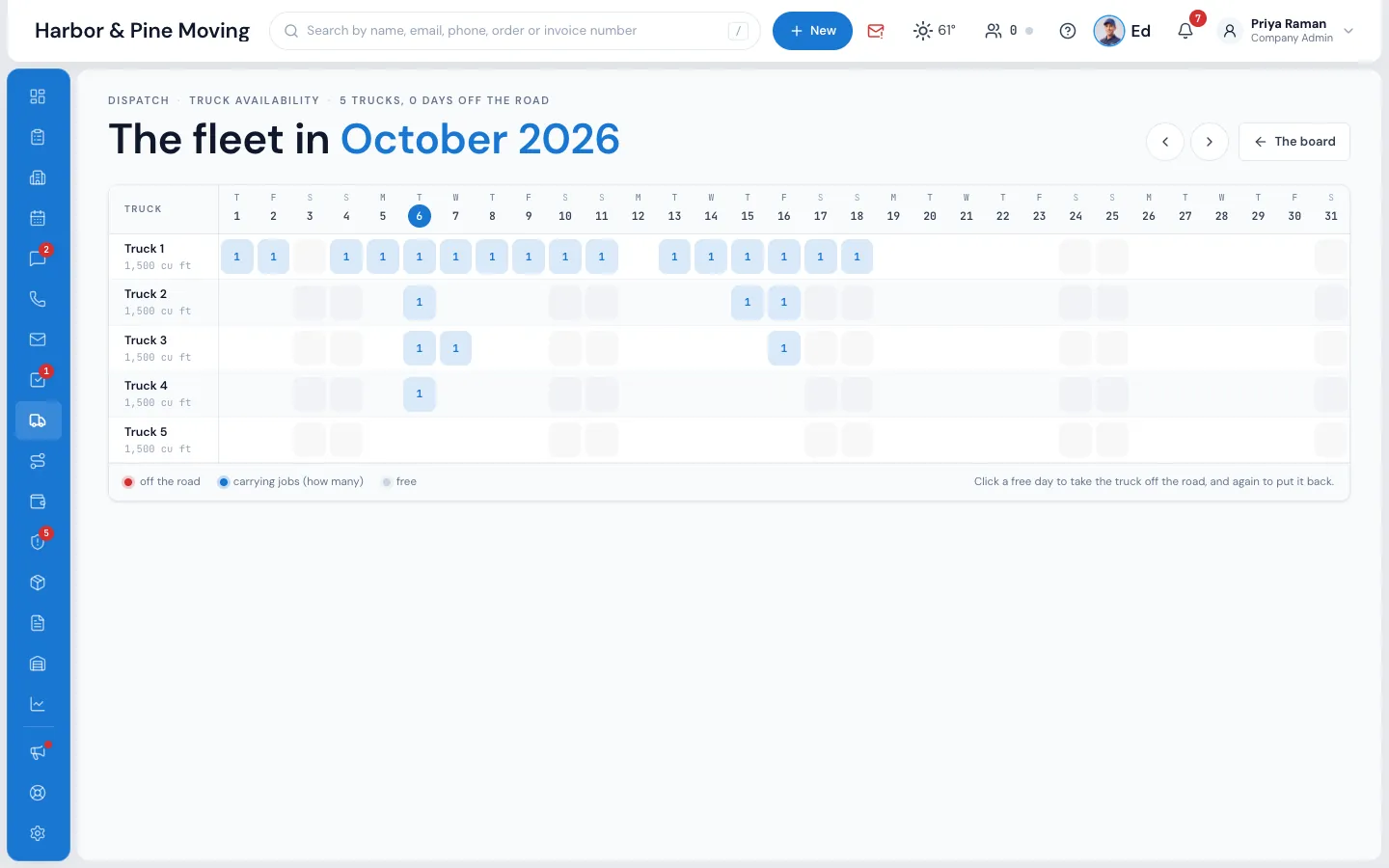
The fleet shows one month, a row per truck and a column per day, with how many jobs each truck carries. Click a free day to take a truck off the road for a repair, and MoveBoard won't let a job onto it that day.
- A whole year of days off from Truck Availability in settings
- Count a truck as free by open hours, or one job per truck per day
- Blocked and held time shown on the truck's row, with the reason
06 / On a phone
Run the day from your pocket.
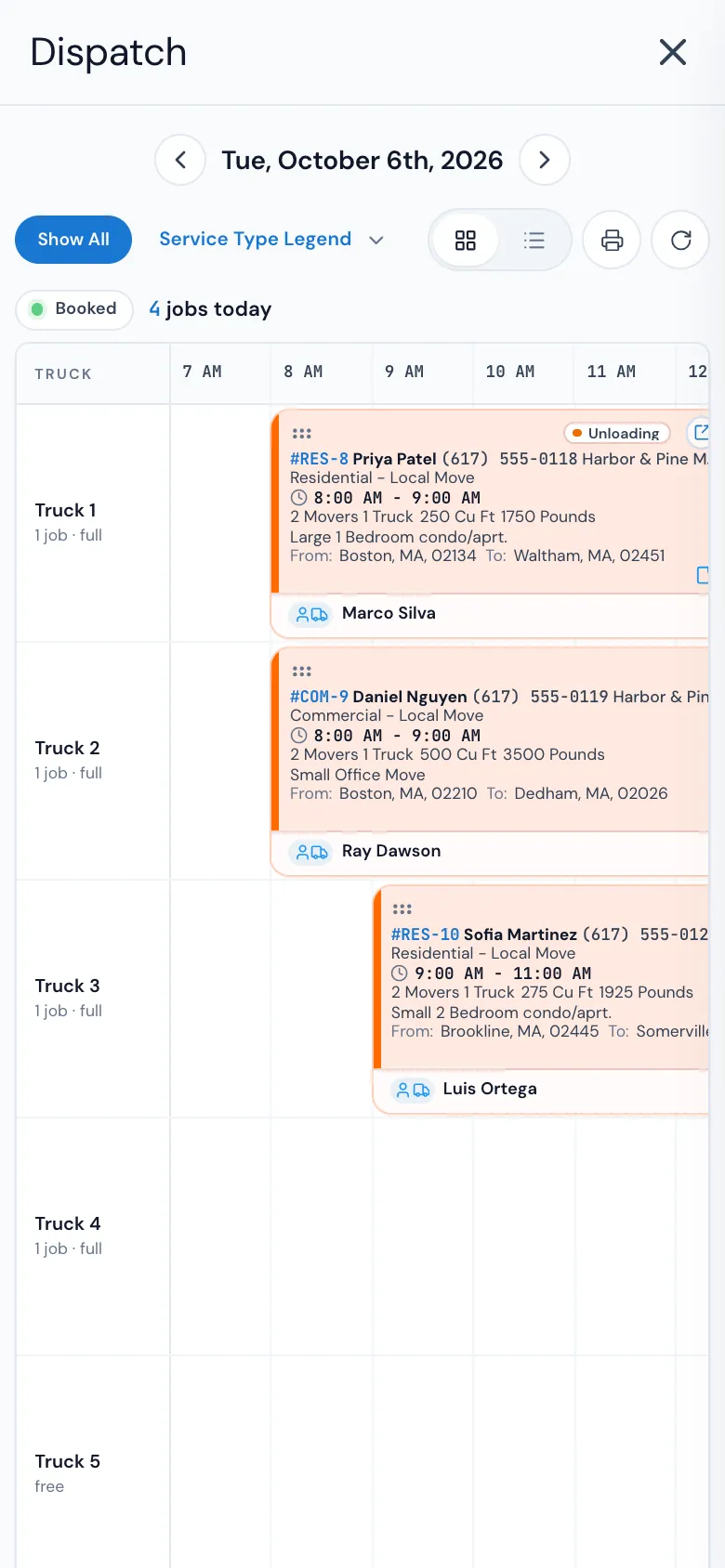
On a phone, Dispatch fills the screen with its tiles. Tap a job, then tap a crew, and it's assigned. Jobs move only by their six-dot handle, so a swipe never moves one by accident. The Crew Schedule keeps Send Notification in a bar at the foot of the screen.
- A tablet held sideways shows the full desk layout
- Open order opens the order window over the board
“The best moving software I have used in the past 10 years.”
By the numbers
1
Press texts the day's crews
Send Notification saves the crews and texts everyone not told yet their crew and report time. Their answers show on the Crew Schedule as they come in.
Can I see multiple crews on the same view?
Yes. The board has a row per truck with the day's hours across, and under each truck its crew and report time. The Crew Schedule shows every crew of the day side by side. Pick a service in the Service Type Legend to see only its jobs, or switch to the list for one row per job.
How do TBD arrival windows work?
Switch TBD on in your arrival window settings and a move can be booked with the earliest and latest the truck may start. On the day, drag it from TBD / Unassigned jobs onto a truck at the hour it should start, or type the exact window. Then press the envelope and the customer gets an email and a text with their arrival window.
Can crews see their assignments on mobile?
Yes, in the Mover's Portal, which opens in the phone's browser from the link in their text. They confirm (or decline, if you allow it) each day, see the job details and directions, and the foreman runs the bill of lading on the phone.
Does dispatch integrate with the rest of the system?
It's the same MoveBoard. A booked order is on the board on its move date, double-clicking a job opens its order, the crew's taps move the job's status, and when the foreman submits the bill of lading the job is completed and the signed bill goes to the customer.
What happens when a crew member declines a shift?
Their name turns red on the Crew Schedule the moment they decline in the Mover's Portal. Drag someone else into the spot and press Send Notification. If someone answers you by phone, set their answer yourself from the spot's menu.
Can I block out a truck for maintenance or repairs?
Yes. On The fleet, click the truck's day and it's off the road; a whole year of days off is set from Truck Availability in settings. For part of a day, Block time holds the truck with a reason everyone can read.
Does MoveBoard show where my trucks are on a map?
Not yet. You follow each job from the foreman's taps on the phone: Received, En Route, Arrived, Loading, On The Way, Unloading, Payment and Completed, each with its time, on the job card and the Dashboard.
See your company on MoveBoard.
A live demo built around your own kind of moves: your service area, your pricing, your crews.