
Moving & storage management software: Moving and storage, billed on its own.
MoveBoard runs your warehouse next to your moves. A booked move into storage becomes a storage tenant, each tenant is billed every month with the autopay card charged, and late fees, reminders and declined cards are handled for you. The Storage page shows who is in, who is coming and going, and who owes.
- ways to price: per cu ft, per vault or by unit
- 3ways to price: per cu ft, per vault or by unit
- autopay card per tenant, charged every month
- 1autopay card per tenant, charged every month
- storage reports, from occupancy to length of stay
- 6storage reports, from occupancy to length of stay
Storage · All facilities
Storage, at a glance
In storage
38
21,450 cu ft · 2 moving in
Every month
$7,820
from 38 tenants
Charges due
$3,140
in the next two weeks
Owed
$1,265
by 4 tenants
Moves in today
1
Moves out today
0
Total jobs in storage
38
Total cubic feet in storage
21,450
Moves in tomorrow
1
Moves out tomorrow
2
Aging
Needs attention
#1139 Greg Moss
card declined · $195.00
#1152 Lina Park
no signed storage agreement
#1127 Tom Reyes
owes $420.00
What it fixes
The day before Storage, and the day after.
Storage bills go out by hand on the 1st, and some months half of them are forgotten.
Each tenant is billed on their own Next Run date, and the autopay card is charged for everything they owe.
A card declines and nobody notices until the balance is three months old.
The customer gets an email and a text with a link to put in a new card, and the tenant shows under Needs attention.
The storage price the salesperson quoted never reaches the warehouse bill.
The quote's Storage Charge becomes the tenant's pricing the moment the move in is booked.
How it works
Storage, screen by screen.
01 / From the move to the tenant
Book the move in, and the tenant is there.
A moving-and-storage order carries its storage price on the quote: the facility, per cubic foot or per vault, the billing schedule, free months and price increases. When the move in is booked, MoveBoard creates the storage tenant with the customer, the sizes and the order. The move out is its own order, linked, and booking it sets the tenant's move-out date.
- Storage ID, status, flags, files and the balance across the top
- Actual and billable size, facility, vaults and lots
- Every change in the Storage Log, with who made it
- Its own copy of the pricing, so a new price list never re-prices it
Storage ID 1146 · Rachel Stone
Rachel Stone, in storage
Balance Due $195.00 · Move In Aug 14 · Move Out Jan 9
Storage Info
Billing & Recurring
02 / Monthly billing
The bill goes out, the card is charged.
Every night MoveBoard bills each tenant whose Next Run has come: the month's charge, part of a month at the start or end, nothing in a free month, plus tax and bulky items. If the tenant has an autopay card, it's charged for the whole balance. Unpaid bills earn the facility's late fee, and the reminders go on the days you set.
- Start, pause and resume a tenant's billing with one button
- New charge, Take a payment and Send statement on the Ledger
- A missed billing day is never charged late without you
Storage ID 1146 · Ledger
Every bill, every payment
Balance due
$195.00
Last payment
$195.00 · Sep 1
03 / Declined cards
A declined card gets a link, not a phone call.
When the monthly charge or a charge from the office is declined, the customer gets an email and a text with a link to their own storage page, where they put in a new card and pay, with no sign-in. The Storage Log records it in one plain line, and the Storage page lists them until they pay.
- Told once per decline, never twice for the same month
- Respects STOP and the customer's own email and text choices
- A text that can't go says why beside the button: STOP, a number that can't get texts, or the carrier's daily limit
- Every email they were sent opens as they got it, with Copy link for the PAY Invoice link
- Your words, in Settings › Communication › Templates
Text to (617) 555-0139
The monthly storage charge of $195.00 on the card ending in 1881 was declined. The customer was told by email and text.
Payment · $195.00 by Mastercard •••• 5510 from the customer's storage page
04 / Facilities
Each warehouse with its own rules.
Every facility has its pricing, tax, late fee, payment terms, billing schedule and its own messages: the bill, any number of reminders and the late-fee notice, each as an email and a text, and its own mailbox if you want one. New tenants go to your default facility.
- Per CuFt, Price/Vault or By Unit
- Price increases by percent or amount after a number of months
- Free months, and a warning when a stay runs past your maximum
Settings · Storage · Facilities
Harbor & Pine Warehouse
05 / Units
Where every tenant's things are, on one map.
The Storage page's Units tab draws your units as a board, each with its tenants and the room left, plus what the units cost you and what your tenants pay. Drag a tenant from the Coming list into a unit, or from one unit to another; a tenant can spread over two units, and a unit can be marked full. A move-out frees the unit at once, and the unit's history says why.
- Edit unit: move it to another location with its tenants, size, capacity, price and next charge date
- Return a unit to the facility, its tenants back to Coming; Re-rent brings it back
- Search by tenant, phone, order number, unit or vault
- The tenant window shows Where is it, with their unit lit up
- Use storage units, per branch: the unit decides the tenant's facility
- Ask Ed "where is Sarah stored?" and he answers from the unit
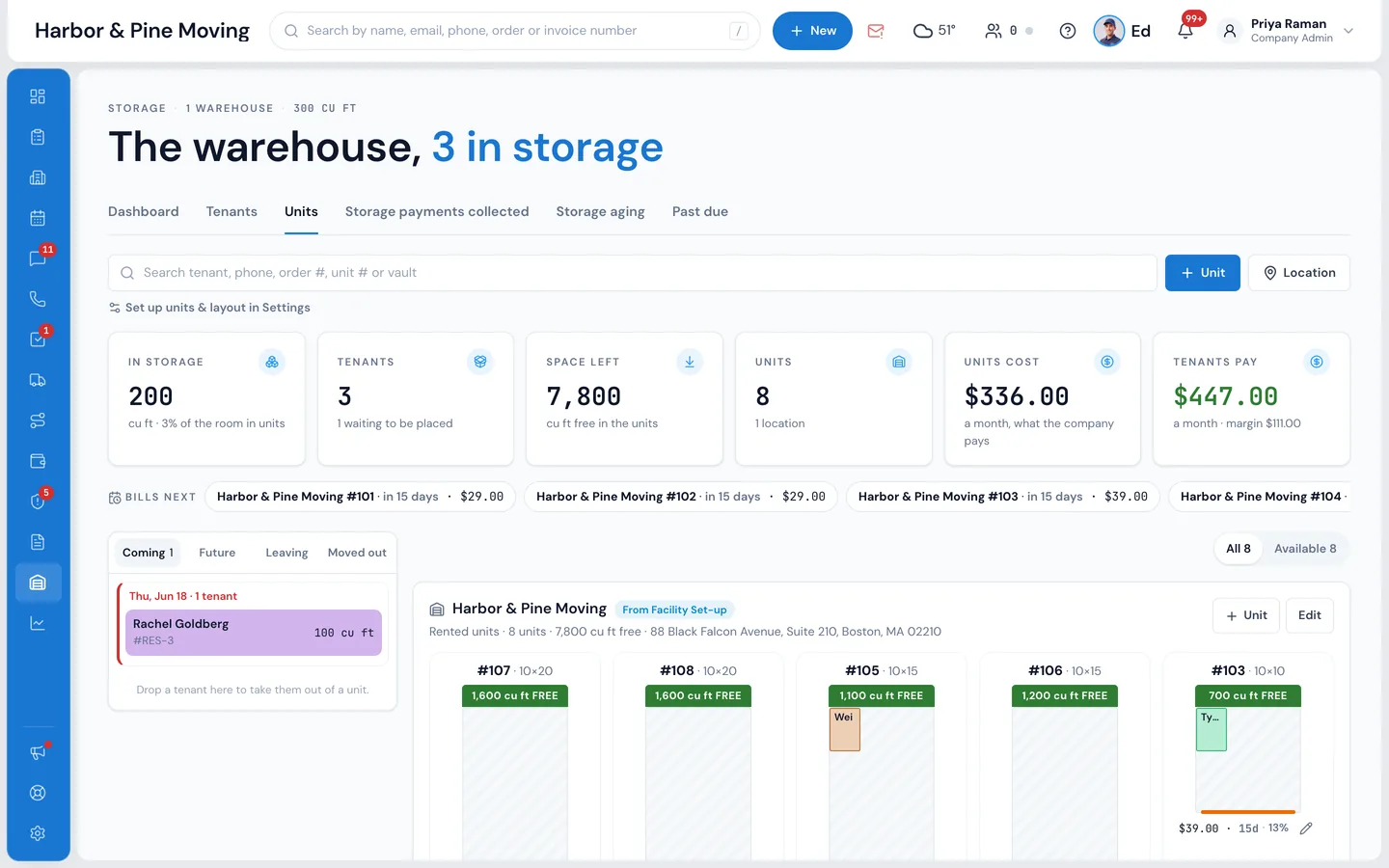
06 / Time Machine
The whole board, on any past day.
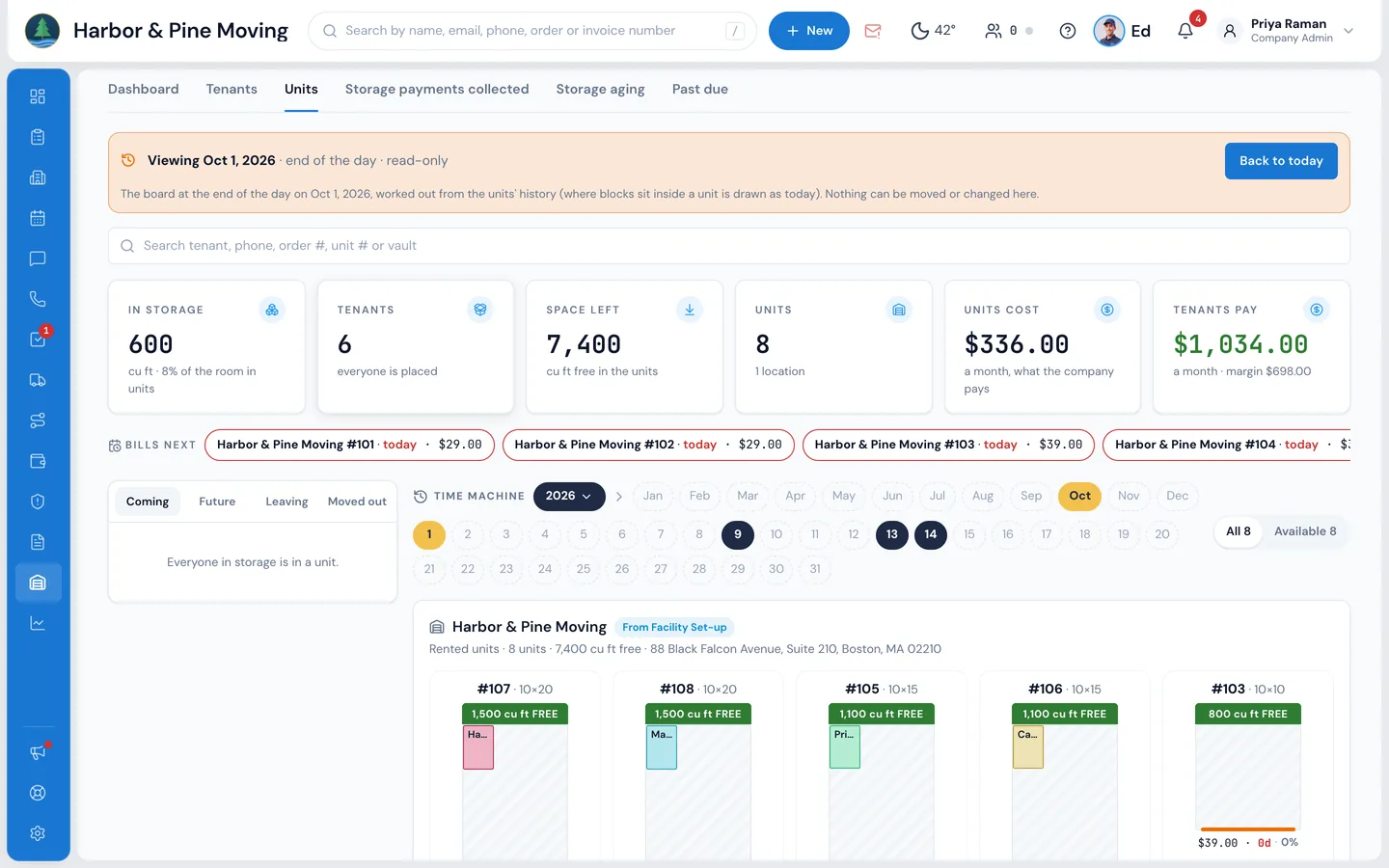
Next to the Units filters, the Time Machine shows the year and its months. Pick a month, then a day, and the board appears as it was at the end of that day: which tenants were in which unit, the free space and what billed next, read-only so nothing can be moved by mistake. Back to today returns to the live board. MoveBoard keeps a copy of each branch's board every night, and works out any other day from the history of every change.
- Days with records are dark; a day before anything was recorded says so
- Open to everyone who can see the Storage tab
- Ask Ed "what was in unit 104 on Oct 3?"
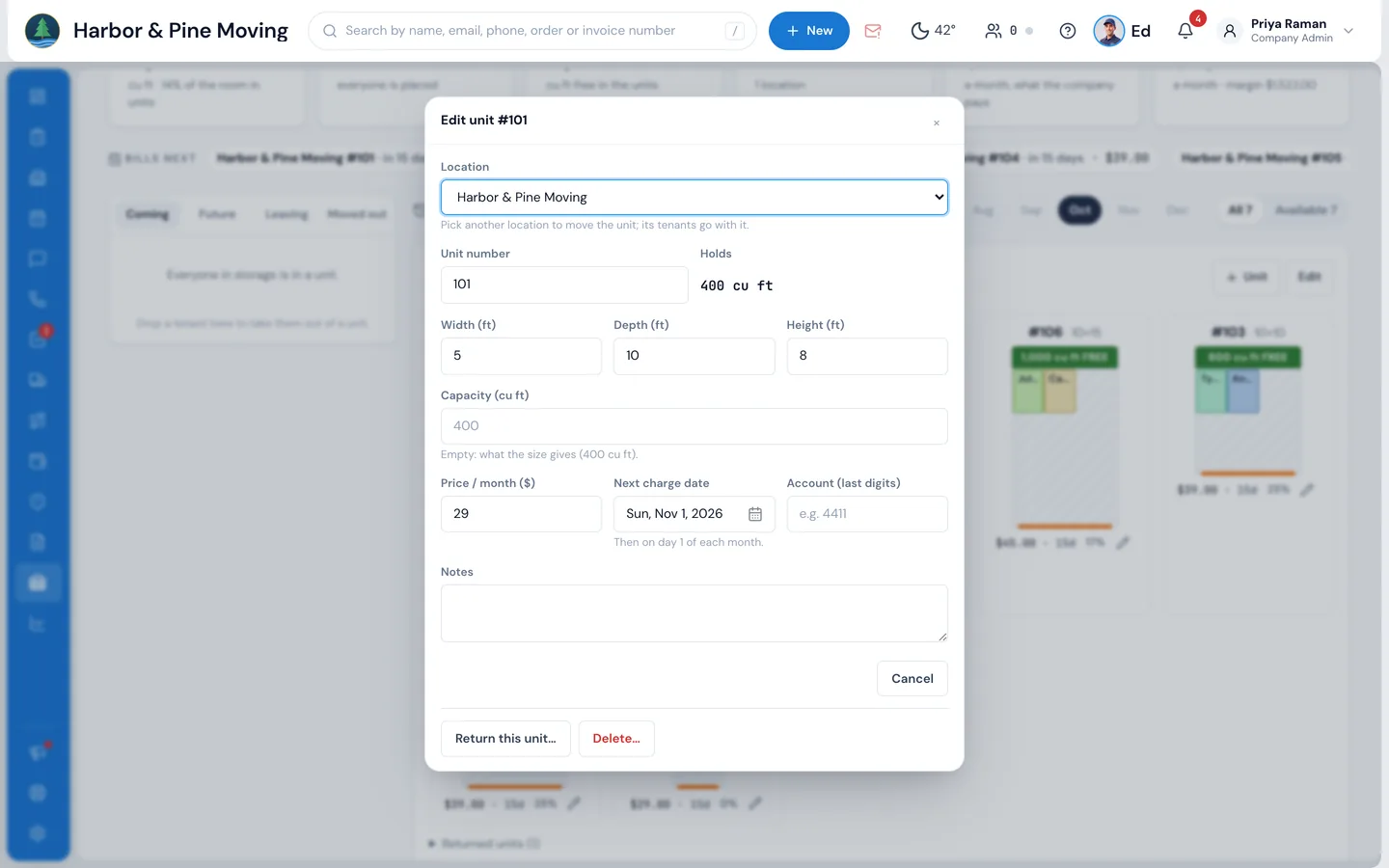
07 / Edit a unit
Everything about a unit, in one pop-up.
The pencil under a unit, its own pop-up and the unit opened big all open the same Edit unit: the location, unit number, size and what it holds, a capacity when it really holds more or less, the price your company pays, the next charge date, the account it bills and notes. Save shows only when something really changed. At the bottom, Return this unit gives it back to the facility, and Delete removes an empty unit added by mistake.
- Moving a unit to another location takes its tenants with it
- After the next charge date it bills on the same day each month
- Delete stays off while tenants are in the unit
08 / The customer's side
Their storage account, on their phone.
Storage customers see My Storage in their customer portal, or open it from the link in their bill: the balance, status, facility, bills, payments and a printable statement. They pay with a card on file or a new one, and can make it the card the monthly charge uses if you allow it.
- The storage agreement signed on the move-in day, with the card
- Messages and notes land on the tenant in the office
- Pay storage can be switched off in the portal designer
Harbor & Pine Moving
My Storage
Storage Details
Your Balance is:
$195.00
This is the amount you owe.
Pay Storage
Your payment is the full balance
“Time relief, organization, all in one location of client files!”
By the numbers
6
Storage reports, ready in Reports
Storage Occupancy, Move-Ins & Move-Outs, Storage Revenue, Past-Due Storage Balances, Storage Payments and Tenant Length of Stay.
Can I see which unit each tenant is in?
Yes. The Units tab shows every unit and who is in it. Drag tenants in and between units; a move-out frees the unit by itself, and the tenant's window shows where their things are.
Can I see who was in a unit on a past date?
Yes. The Time Machine on the Units tab shows the whole board at the end of any past day: the units, which tenants were in them and the free space, read-only. Ed answers it too.
Can I manage multiple storage facilities in MoveBoard?
Yes. Each facility has its own address, pricing, tax, late fee, terms and messages, and one is your default for new tenants. On the Storage page the Warehouse chips show all facilities or one. A tenant can carry a second facility, with the one the monthly bill follows marked.
How does vault tracking work?
Price a facility by the vault, with a Max CuFt per vault and a price per vault, and the goods take as many vaults as they need. Each tenant records their facility and the locations in it, plus lot number, colour and from-to on Additional Details. MoveBoard doesn't scan barcodes.
Is storage billing included in the plan?
Storage is part of MoveBoard on every plan: tenants, monthly billing, autopay, late fees, reminders and the customer's storage page. Card payments go through your own card processor, and storage texts use your company's texting balance.
Can customers see their storage online?
Yes. My Storage in the customer portal shows their balance, status, facility, cubic feet, bills, payments, files and a printable statement. They can pay there, and set the card the monthly charge uses if you allow it.
How do you handle storage disputes?
The customer signs a storage agreement on the move-in day with the space, the monthly rate and your terms. Files attach to the tenant, and the Storage Log records every change and who made it, every bill, payment and declined card.
Can I pause billing for a specific tenant?
Yes. On the tenant's Billing & Recurring card press Pause Billing, and Resume when you're ready. For a free month, set it in the tenant's pricing and that month is billed at nothing.
What happens if a tenant's card on file fails?
The customer is emailed and texted a link to put in a new card and pay. The tenant shows under Needs attention and in the aging, the facility's reminders go out on schedule, and once the bill is unpaid for the facility's late-fee days the late fee is added.
See your company on MoveBoard.
A live demo built around your own kind of moves: your service area, your pricing, your crews.