
Sales · AI Leads
Every lead your AI brought in, and what it became.
AI Leads is the page in MoveBoard's menu that gathers every lead the AI Receptionist made on the phone: how many conversations there were, how many became orders, and each lead ready to work, with the call's summary, recording and transcript one double-click away.
- live numbers for any dates
- 4live numbers for any dates
- list of every AI lead, newest first
- 1list of every AI lead, newest first
- leads typed in by hand
- 0leads typed in by hand
AI Leads · last month
What your AI brought in
Conversations
64
+9 vs. last period
Orders Created
27
+5 vs. last period
Conversion Rate
42%
+3 pts vs. last period
Avg Duration
3:08
−0:14 vs. last period
What it fixes
The day before AI Leads, and the day after.
You pay for an answering service and have no idea how many calls turned into jobs.
Conversations, orders created and the conversion rate, side by side.
Phone leads hide among web leads, so nobody knows which ones the AI took.
One list of AI leads, and an AI tag on their status in the Orders list.
Salespeople call back cold, without knowing what the customer already said.
The summary, the transcript and a sales note are on the order before they dial.
How it works
AI Leads, screen by screen.
01 / The numbers
Is the AI paying for itself?
Four cards cover the dates in From and To, the last month to start with: Conversations, Orders Created, Conversion Rate and Avg Duration. Each compares with the period before, so a better greeting or a new estimate setting shows up in the numbers the following week.
- Change the dates and the cards follow; the list keeps every AI lead
- Long calls with a low conversion often mean callers wanted a price they didn't get
- Many short calls can mean callers hang up on the greeting: try a shorter one
AI Leads
Calls in, orders out
Conversations
64
+9 vs. last period
Orders Created
27
+5 vs. last period
Conversion Rate
42%
+3 pts vs. last period
Avg Duration
3:08
−0:14 vs. last period
Channel split
02 / The list
Work AI leads like any other lead.
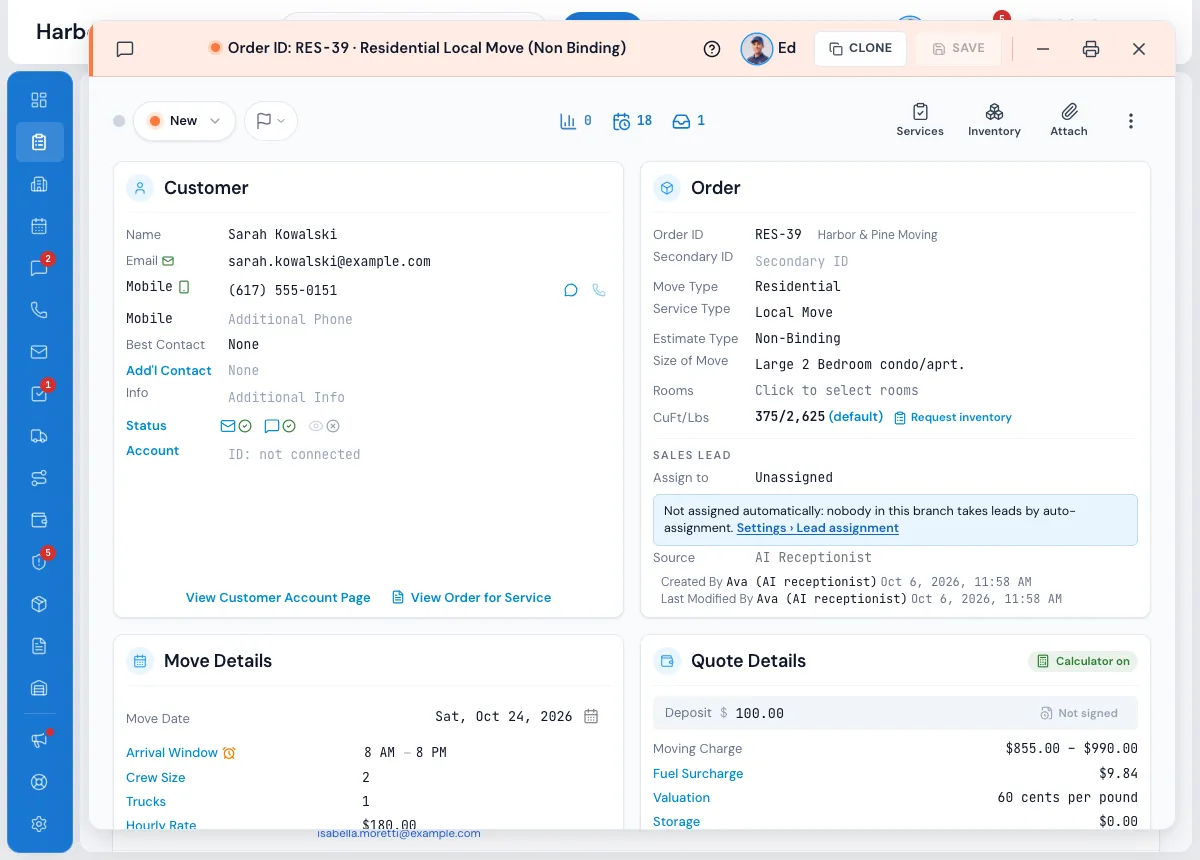
The list is the same table as your Orders list, 25 to a page, with one more column: AI channel. Status opens on All statuses so you see every AI lead, booked, lost or still new, and the envelope, flags, sales person, bulk actions and column picker all work as they do on Orders.
- Filter by status, with the count of matching orders beside it
- Double-click a row to open the order window
- Only the orders each person is allowed to see
- Handed out by your own lead assignment rules, source AI Receptionist
03 / The call, on the order
Read what the caller said before you call back.
In the order's conversation the AI's call reads AI receptionist call, inbound from the caller's number, with how long it was and a summary. The recording and the conversation transcript are right there, beside the texts, emails and the office's own calls.
- A sales note with the size, the addresses and the special items
- The caller's preferred way and time to be contacted, when they said it
- Texts, emails and calls on the same thread
Order #RES-1150 · conversation
The whole story, in one thread
Voicemail · 0:38 Unread
Voicemail transcript: Hi, it's Megan, can we move the start to 9 instead of 8 on Saturday? Call me back, thanks.
Call recording · Outbound · 2:14 · Jamie M.
Call transcript
AI receptionist took a call from (617) 555-0131 · 1 min 50 s
Asked whether the crew brings wardrobe boxes. Answered from the company's FAQ.
04 / The follow-up
A task waiting, due within the hour.
After every estimate the AI gives, a Follow up AI quote task goes to the person you chose, with the estimate in its notes. Callers who ask to be called back leave a Call back task with the reason. Both show in Tasks and on the order like any other task.
- Call-back tasks go to the person set in Assign Call-Back Tasks To
- Change requests from existing customers go to the person you set
- Nobody gets a New lead notification for a call that made no new order
Tasks · due today
Follow-ups, already explained
Follow up AI quote: Dana Ruiz, order RES-1142
Estimate $1,180 – $1,420 · 3 movers, 1 truck · 2BR Quincy → Braintree
Due in 52 minHigh
Call back (508) 555-0122
Asked about storage for 2 months between moves
Due today 3:00 PMNormal
Follow up AI quote: Hannah Ortiz, order LD-2241
Long distance · Boston → Charlotte · estimate given on the call
Due in 18 minHigh
AI receptionist call — inbound from (781) 555-0193, 3 min 12 s
Two-bedroom, third floor with elevator in Quincy; new building in Braintree needs a COI. Wants packing for the kitchen. Prefers texts in the morning.
“We don't lose customer anymore, everything is keep on software platform that is easy to use and easier to follow up with customer.”
By the numbers
100%
Of AI calls filed on an order
Every call the AI takes lands on the lead it made, or on the caller's own order, with its summary, recording and transcript.
Where is the AI Leads page?
In MoveBoard's left menu, with a robot icon. It shows once the AI Receptionist is on for your company. Everyone in the office can open it, and the list shows only the orders each person is allowed to see.
Who gets the leads the AI makes?
AI leads go out by your normal lead assignment rules, like any other lead. They carry the source AI Receptionist, so you can give that source its own rule if you want certain people to take them.
What do the numbers mean?
Conversations counts the calls the AI had, Orders Created how many became orders, Conversion Rate is orders out of conversations, and Avg Duration is how long a conversation lasted. Each card compares with the period before.
Can I listen to the call?
Yes. Double-click the lead to open the order. In its conversation you'll find the call's summary, the recording and the conversation transcript.
Can I tell AI leads apart on the main Orders list?
Yes. An order the AI made carries a small AI tag on its status in the Orders list, and its source is AI Receptionist.
Works with
AI Leads hands the work to the next screen.
See your company on MoveBoard.
A live demo built around your own kind of moves: your service area, your pricing, your crews.