
Referral & affiliate software for movers: Realtors send the moves, MoveBoard keeps the score.
Give every realtor, stager, property manager and past customer their own referral link and QR code. Each quote that comes through it is credited to them automatically. Pay them a set amount or a percent for the moves they send, give their customers a discount, record every payout with a monthly statement, and let partners follow it all in their own partner portal.
- link and QR code for each partner
- 1link and QR code for each partner
- days a referred customer still counts
- 30days a referred customer still counts
- passwords: partners sign in with a code
- 0passwords: partners sign in with a code
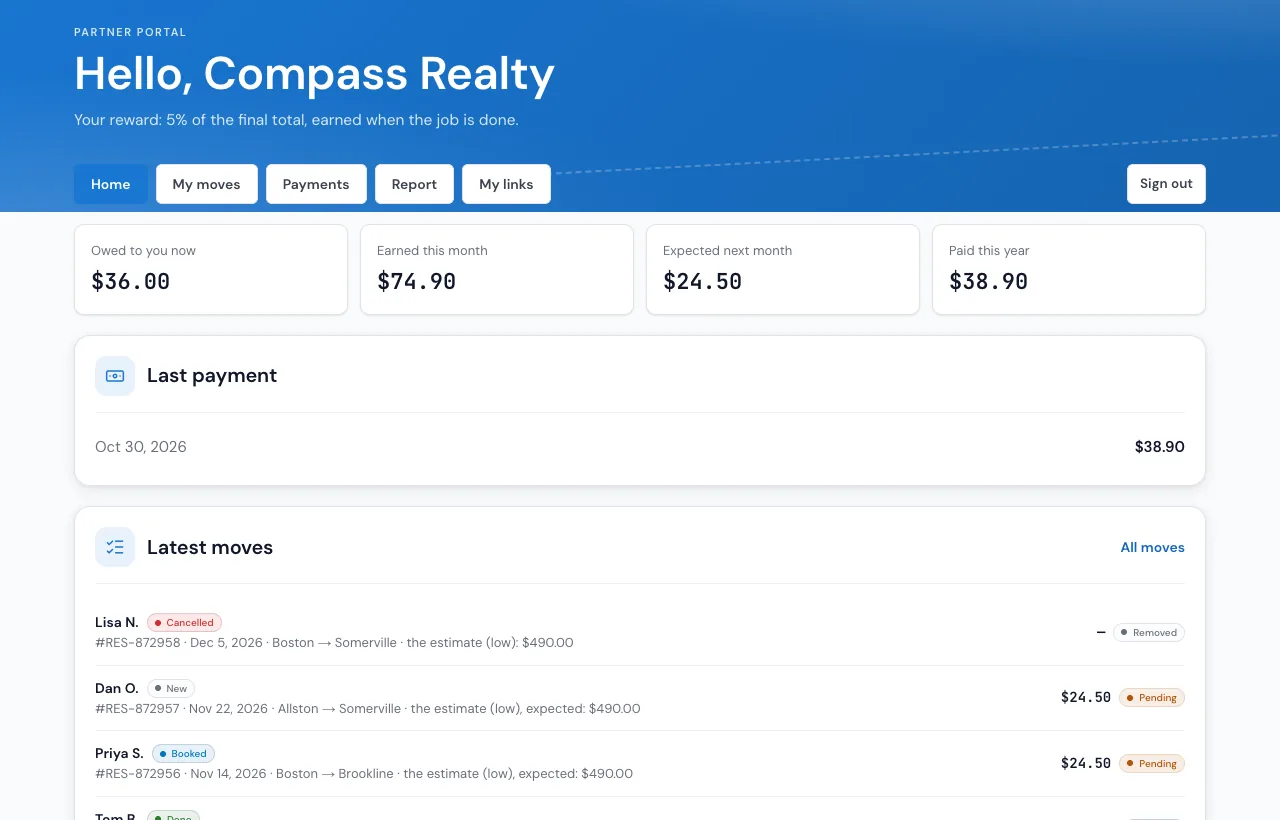
Referral links, rewards and the partner portal are set up in Settings › Affiliates. Included in every plan, with no add-on fee. MoveBoard records what you pay your partners; it never sends money.
What is affiliate and referral tracking for a moving company?
Affiliate and referral tracking for a moving company means knowing which realtor, stager, property manager or past customer sent each move, and paying them fairly for it. In MoveBoard each partner gets a personal link and QR code, every quote through it is credited to their account, rewards follow the move, and partners see it all in their own portal.
What it fixes
Referral tracking for movers, without the spreadsheet.
A realtor says "I sent you three moves last month" and nobody can check.
Every quote through their link is credited to them, with clicks, leads, bookings and booked value per link.
Referral fees live in a notebook, and the partner gets paid twice, or never.
Each move gets a reward line that turns Earned on your rule; Record payment marks it Paid.
Partners call the office to ask how their clients' moves are going.
Their own partner portal shows their moves, earnings and payments, with no password to forget.
How it works
Links, rewards, payouts and the partner portal, screen by screen.
01 / Referral links
A link and a QR code for every partner.
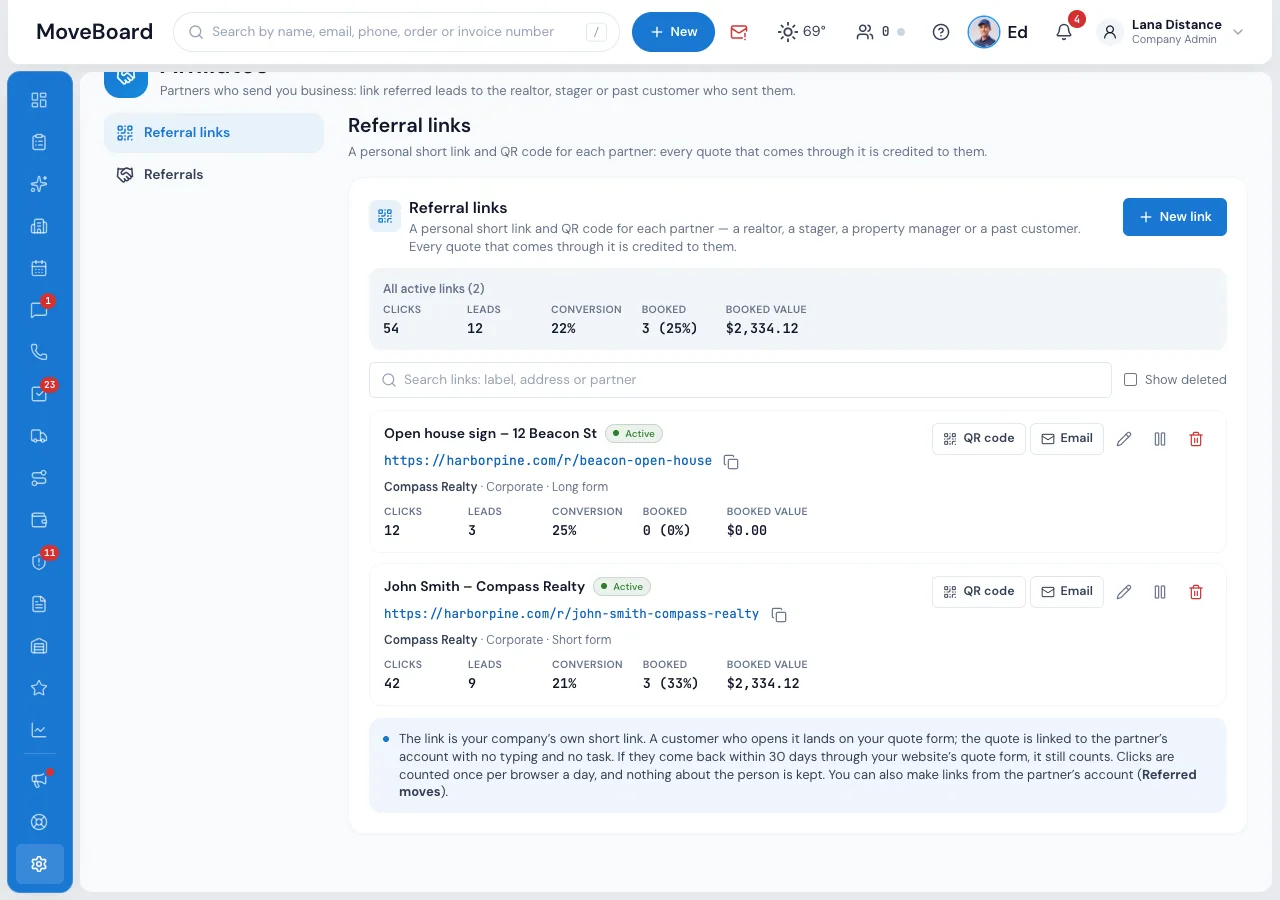
In Settings › Affiliates › Referral links, or on the partner's account, press New link: pick the partner's account, give the link a label such as John Smith – Compass Realty, and choose the quote form it opens, Short, Long or Single page, and optionally the service. The link is your company's own short link, on your website's address when your website opens MoveBoard links.
- QR code with your logo in the middle: PNG, SVG or Print, for flyers and open-house signs
- Email the partner their link and QR code from MoveBoard
- Clicks, leads, conversion, booked and booked value for every link
- Pause a link or delete it; its numbers and moves stay
02 / Credited automatically
No typing, no matching, no task for the office.
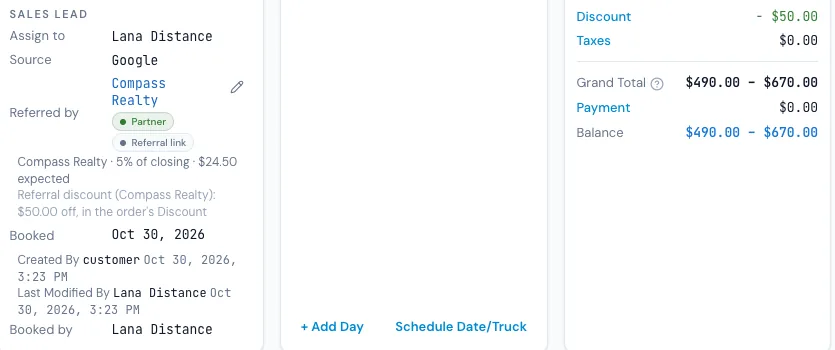
A customer who opens the link lands on your quote form, and the quote is linked to the partner's account by itself. The order shows Referred by with a Referral link tag, the partner's Referred moves card counts it, and so does the Referral Performance report. If the customer leaves and comes back through your website's quote form within 30 days, it still counts.
- The last link or ad they came through gets the credit
- A customer who skips How did you hear about us? gets your referral source
- A customer never refers themselves
- With rewards on, Referred by also shows the reward, such as 5% of closing · $24.50 expected
03 / Rewards
A set amount or a percent, earned on your rule.
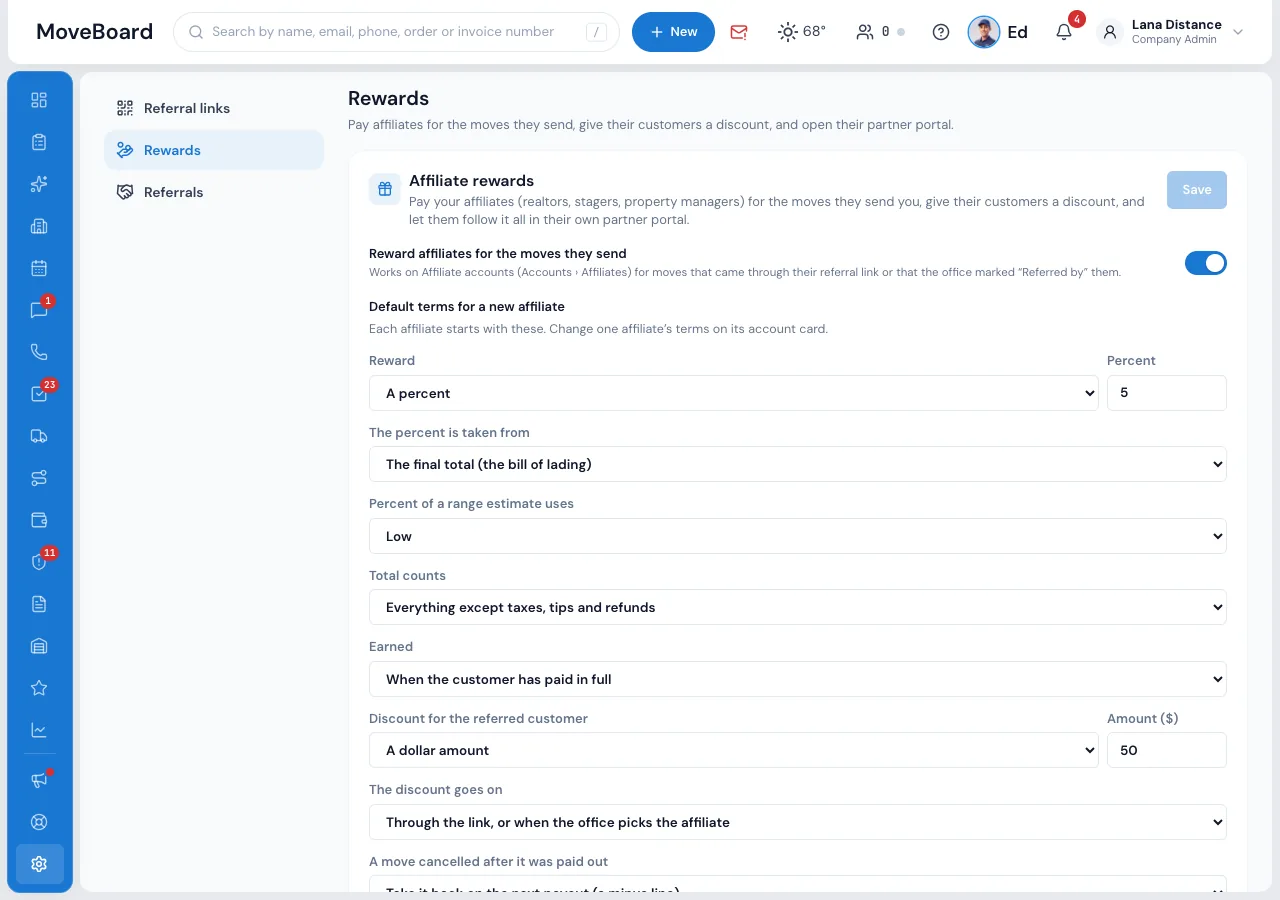
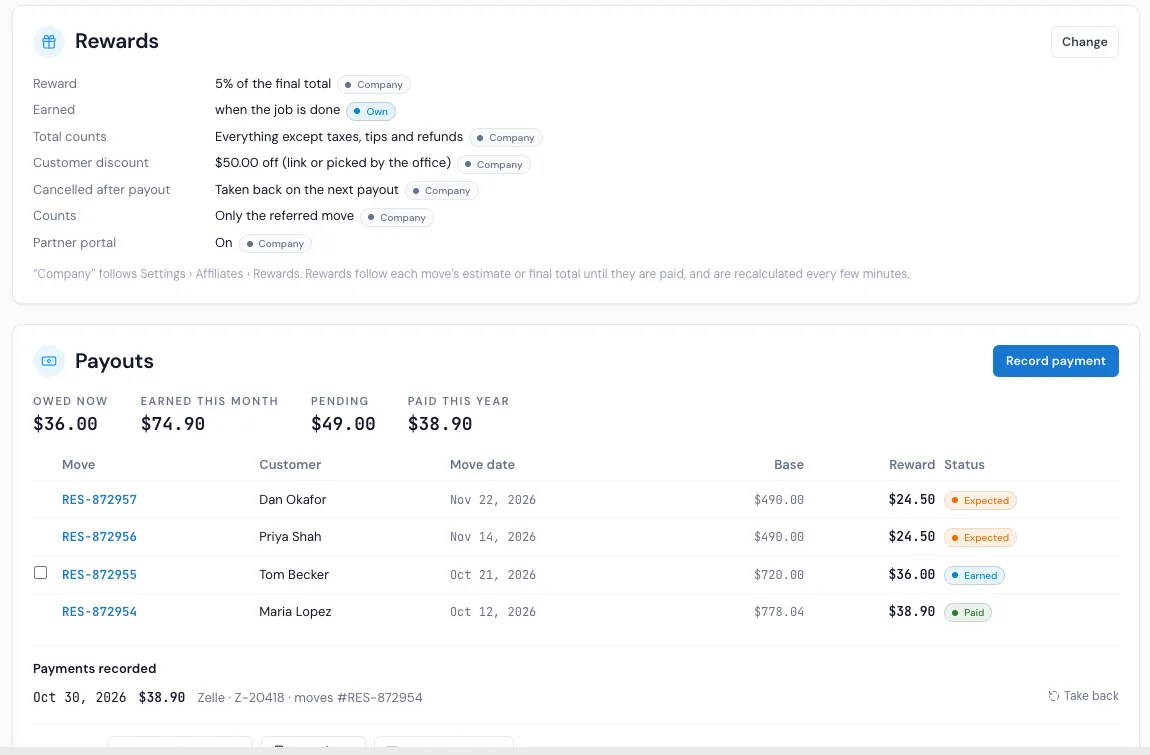
In Settings › Affiliates › Rewards set the terms every affiliate starts with: a set amount per job or a percent, taken from the final total on the bill of lading or the estimate when booked, and earned when the move is booked, when the job is done or when the customer has paid in full.
- Choose what the total counts: everything except taxes, tips and refunds, or moving charges only
- Only the referred move, or every move of that customer for some months
- A move cancelled after it was paid out is taken back on the next payout, or kept
- Rewards count for referrals made from the day you start them
04 / The referred customer's discount
Their clients get a discount, on the order by itself.
Give an affiliate's customers a percent or a dollar discount, only through the link or also when the office picks the affiliate. It goes into the order's normal Discount field while the order is still a lead, named Referral discount in the order's log. Each affiliate can keep the company's terms or have its own, set on its account's Rewards card.
- A booked price is never changed
- An account's own discount wins: the referral discount is not added on top
- Each term shows Company or Own; Use the company's terms puts them back
05 / Payouts and statements
What you owe, what you paid, and a statement to send.
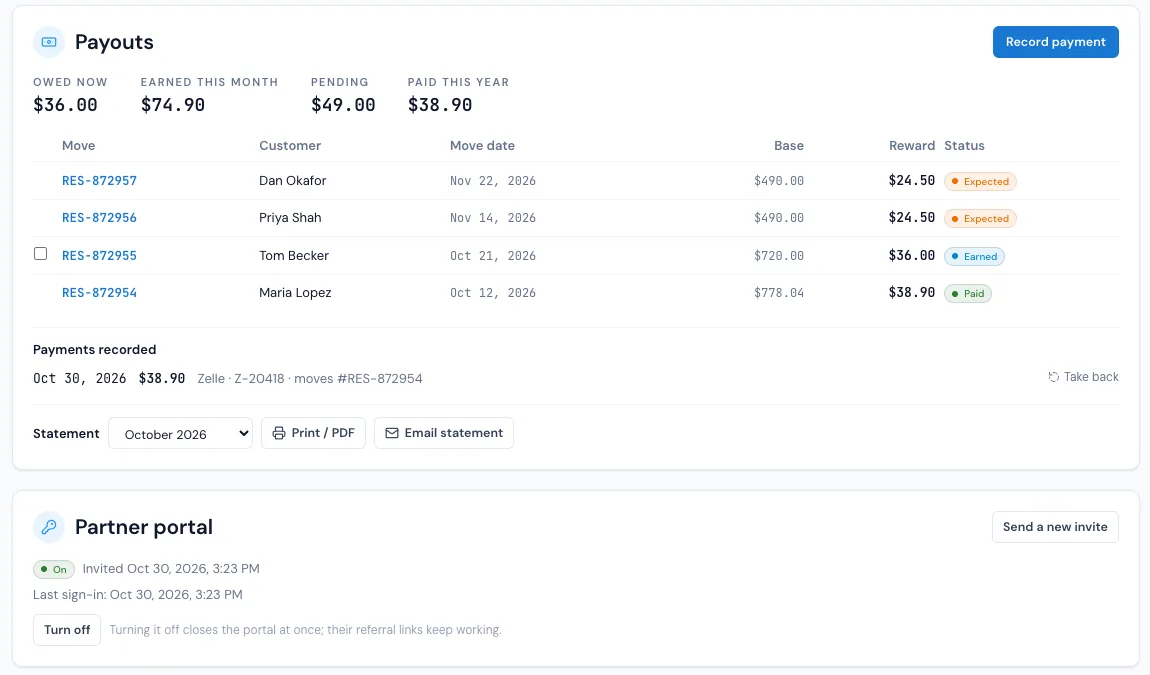
Each affiliate account has a Payouts card: owed now, earned this month, pending and paid this year, and every move with its base, reward and status, Pending, Earned or Paid. Record payment fills in what is owed, or the moves you tick, with the date, how it was paid and a reference. You pay by check, Zelle, ACH or cash outside MoveBoard; MoveBoard keeps the record.
- Take back a payment recorded by mistake: the moves are owed again
- Monthly statement: Print / PDF, Download CSV or Email statement
- Reports › Affiliate payouts lists every affiliate's earned, paid and owed
- Every change goes on the order's and the account's log
06 / The partner portal
Partners see their own moves, and nothing else.
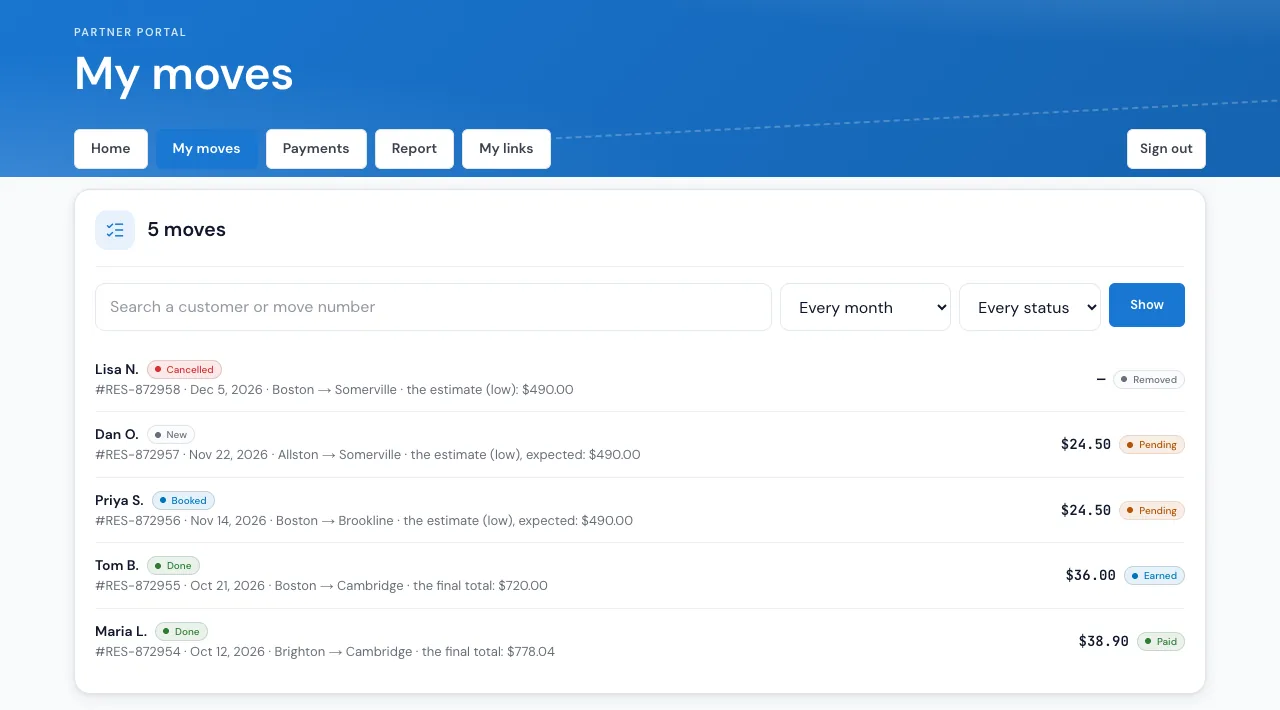
Press Invite to portal on the affiliate's account and they get a link by email or text. They sign in with a code, no password, and see Home with what they are owed, My moves with each customer, move date, status and reward, Payments, a Report with PDF and CSV, and My links with their referral links and QR codes. It is your client portal, in your colors and with your logo.
- Customers show as first name and last initial, or the full name, with from city → to city
- Never a customer's phone, email or street address, your prices or another affiliate
- Close a partner's portal at once from their account; their links keep working
When there's no link
Partners who just tell the customer your name.
With Referrals in Settings › Affiliates › Referrals, a lead that says who referred the customer, from the quote form's Someone referred me box or the lead API, is linked to that partner's account by account number, exact email, exact phone or company name. MoveBoard never guesses: when nobody matches, the order's salesperson gets a task to link it.
The office can set or change Referred by on any order, phone leads too, and the Referral Performance report counts each partner's leads, bookings and value, per partner or per referral link.
Corporate & affiliate accounts Online quotes & forms Reports
“We don't lose customer anymore, everything is keep on software platform that is easy to use and easier to follow up with customer.”
By the numbers
3
Moments a reward can be earned
When the move is booked, when the job is done, or when the customer has paid in full: you choose, for everyone or one affiliate.
Questions
About affiliates and referral partners.
Every screen has a step-by-step guide in the help center.
How do I track which realtor referred a customer?
Give the realtor a referral link in Settings › Affiliates › Referral links. Every quote through it is linked to their account automatically and shows as Referred by on the order. For partners who don't use their link, Referrals takes over: the quote form's Someone referred me box and the lead API link the lead to the right account, and the office can set Referred by on any order.
Can I print a QR code for an open house?
Yes. Every referral link has a QR code, with your logo in the middle if you like. Download it as PNG or SVG for flyers, signs and business cards, or press Print to print it with the label and the link.
How are affiliate rewards worked out?
Each affiliate gets a set amount per job or a percent, taken from the final total on the bill of lading or from the estimate when booked. The reward is Pending when the move comes in and turns Earned when it is booked, done or paid in full, as you choose. Until it is paid out it follows the move's estimate or final total.
Does MoveBoard pay my affiliates?
No. MoveBoard records what you pay. You pay by check, Zelle, ACH, cash or any other way, then press Record payment on the affiliate's account; the moves it covers turn Paid, and the monthly statement shows it.
Can referred customers get a discount?
Yes. Set a percent or a dollar discount for an affiliate's customers. It goes into the order's Discount field while the order is still a lead, never onto a booked price, and an account's own discount takes its place when the order has one.
What do partners see in the partner portal?
Their moves with each customer's first name and last initial (or the full name, if you choose) and the cities, the move date, the status and their reward, what they are owed, earned and were paid, a report with PDF and CSV, and their referral links. Never a customer's phone, email or street address, your prices, or other affiliates.
Do partners need a password?
No. You invite them from their account by email or text. Each time they sign in they get a new code, and their device stays signed in for 30 days.
Is it an add-on?
No. Referral links, rewards and the partner portal are part of MoveBoard on every plan. They are set up in Settings › Affiliates.
See your company on MoveBoard.
A live demo built around your own kind of moves: your service area, your pricing, your crews.