
QuickBooks for moving companies: Every job in QuickBooks, to the cent.
MoveBoard posts each closed move to QuickBooks Online the way your accountant would enter it by hand: the order as its own job, every charge on its own line, MoveBoard's tax, deposits and payments applied, tips set aside for the crew. Nobody types a job twice, and the totals match MoveBoard exactly.
- difference from MoveBoard's total
- $0.00difference from MoveBoard's total
- invoice per order, updated, never doubled
- 1invoice per order, updated, never doubled
- between posts; nobody waits for QuickBooks
- 5 minbetween posts; nobody waits for QuickBooks
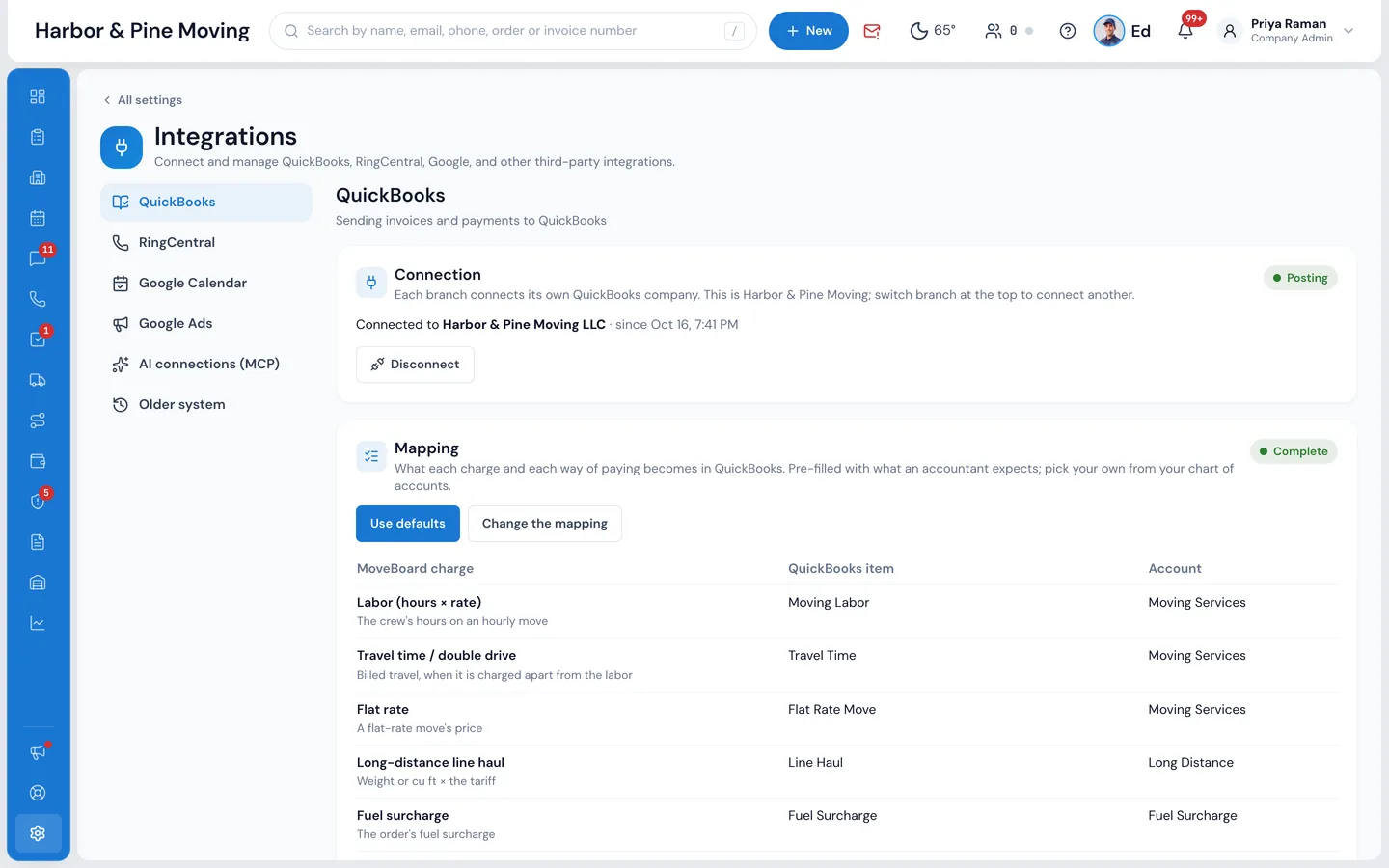
QuickBooks Online. Posting is one way, from MoveBoard to QuickBooks; a company admin connects each branch.
What it fixes
The day before QuickBooks, and the day after.
Someone re-types every closed job into QuickBooks at night, and the numbers never quite match.
Each closed order posts by itself, line by line, and QuickBooks' total is MoveBoard's total to the cent.
Tips show up as income, and the crew's money is mixed into revenue.
Tips go to Tips Payable, a liability, so they stay the crew's money until payroll pays them out.
A closing changes after it was entered, and now there are two invoices.
An edited closing updates the same invoice, and a canceled order's invoice is voided.
How it works
QuickBooks, screen by screen.
01 / Customers and jobs
Account, customer, then the order.
A private customer is a customer of their own in QuickBooks, by their name. A business account, a Corporate or Affiliate account in MoveBoard, becomes the parent, with the person under it. Every order is its own job, like 426 · Local Moving · Oct 20, 2026, billed with the parent, so Profit & Loss by Customer works per order, per customer and per business account.
- Realtors and builders as parents, their clients beneath
- Private customers stay top-level, never under a stranger
- One job per order, named by order number, service and move day
In QuickBooks: Customers
Every order is its own job, so Profit & Loss by Customer works per order
Only a Corporate or Affiliate account becomes a parent. A private customer is a customer of their own, by their name.
02 / The invoice
Every charge on its own line.
One invoice per order, numbered with the order number and dated the move day. Labor as hours × rate, travel time on its own line, a flat rate or a long-distance line haul, each box and material with its quantity and price, each service, each fee, storage, additional weight, valuation and the fuel surcharge. Discounts are negative lines, and MoveBoard's own tax goes on, line by line as MoveBoard taxed it.
- A multi-day move is one invoice, each line dated to its day
- Discounts book to Discounts Given, so income shows before and after
- The card fee the customer paid, as its own line
- A cent of rounding gets its own Rounding line, never a silent difference
Invoice 1176 · Dana Ruiz
Dated the move day, Oct 20, 2026 · Job 1176 · Local Moving
Sales tax (MoveBoard's, 6.25% on materials)$6.44
Total$1,474.44
Same as MoveBoard's closing
03 / Money in
Payments land where your bank expects them.
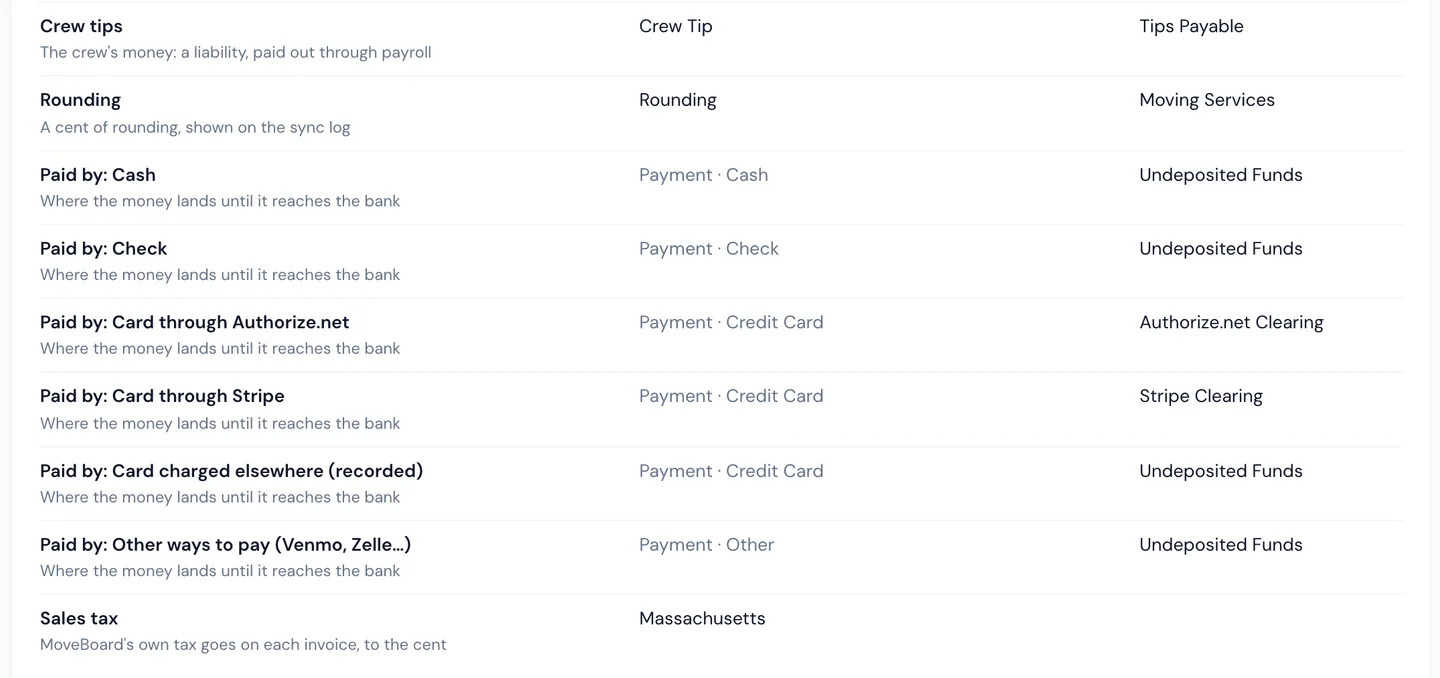
Each payment is posted on the order's job, dated the day it was taken, with its method and reference: the check number or the card's last four. A deposit taken before the move waits as a credit on the job and is applied the moment the invoice posts. Card money lands in a clearing account for each processor, so the payout to your bank reconciles; cash and checks land in Undeposited Funds.
- Stripe Clearing and Authorize.net Clearing, one per processor
- Cash, checks, Venmo and Zelle to Undeposited Funds
- Crew tips to Tips Payable, paid out through payroll
- A refund comes off what the customer owes on the job
04 / When it changes
Change the closing, the books follow.
QuickBooks stays the same as the order. A closing edited after it posted updates the same invoice, never a second one. A payment voided in MoveBoard is voided in QuickBooks. A canceled order's invoice is voided, and its payments stay on the job as the customer's credit until they're refunded.
- No duplicate invoices, even when a post is retried
- Refunds as a journal entry against the account the money left
- A date in a period your accountant closed is flagged, not forced
When something changes
MoveBoard keeps QuickBooks the same as the order
The closing is edited after it posted
QuickBooksThe same invoice is updated, never a second one
A payment is voided in MoveBoard
QuickBooksIt is voided in QuickBooks
The order is canceled
QuickBooksThe invoice is voided; payments stay on the job as the customer's credit
05 / Set it up once
Connect, map, pick a start date.
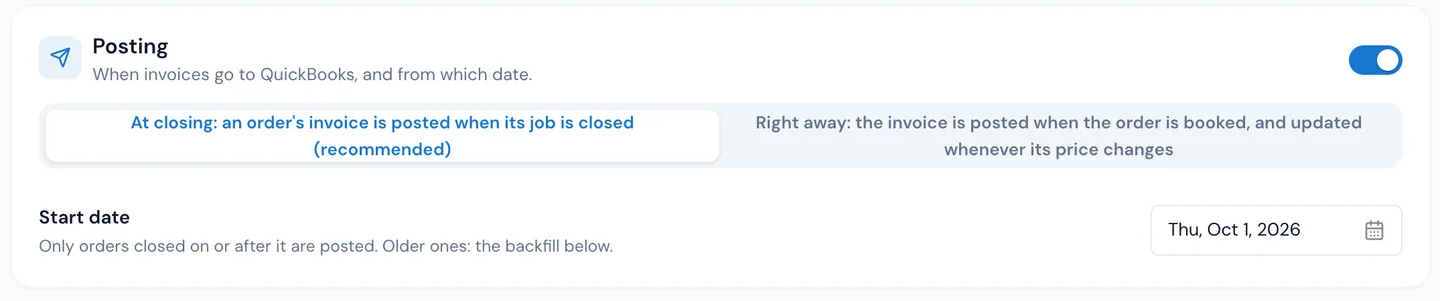
A company admin presses Connect to QuickBooks and signs in at Intuit, with no keys to paste. Use defaults finds or makes the items and accounts an accountant expects, and reuses ones you already have with the same name; Change the mapping picks your own from your chart of accounts. Then choose when to post, at closing or right away, and the start date.
- At closing (recommended), or right away from the booking
- Only orders closed on or after the start date are posted
- Older orders: a backfill you check first, with nothing posted
- Changes apply only when you press Save
“Mostly time, it's saves you all headache, everything is digital, invoices, booking and everything else.”
By the numbers
$0.00
Between MoveBoard and QuickBooks
Every line, the tax and the payments come from the order's own closing, so the invoice in QuickBooks totals exactly what MoveBoard says the customer owed.
Does MoveBoard work with QuickBooks?
Yes, with QuickBooks Online. Each branch connects its own QuickBooks company in Settings › Integrations › QuickBooks, and MoveBoard posts every closed order as an invoice on its own job, with its payments applied.
What goes on the QuickBooks invoice?
Every charge on its own line: labor as hours × rate, travel time, a flat rate or line haul, each packing material, each additional service and fee, storage, additional weight, valuation, the fuel surcharge, discounts as negative lines, the card fee the customer paid and the crew's tip. MoveBoard's tax goes on as MoveBoard charged it, so the totals match to the cent.
How are tips handled?
A tip charged with a payment goes on the invoice booked to Tips Payable, a liability, because it is the crew's money, paid out through payroll, not income. A cash tip handed straight to the crew never went through the company, so it isn't on the invoice.
Where do card payments and deposits land?
Card payments land in a clearing account for the processor they went through (Stripe Clearing or Authorize.net Clearing), so the processor's payout reconciles. Cash and checks land in Undeposited Funds. A deposit taken before the move is a credit on the job until the invoice posts, then it is applied.
What if the order changes after it was posted?
An edited closing updates the same invoice. A payment voided in MoveBoard is voided in QuickBooks. A canceled order's invoice is voided and its payments stay on the job as the customer's credit.
Can I send my older orders?
Yes. Set a start date for posting, then use the Backfill for anything closed before it: Check (nothing is posted) shows how many orders, for how much and which can't post as they are, and Queue these orders sends them, 25 every 5 minutes.
How do I know what was posted?
The sync log lists every order with a tick and the time it posted, or the problem in plain words, like an item that's inactive in QuickBooks. Fix it and press Re-sync on the order, or Retry everything that failed.
Does it work with QuickBooks Desktop, or sync back from QuickBooks?
No. It is QuickBooks Online only, and it posts one way, from MoveBoard to QuickBooks. Storage tenants' monthly invoices, long-distance partner bills, claim payouts and Canadian tax codes aren't posted yet.
Works with
QuickBooks hands the work to the next screen.
See your company on MoveBoard.
A live demo built around your own kind of moves: your service area, your pricing, your crews.