
Lead scoring for moving companies: Know who's ready, before you call.
Every time a customer opens your email, signs in to their portal or changes their inventory, their lead earns the points you set. Past your warm and hot lines it turns Warm, then Hot, on the Orders list and in the order window, updating by itself while you watch.
- customer actions you can score
- 20customer actions you can score
- bands: Cold, Warm and Hot
- 3bands: Cold, Warm and Hot
- press shows why a lead scored
- 1press shows why a lead scored
Lead Score
140Hot leadRES-1188 · Rachel Stone2
Calls Made
3
Emails Sent
4
SMS Sent
1
Messages Sent
3
SMS Received
2
Messages Received
Score Factor newest first
What it fixes
The day before Lead scoring, and the day after.
Reps call leads in the order they arrived, not the order they're ready.
Sort the Score column and the busiest leads come to the top.
A customer spends twenty minutes on their inventory and nobody notices.
Changing the inventory earns points, and the lead turns Warm while they work.
Nobody can say why a lead is called hot.
Press the score: every action that earned points, with its date and how many.
How it works
Lead scoring, screen by screen.
01 / On the Orders list
The busiest leads, sorted to the top.
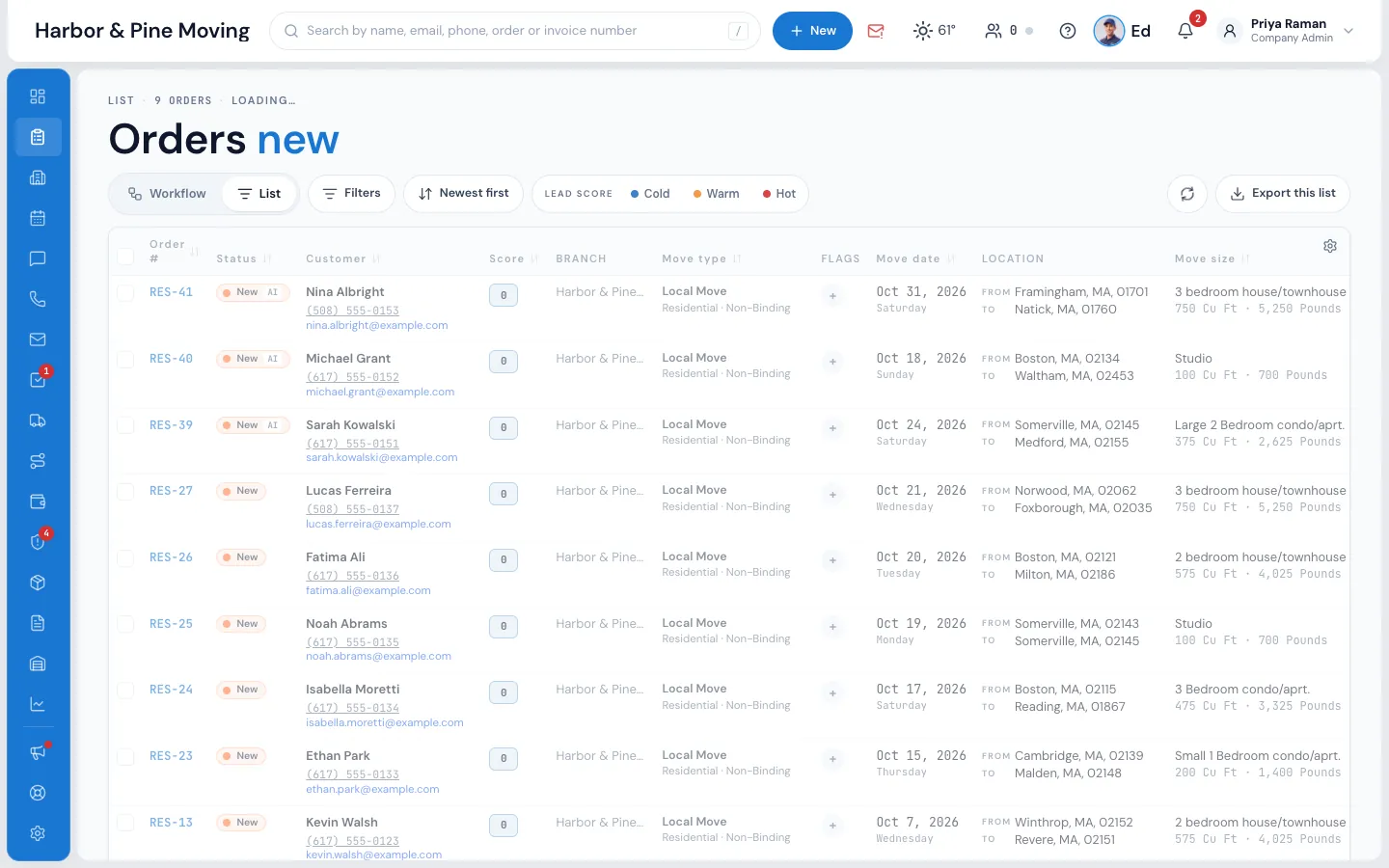
The Score column shows each lead's score in its colour. Press the heading to sort the busiest leads first, or use the Cold, Warm and Hot buttons in the toolbar to see only the leads in that band. The same score sits in the counters at the top of the order window.
- Updates by itself as the customer acts, no refresh needed
- Hover it in the window: Warm lead · score 120
- Points never go down, so the score shows interest over time
02 / Why it scored
Every point, with its reason.
Press the score at the top of the order window and the Lead Score pop-up opens. The tiles show how much contact there has been: calls made, emails and texts sent, messages sent and received, counting only messages a person wrote. Score Factor lists every action that earned points, newest first.
- Each action with its date, time and the points it added
- Points go to the order the customer was working on
- Automatic messages and office work never add points
Lead Score
140Hot leadRES-1188 · Rachel Stone2
Calls Made
3
Emails Sent
4
SMS Sent
1
Messages Sent
3
SMS Received
2
Messages Received
Score Factor newest first
03 / Set the points
Your weights, your lines.
Settings › Sales & orders › Lead scoring turns scoring on for the company. Under Lead Temperature you type when a lead turns Warm and when it turns Hot; under Customer actions, the points each action earns, with a switch to stop any action counting. Nothing changes until you press Save.
- Actions like adding a stop, picking valuation, adding packing or uploading a file
- Opens their order for service, opens or pays an invoice, asks for a COI
- Changing the points doesn't rescore old activity
Settings · Sales & orders
Lead scoring, your weights
Enable Lead Scoring
Lead Temperature
COLD0
WARM50
HOT120
Customer actions
2 changes not savedCancelSave
04 / Use it in workflows
A hot lead taps a rep on the shoulder.
Lead score is a condition in every workflow's Only if, compared with is more than, is less than or is between. Tell the sales rep the moment a customer crosses your Hot line, or send a friendly text to a lead that's gone quiet three days after it came in.
- When the customer changes their inventory, only if the score is hot: tell a teammate
- Three days after it was created, only if the score is low and the status is New: text them
- Every run is written in the workflow's log
Communication · Workflows
Hot lead alert, on its own
When
The customer changes their inventory
Wait
Right away
Only if
Lead score is more than 120 · status is New or Follow Up
Do
Tell a teammate: the sales rep — “Rachel Stone is hot, call her now”
Last run 10:31 AM · RES-1188 · task sent to Priya Shah
“Elromco is user-friendly. Can be customized for your needs and that is a plus. Highly recommended.”
By the numbers
0
Points for what your office does
Only the customer's own actions count, and points never go down, so the score measures their interest, not your team's effort.
How does lead scoring work in MoveBoard?
Every time a customer does something on their own, such as opening your email, signing in to their portal, changing their inventory or opening their order for service, their lead earns the points you set for that action. When the score crosses your Warm and Hot lines, the lead's colour changes on the Orders list and in the order window.
Can I customize the point values for each action?
Yes. In Settings › Sales & orders › Lead scoring you type the points for each customer action and switch off any action that shouldn't count. Give the most points to actions that show real intent, like changing the inventory or opening the order for service.
What are the temperature thresholds?
You set them. Every new lead starts Cold at 0 points; under Lead Temperature you type the score at which it turns Warm and the score at which it turns Hot. For example, warm at 20 and hot at 50: a customer who changes their inventory (15) and then opens their order for service (25) is warm at 40.
Does lead scoring work across multiple orders from the same customer?
Points go to the order the customer was working on, so each quote has its own score. The order window also shows how many orders the customer has with you, and a returning customer's new lead goes back to their salesperson.
How does email open tracking work?
When a customer opens an email you sent from MoveBoard, the action Opens an email you sent adds its points to the order. Most companies give it fewer points than actions that show a real decision, such as changing the inventory.
Is lead scoring included in all plans?
Yes, lead scoring is part of MoveBoard on both plans. Switch it on or off in Settings › Sales & orders › Lead scoring; off, the Score column and the score in the order window disappear and no points are added.
Works with
Lead scoring hands the work to the next screen.
See your company on MoveBoard.
A live demo built around your own kind of moves: your service area, your pricing, your crews.