
Moving estimate & pricing software: Prices that work themselves out.
MoveBoard turns the size of a move into a crew, trucks and hours, takes the rate from the day's price level, then adds travel, fuel, materials and taxes. The calculator is always on: change a stop or the date and the quote moves while you look, and the saved price is the one the customer sees.
- price levels, Discount to High-Peak
- 5price levels, Discount to High-Peak
- steps from size to grand total
- 10steps from size to grand total
- calculator for office, forms and portal
- 1calculator for office, forms and portal
Order RES-1188 · Residential Local Move
Priced as you type, calculator on
Move Details
Move DateWed, Oct 21
Price levelPeak
Crew Size3
Trucks1
Hourly Rate$189.00
Labor Time3:45 – 4:45
Travel Time0:45
Minimum hours3 h
How it got there
Size2 Bedroom · 1,050 cu ft
Crew rule→ 3 movers, 1 truck
Speed250 cu ft/h, 3rd floor −20%
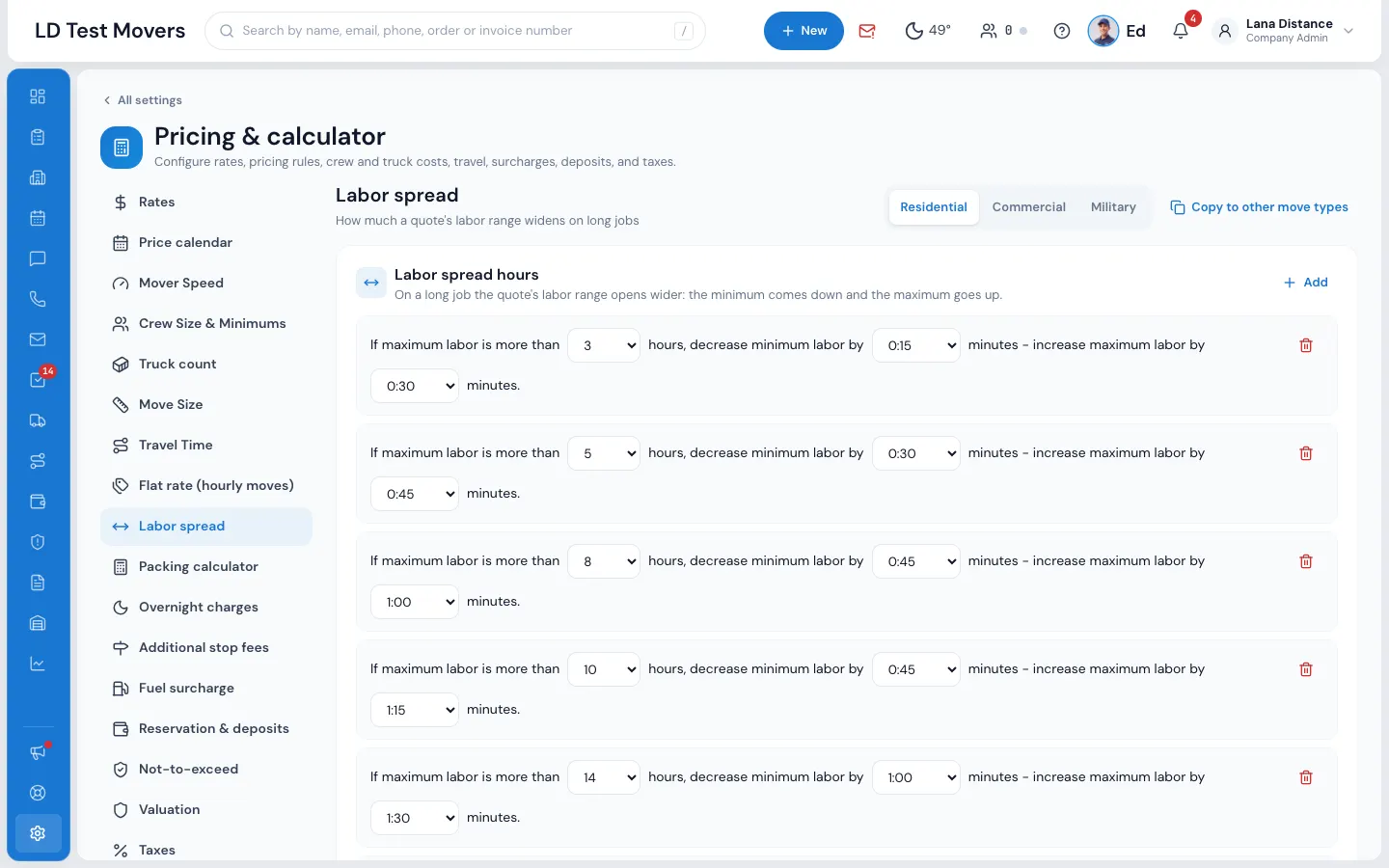
Labor spread± 0:30
Drive between stops+ 0:20
Quote Details Calculator on
Moving Charge$851 – $1,040
Fuel Surcharge$45.00
Valuation60¢ / lb
Materials$86.00
Taxes$7.10
Grand Total$989 – $1,178
What it fixes
The day before Pricing engine, and the day after.
Every salesperson prices the same move a little differently.
One calculator prices it from your settings, in the office, on your forms and in the portal.
You raise Saturday rates and forget the quotes already out.
MoveBoard offers to reprice the open orders on those days. Reserved and Booked never change.
A long job quoted at 4 to 5 hours runs 7.
Labor spread widens the range on long jobs, and not-to-exceed caps what the customer can be asked.
How it works
Pricing engine, screen by screen.
01 / Rates and price levels
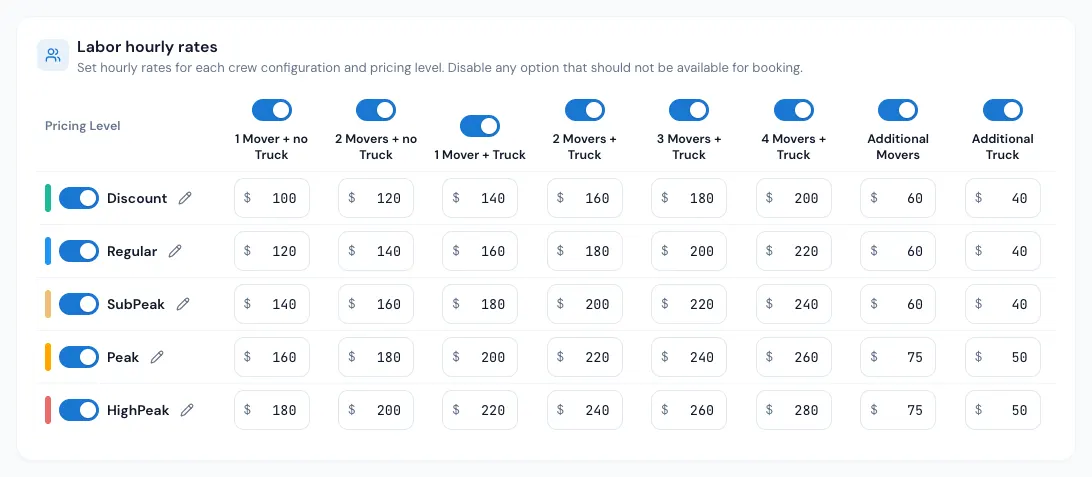
A row per level, a column per crew.
Every hourly quote takes its rate from the Rates grid: Discount, Regular, Sub-Peak, Peak and High-Peak down the side, crew and truck combinations across the top. Bigger crews add the Additional Movers and Additional Truck rates, so 5 movers and 2 trucks on a Peak day price themselves.
- Its own grid per move type: residential, commercial, military
- Rename a level ("Summer") and it shows on the customer's calendar
- Separate travel rates, or the same as labor
- Copy to other move types in one press
02 / The price calendar
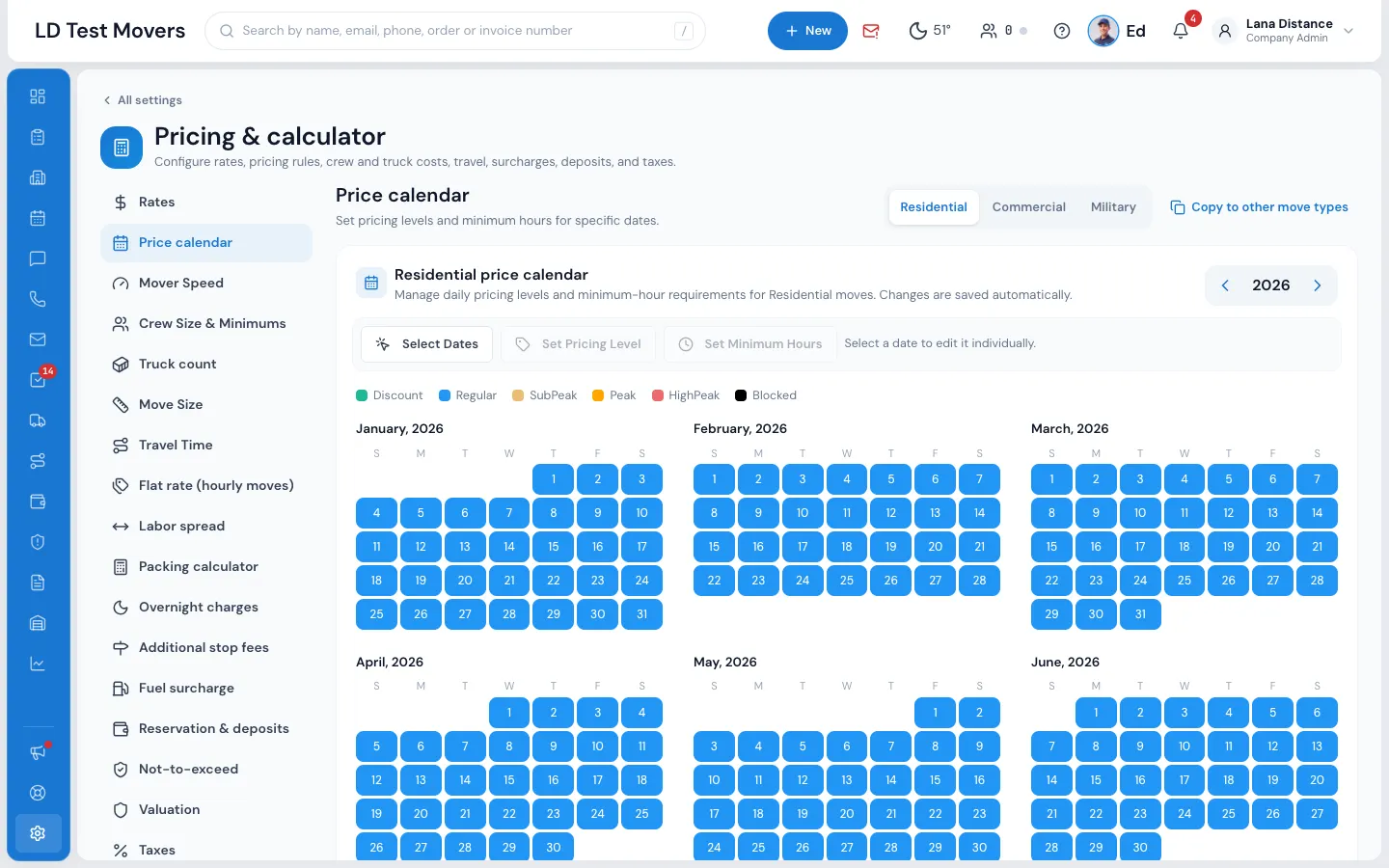
What every day is worth.
Colour each day with its price level, give it its own minimum hours, or block it so customers can't pick it on your forms and portal. Select many dates at once. When you change days that already have quotes, MoveBoard asks whether to update the open orders on those days to the new rates.
- A day you never marked is Regular
- Blocked days are refused on the forms, the portal and by the AI receptionist
- Each repriced order gets a line in its Order Log
03 / From size to hours
Hours from the move itself.
The move's cubic feet come from the size, the inventory or a custom volume. Your crew rules turn it into movers and trucks, the crew size gives a speed, and stairs, elevators and a long walk slow it down. Loading and unloading are timed at each end, then your labor spread widens the hours into a range on long jobs.
- Drive time between the customer's stops added when you charge travel
- Company minimum hours, or the day's from the price calendar
- Travel from your office and back, measured your way
- Type your own figure and it shows in red, with an arrow to give it back
04 / Fuel, valuation and taxes
The extras, added the same way every time.
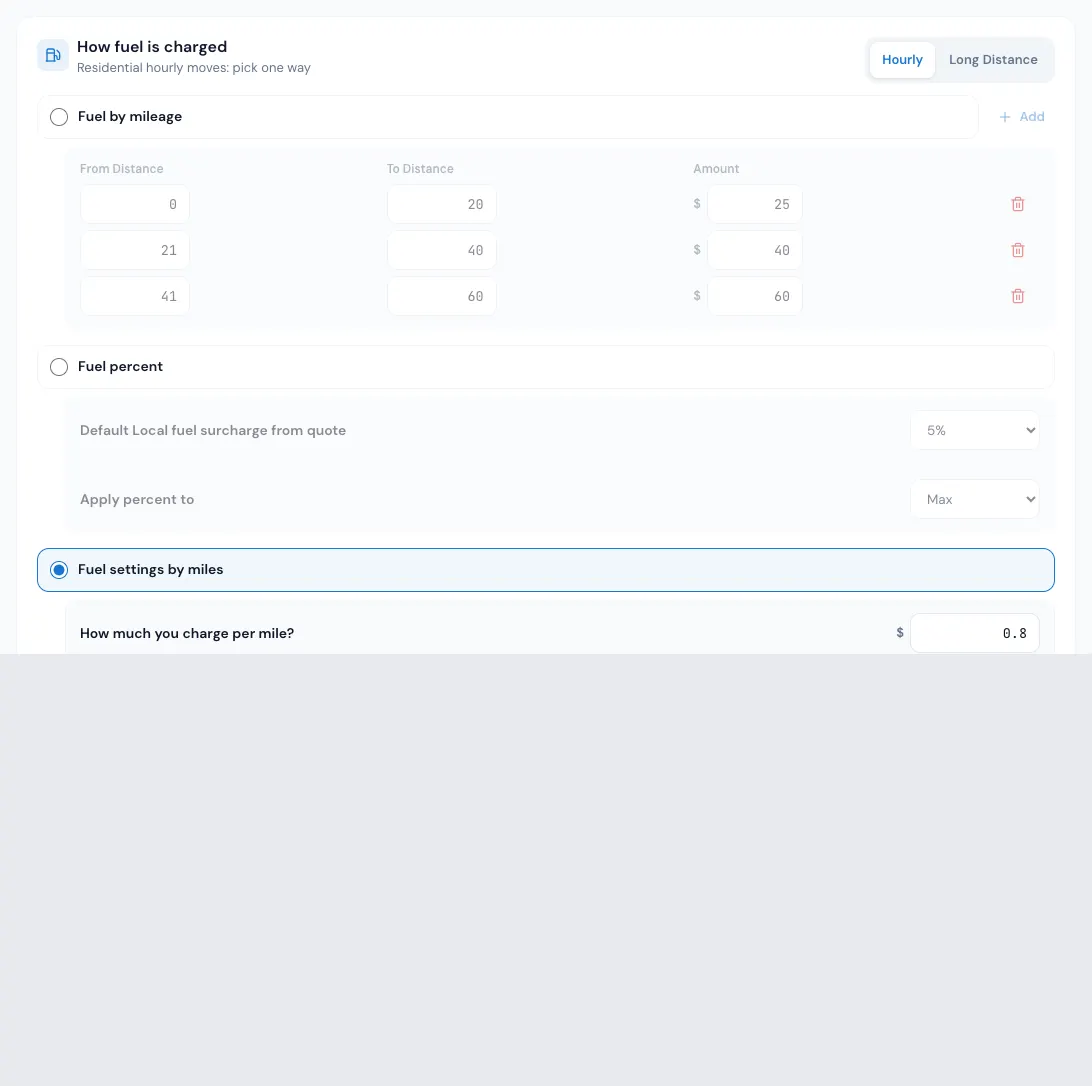
Fuel is charged by a table of distance ranges, as a percent of the moving charges, or per mile with four ways of measuring the trip, and optionally once per truck. Valuation, materials, additional services and fees follow; the discount comes off; your tax rates go on.
- Five tax rates per move type, or one on the order total
- Money or percent discounts, and promotions that cross out a higher rate
- Flat rate quotes priced by the cubic foot plus distance
- Not-to-exceed: the grand total plus your contingency percent
“We really like that you can customize everything from rooms to special items.”
By the numbers
$305
An hour, worked out for you
5 movers and 2 trucks on a Peak day: the 4 Movers + Truck rate, plus one Additional Mover, plus one Additional Truck, straight from your own grid.
How does the pricing engine determine the rate for a specific date?
Each day on your price calendar carries one of five price levels: Discount, Regular, Sub-Peak, Peak or High-Peak. A day you never marked is Regular. The move date picks the row of your Rates grid, and the crew and trucks pick the column. A day can also carry its own minimum hours, or be blocked so customers can't choose it.
Can I set different rates for different move types?
Yes. Rates, the price calendar, fuel, taxes and most pricing settings are kept per move type, such as residential, commercial and military. Within each, the Rates grid has a rate for every price level and crew and truck combination, and Copy to other move types fills the others in when they're the same.
How does the fuel surcharge work?
Pick one way per move type: Fuel by mileage (a dollar amount for each distance range), Fuel percent (a percent of the moving charges, or of labor and travel only), or Fuel settings by miles (a rate per mile past a starting distance, measured one of four ways). You can charge it once per truck, and the office can replace it on one order with a percent or a flat amount.
What happens when a customer changes their inventory after getting a quote?
The change is saved on the order and the price is worked out again by the same calculator, so the size, crew, trucks and hours follow. Your expiration rules decide the status: send it to New-Info for the office to check, or let the customer keep booking when their truck is still free.
Can I offer discounts to specific customers or move types?
Yes. Any order can take a money or a percentage discount. A business account carries its own Account Discount to every order put on it: a total discount, an hourly-rate discount or a set hourly rate. A promotion can also show customers a higher rate crossed out above the rate they're getting.
Does the pricing engine handle taxes?
Yes. Each move type has five tax rates: labor, travel time, long-distance linehaul, packing materials, or one Order Total Tax on everything. Valuation is never taxed. The office can change the rate on one order, and the quote follows as you type.
Works with
Pricing engine hands the work to the next screen.
See your company on MoveBoard.
A live demo built around your own kind of moves: your service area, your pricing, your crews.