
Operations · Trips
Long-distance loads, planned to the mile.
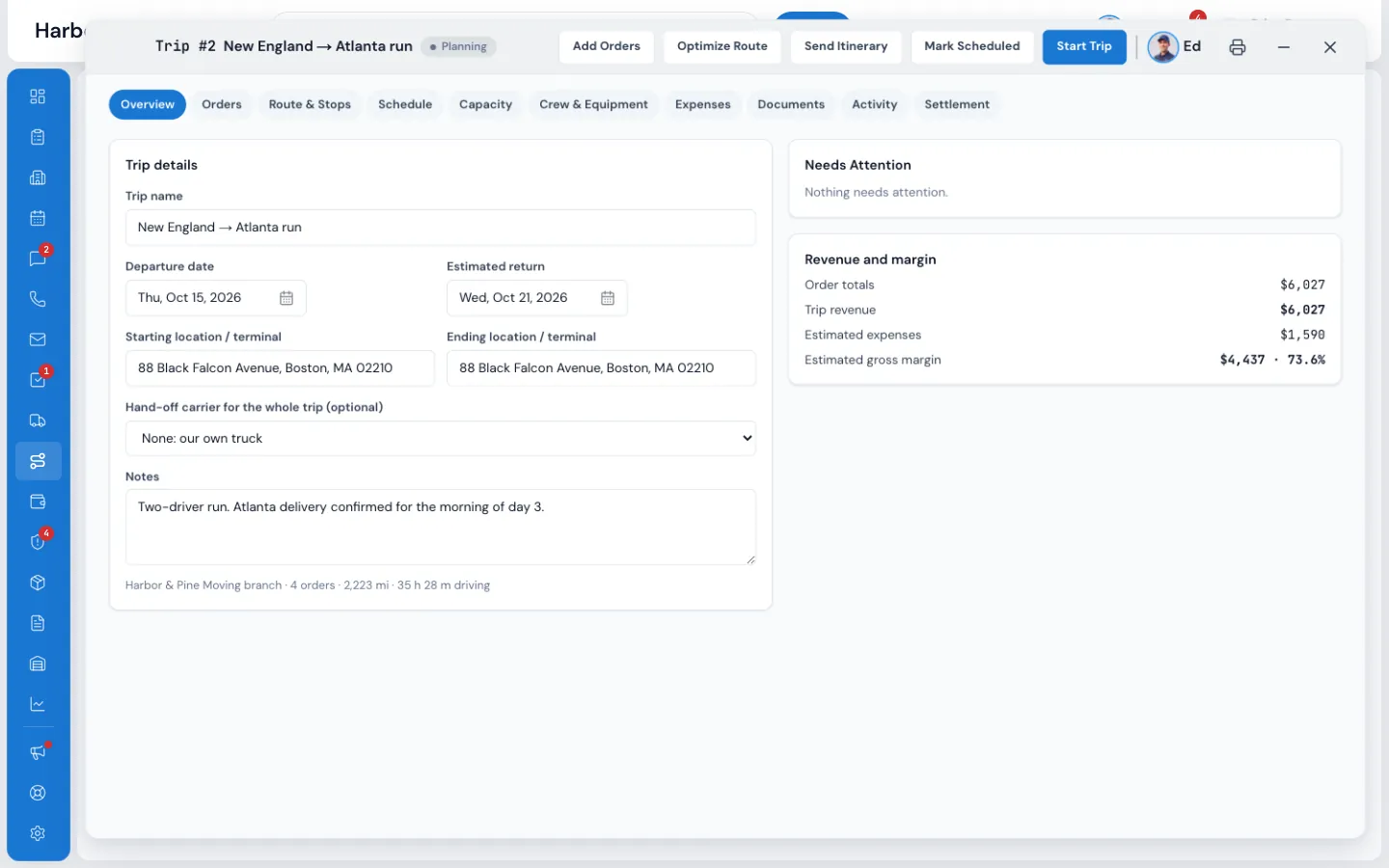
The Trip Planner puts your long-distance orders on trips: one truck, or several, leaving on a date and picking up and delivering many orders along one route. Plan the stops inside every customer's spread, check that it fits on the truck at every stop, then settle the driver and see the trip's real margin.
- driving a day, planned for you
- 11 hdriving a day, planned for you
- and pounds, at every stop
- cu ftand pounds, at every stop
- press to send pay to payroll
- 1press to send pay to payroll
What it fixes
The day before Trip Planner, and the day after.
Trips are planned on a whiteboard, and a delivery promised for the 24th rides until the 29th.
Stops are placed inside each order's pickup and delivery spread, and anything outside turns red.
The truck is “probably fine” until it's full in Ohio with two pickups to go.
The Capacity tab shows cubic feet and pounds at every stop, and the fullest moment.
Nobody knows if the trip made money until the accountant does, months later.
Trip revenue, expenses with receipts and the gross margin, live on the trip.
How it works
Trip Planner, screen by screen.
01 / The board
Every trip, and what needs attention.
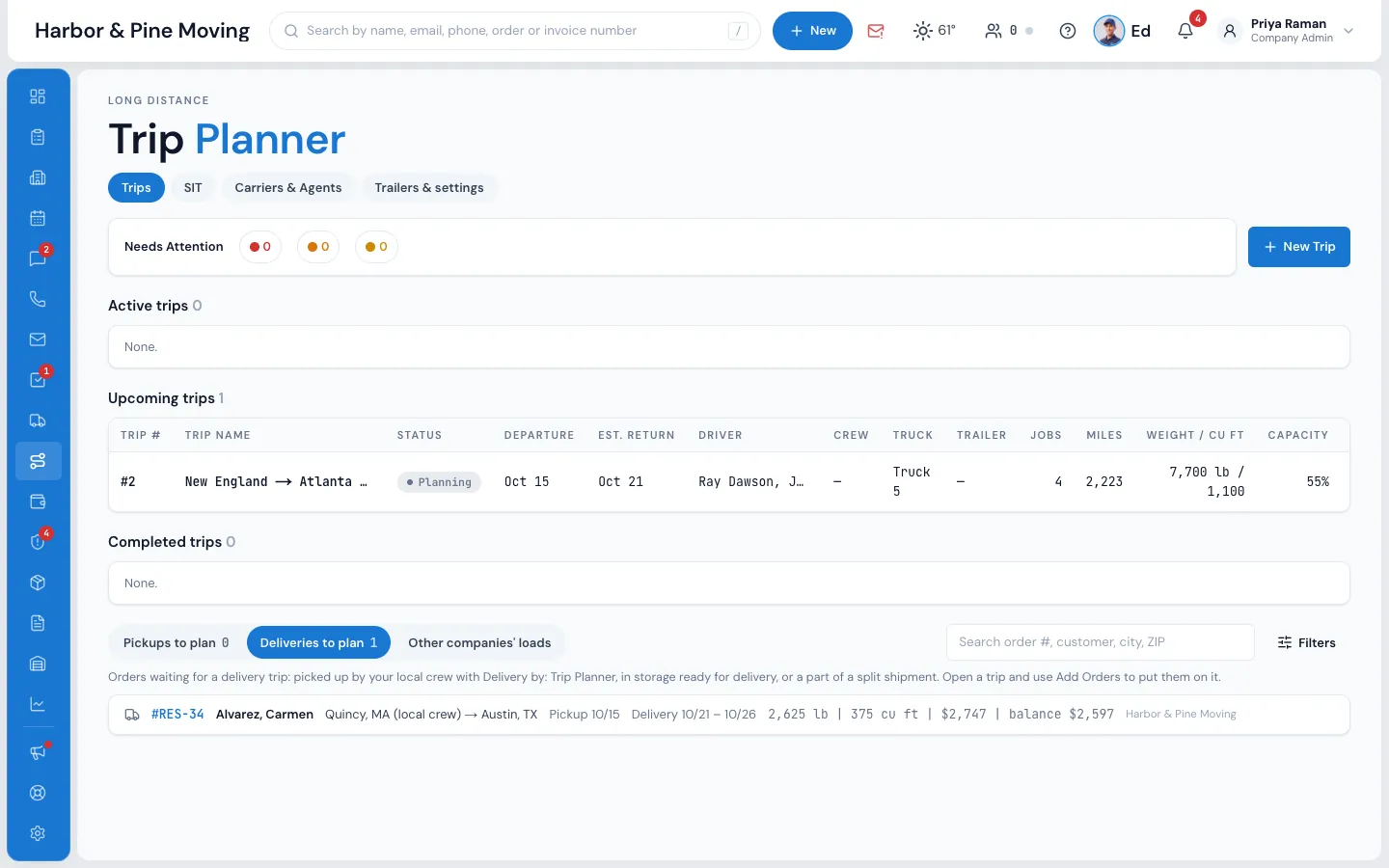
Trips in the menu opens the board: active, upcoming and completed trips with their dates, driver, truck, jobs, miles and how full they are. Needs Attention at the top counts every trip's warnings by colour. Under the trips, the work still waiting: Pickups to plan, Deliveries to plan and Other companies' loads.
- Search and filter by dates, states, cubic feet, weight, balance and branch
- Long-distance orders choose Pickup by and Delivery by: Local crew or Trip Planner
- Orders in storage in transit wait on Deliveries to plan, with their days in storage
- Loads you carry for other companies have their own list and folios
02 / The route
Let MoveBoard find the shorter way.
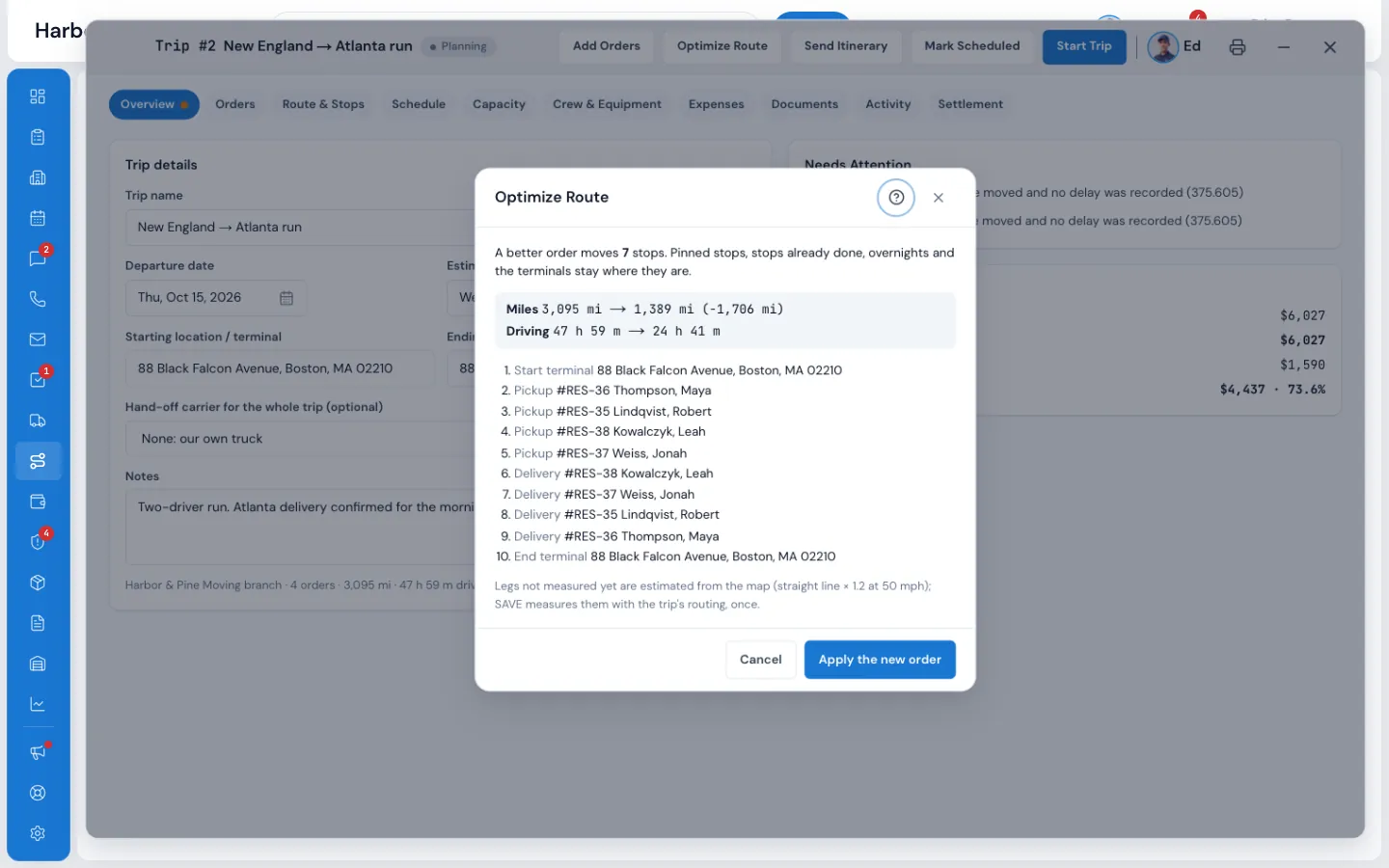
Optimize Route looks for a better order of the stops and shows the miles and driving hours before and after. It keeps every pickup before its delivery, every stop inside its spread and time window, no truck over capacity, and pinned stops where you put them. Nothing changes until you apply it and save.
- Drag a stop by hand and it stays pinned, or pin it to a trip day
- Miles by state along the route, for your IFTA return
- Google Maps routing, or truck-safe routing if you choose it
03 / Capacity
Will it fit? At every stop.
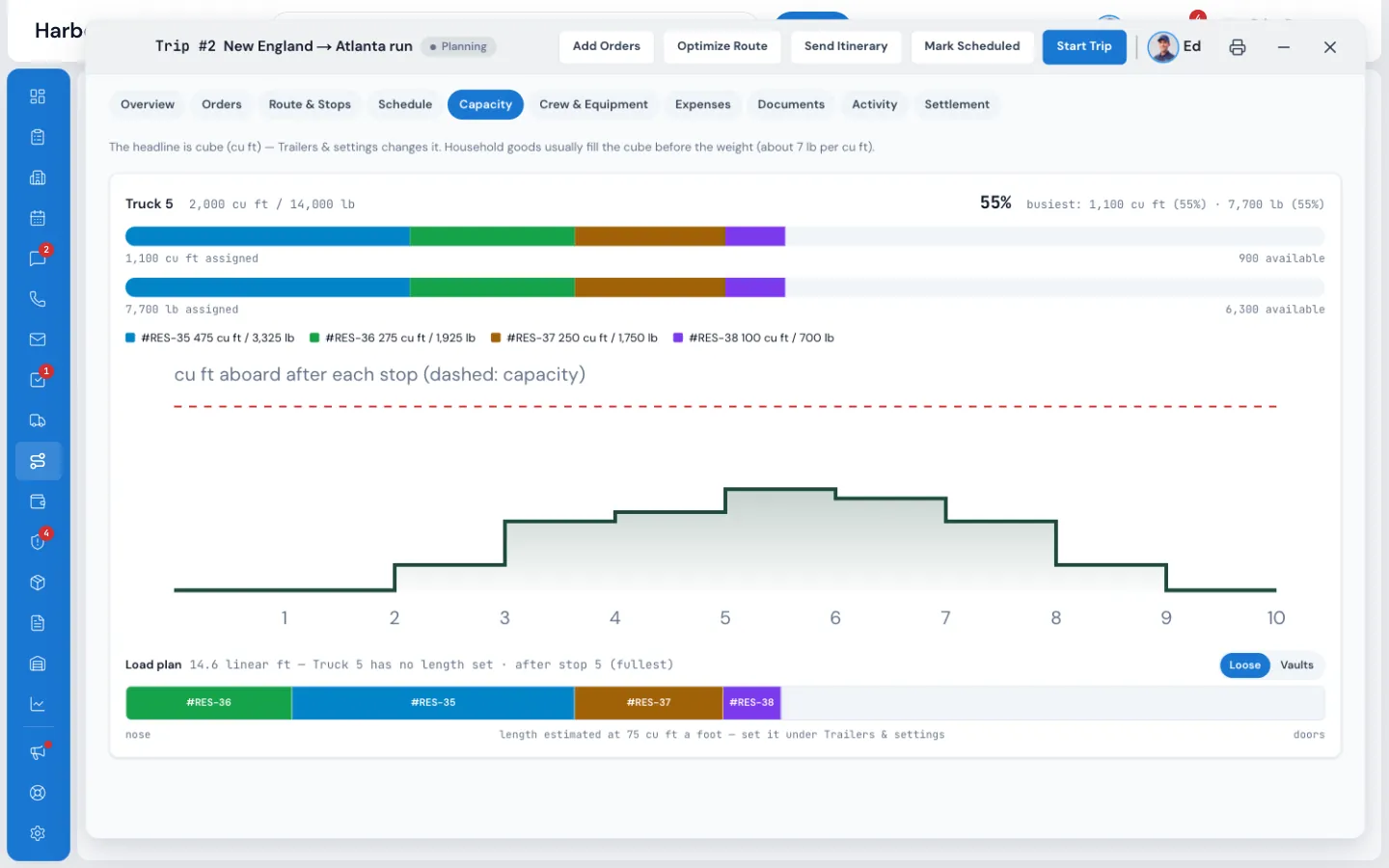
Each truck and trailer has a bar in cubic feet and pounds, coloured by order. The step chart climbs at each pickup and drops at each delivery, so the truck's fullest moment is plain, and the load plan draws the floor from the nose to the doors in linear feet or vaults.
- Exclusive use counts the whole truck; Space reserved counts in full
- Split an order between trucks, or across trips
- Over capacity at any stop turns up red on Needs Attention
04 / Drivers' hours
Days the driver can actually drive.
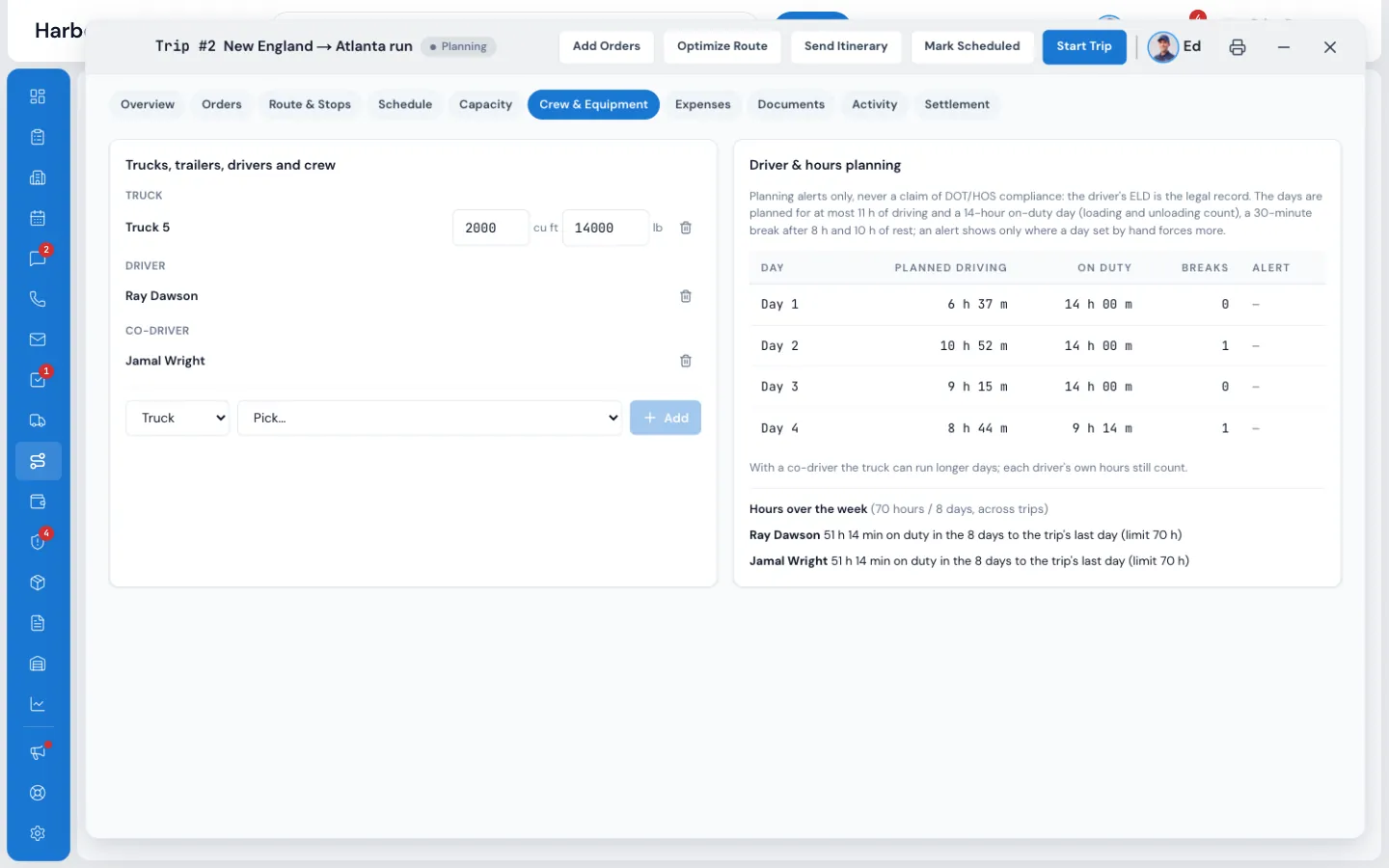
MoveBoard splits the stops into trip days planned for at most 11 hours of driving, a 14-hour on-duty day with loading counted, a 30-minute break after 8 hours and 10 hours of rest. It warns when a day you set by hand goes over, and adds up each driver's week across trips for your 60/7 or 70/8 cycle.
- Planned driving, on duty and breaks for every trip day
- Clashes with another trip or a local job, as a warning
- Planning alerts only: the driver's ELD stays the legal record
05 / Money
The trip's margin, and the driver's pay.
Record fuel, tolls, hotels, per diem and advances with a photo of each receipt, estimated and actual. The margin is worked out on trip revenue, the linehaul and the trip's own services, never on packing or storage. When the trip is complete, the Settlement tab pays each driver and crew member and sends it to payroll, or onto an owner-operator's folio.
- Pay by % of linehaul, per mile, flat, per day or hourly
- Driver advances come off the settlement automatically
- Fuel gallons by state feed the IFTA Miles & Fuel by State report
- Who sees money is a permission: Can see trip profit and settlements
“Online booking, instant pricing for the customer. One of the best input for the long distance tariff. User friendly.”
By the numbers
11 h
Of driving a day, at most, in every plan
Plus a 14-hour on-duty day, a 30-minute break after 8 hours and 10 hours of rest, checked across each driver's week.
Which orders go on a trip?
Long-distance orders whose Move Details say Pickup by: Trip Planner or Delivery by: Trip Planner, once they're booked or reserved. Your local crew can do the pickup and the trip the delivery, or the trip can do both.
Can one trip carry orders from several branches?
Yes. Orders of another branch can go on the same trip and show their branch name.
Does the Trip Planner check hours of service?
It plans each day inside the driving-hours limits and warns when a day or a driver's week goes over. These are planning alerts, not a compliance check: MoveBoard doesn't read ELDs, so always check the driver's own logs.
How is the driver paid?
On the trip's Settlement tab, each driver and crew member is paid as an employee through payroll or as an owner-operator through their carrier record, by % of linehaul, per mile, flat, per day or hourly, plus per diem, minus advances and deductions.
Can I haul loads for other moving companies?
Yes. Other companies' loads have their own list, go on your trips like your own orders, and are settled on that company's folio in Carriers & Agents.
Does it help with IFTA?
Yes. Type the gallons and the state on each fuel line, and the IFTA Miles & Fuel by State report gives miles, gallons and taxable gallons per truck and state for the quarter. File from your truck's own records and use the report to check them.
Works with
Trip Planner hands the work to the next screen.
See your company on MoveBoard.
A live demo built around your own kind of moves: your service area, your pricing, your crews.