
AI moving inventory: The real inventory, from their photos.
Your customer takes photos of their rooms, uploads pictures or pastes a list, and AI suggests the items with their room, cubic feet and weight. They check the list, change anything, and send it to you. The move's size and the quote follow the real items, from your own item library.
- photos read at a time
- 10photos read at a time
- ways in: photos, a pasted list, a spreadsheet, the catalog
- 4ways in: photos, a pasted list, a spreadsheet, the catalog
- press to send the customer their inventory link
- 1press to send the customer their inventory link
Your photos
Use your phone's camera, room by room
Suggested items
What it fixes
The day before Inventory, and the day after.
The quote is a guess from "two bedrooms", and move day is twice as big.
The customer lists the real items, and the cubic feet, weight and quote follow them.
Customers won't type 60 items into a form.
They photograph each room, AI suggests the items, and they only correct what's wrong.
The piano nobody mentioned shows up on the day.
Special items show as a red count on the order, and their extra fee is added by itself.
How it works
Inventory, screen by screen.
01 / The customer's side
Photos, a list, or the catalog.
On My Inventory in their portal the customer picks Build with AI: take photos with the phone's camera room by room, upload pictures, or paste a list. Find my items suggests what's there; nothing is added until they press Add to my inventory. They can also tap items from your catalog, upload a spreadsheet, or start from your typical list for their move size.
- Rooms come from the move size they chose
- Items your office packs or marks not shipped can't be changed
- Locked once the move is Reserved or Booked
- No password: their link signs them in
Harbor & Pine Moving
My Inventory
Build with AI
This takes a few seconds a photo. You will check everything before it is added.
02 / Ask for it
One press sends the inventory link.
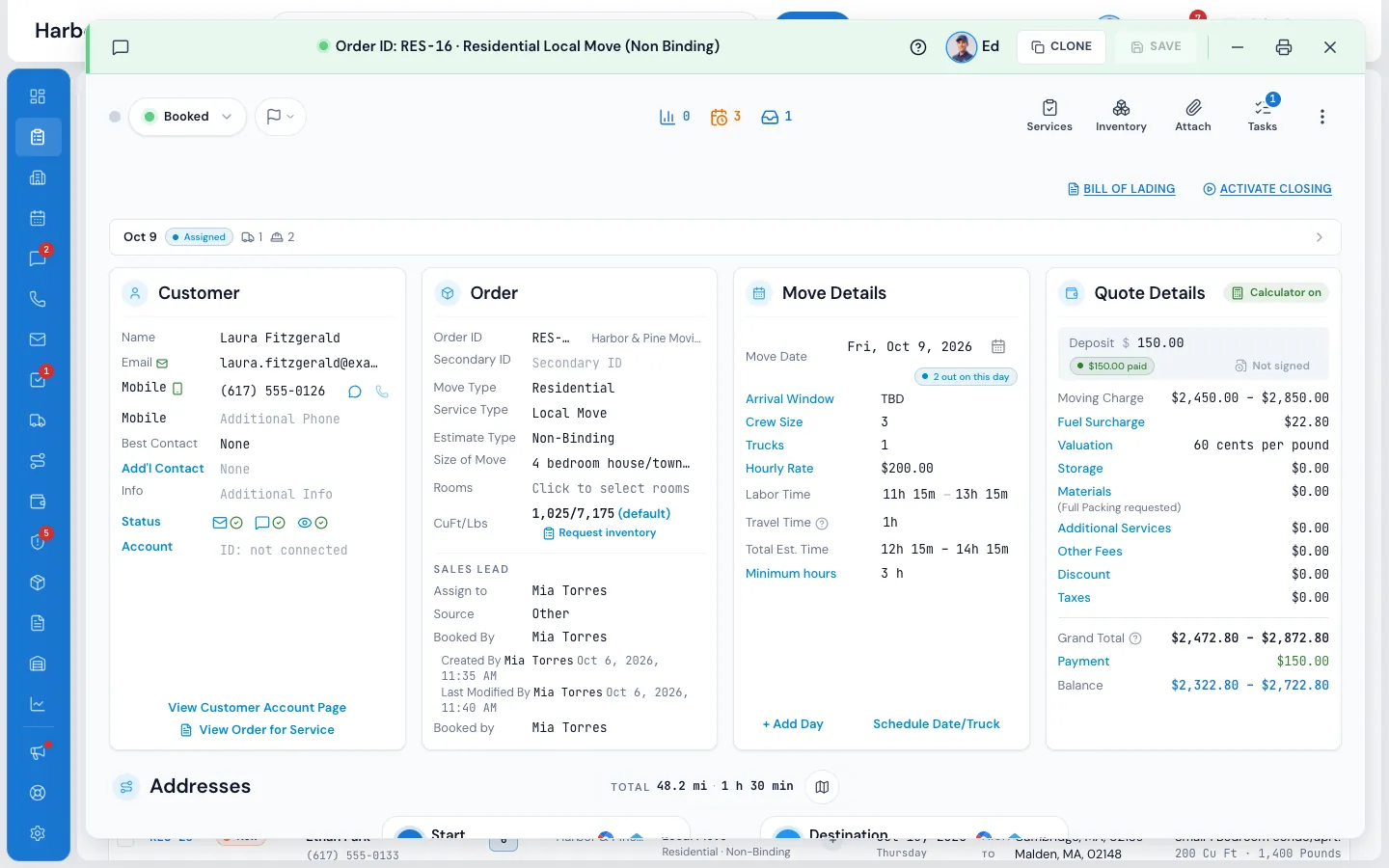
Press Request inventory under the cubic feet on the order, and the customer gets an email and a text with their own signed-in link to their inventory. A workflow can send the same link by itself, for example an hour after a website lead comes in.
- Your words, in the Inventory templates folder
- Shown while the order is still sized by move size
- Both messages land in the order's conversation
03 / When it comes back
The order updates while you watch.
When the customer presses I'm done, leaves the page, or stops for 15 minutes, the inventory is sent once. The order takes the new list, the move's size follows it, the quote is worked out again, and the status moves to New-Info. An open order window shows what was added, the cubic feet and the quote, before and after.
- The salesperson gets one bell notice, not one per save
- Reserved and Booked orders never change status
- If the bigger job no longer fits on its truck, only that truck comes off
Order #RES-1146
Inventory updated by the customer
Dana updated the inventory and sent it to you
Added
Piano, Upright · Bookcase, large · Medium Box ×12
Cubic feet
350 610
Quote
$855 $1,320
This window now shows the new inventory and quote.
04 / In the office
On the phone with them, room by room.
Press Inventory on the order: rooms on the left, your items in the middle, In this move on the right. Add items, change a size for this move only, mark who packs it or that it isn't shipped, or bring a list in with Create with AI: a spreadsheet, a few lines of text, or up to 10 photos.
- Add Custom Item for anything not in your list
- SUBMIT saves a new version and re-prices the move
- The customer sees the same list in their portal
Order #RES-1146 · Inventory
Room by room, item by item
Living Room9
Bedroom 17
Bedroom 20
Kitchen14
Garage4
+ Add New Room
Search items, press Enter to add
Add Custom Item|Create with AI
In this move
Sofa, 3 seat1
Armchair2
Piano, Upright1
Medium Box12
Queen Bed1
05 / Your item library
Your numbers, not someone else's.
Every item comes from your own library, kept per move type: its cubic feet and weight, extra labour time, the fewest movers it needs, an extra fee for hourly and for long-distance moves, bulky-item charges, packing and special handling. Editing an item never changes orders already quoted.
- Special items show as a red count on the order
- Extra fees appear on the quote and the bill of lading as their own line
- Typical lists by room and move size
Settings · Inventory · Inventory items
Your item library
06 / On move day
The crew sees what's coming.
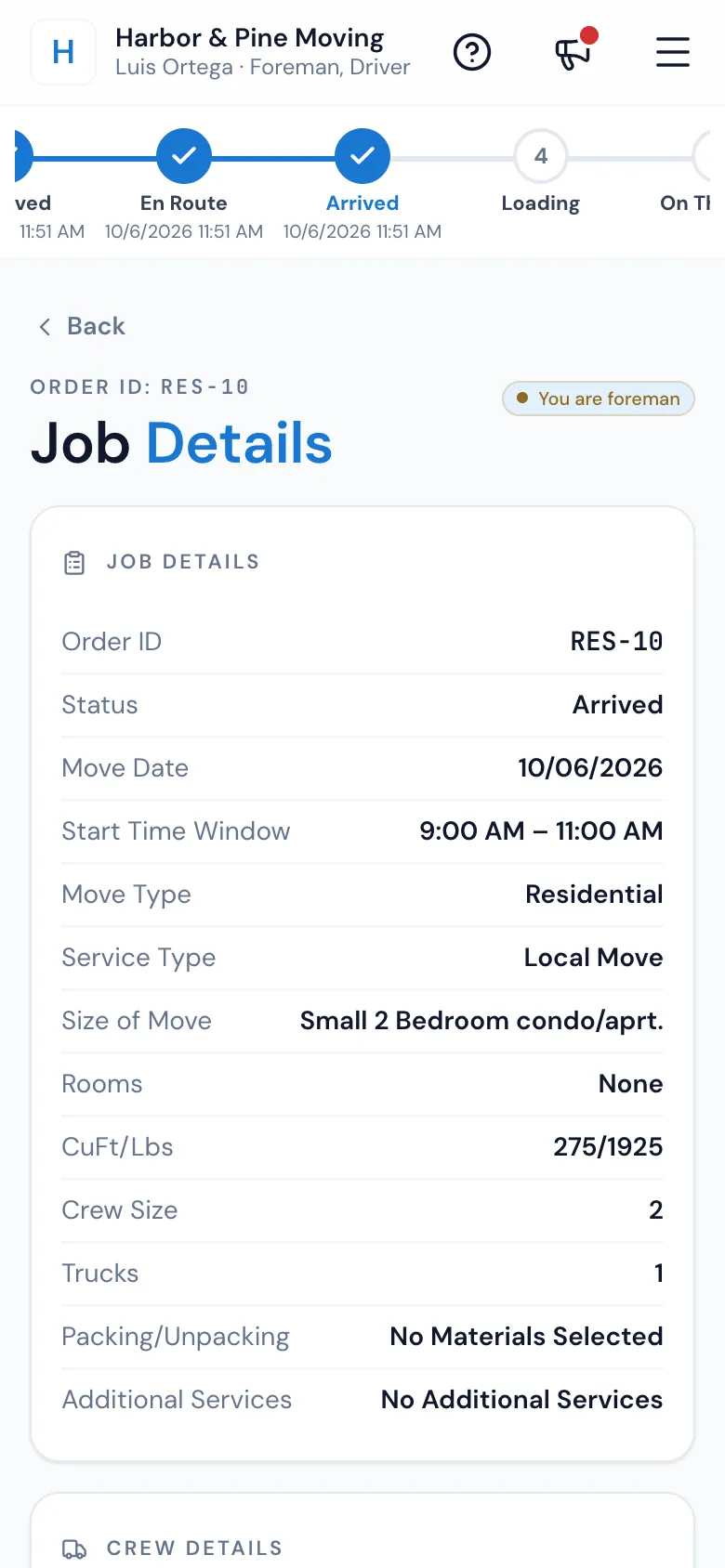
On the Mover's Portal the foreman taps CuFt/Lbs on Job Details for every item with its quantity, size and weight. The inventory stays the office's: items the customer adds on the day go on a change order, and their fees come with them.
- Item fees sit fixed under Additional Services on the bill
- Change order items land in their own room
“Tons ease of booking and allowing my clients to feel welcomed and transparency for them.”
By the numbers
15
Minutes without a change, and it's sent
A customer who forgets to press I'm done still reaches you: the list is sent once, after 15 minutes without a change or when they leave the page.
How does AI inventory work for customers in the Client Portal?
On My Inventory they choose Build with AI, then take photos room by room, upload photos or paste a list. Find my items suggests each item with its room, size and weight; they change or remove any and press Add to my inventory. When they send it, the order and the quote follow the new list.
What does the AI actually detect in the photos?
The item's name, how many, the room, a size in cubic feet, a weight in pounds and a short description. Items that match your library use your sizes and weights. The customer, or your office, checks everything before it's added.
Can I import an existing inventory spreadsheet?
Yes. In the office, Create with AI › Import CSV / Excel reads a CSV, .xlsx or .xls file with a Name (or Item) and a Quantity column, plus Room, Cubic Feet, Pounds and Description when they're there. Names in your library use your sizes; the rest become custom items. The import needs no AI.
Can customers submit their own inventory?
Yes, from their portal at any time: photos for the AI to read, a pasted list, a spreadsheet, your typical list for their move size, or room by room from your catalog. No app to download and no password.
How does inventory affect the quote?
The items' cubic feet and weight add up to the move's size, which sizes the crew, the truck and the time, and the quote is worked out again. Items with an extra fee add it as its own line.
Can I customize the inventory item catalog?
Yes. Your library is kept per move type: names, cubic feet, weight, extra labour time, minimum movers, extra fees, bulky-item charges, packing, special handling and a picture. Add your own items, and keep typical lists by room and move size.
Does the crew see the inventory on move day?
Yes. On the Mover's Portal, CuFt/Lbs on Job Details opens the list with each item's quantity, size and weight. It's read-only on the phone; items added on the day go on a change order.
Can inventory data feed into the bill of lading?
Item fees do: a piano's heavy-carry fee shows under Additional Services on the bill of lading and on the quote, and goes away if the item comes off. Items added by a change order on the day go onto the order's inventory with their fees.
Works with
Inventory hands the work to the next screen.
See your company on MoveBoard.
A live demo built around your own kind of moves: your service area, your pricing, your crews.