
Money · Claims
Damage claims, handled by the book.
MoveBoard keeps every damage claim on one Claims page, from the customer's claim link to the signed settlement and the payment. It works out what's owed under the protection the customer chose, keeps the federal clocks, and shows you which movers' jobs get the most claims.
- per pound, or your own released value rate
- 60¢per pound, or your own released value rate
- day decision clock, kept for you
- 120day decision clock, kept for you
- link the customer files from
- 1link the customer files from
What it fixes
The day before Claims, and the day after.
Claims arrive as angry emails with three blurry photos and no weights.
The customer files item by item on their phone, with photos, value and weight.
Someone works out 60¢ a pound on a calculator, and gets the deductible wrong.
MoveBoard works out the settlement by the protection chosen, with the reason per item.
A claim sits for five months and the 120-day deadline passes unnoticed.
Every claim carries its timer, amber in the last 15 days and red when overdue.
How it works
Claims, screen by screen.
01 / The customer files
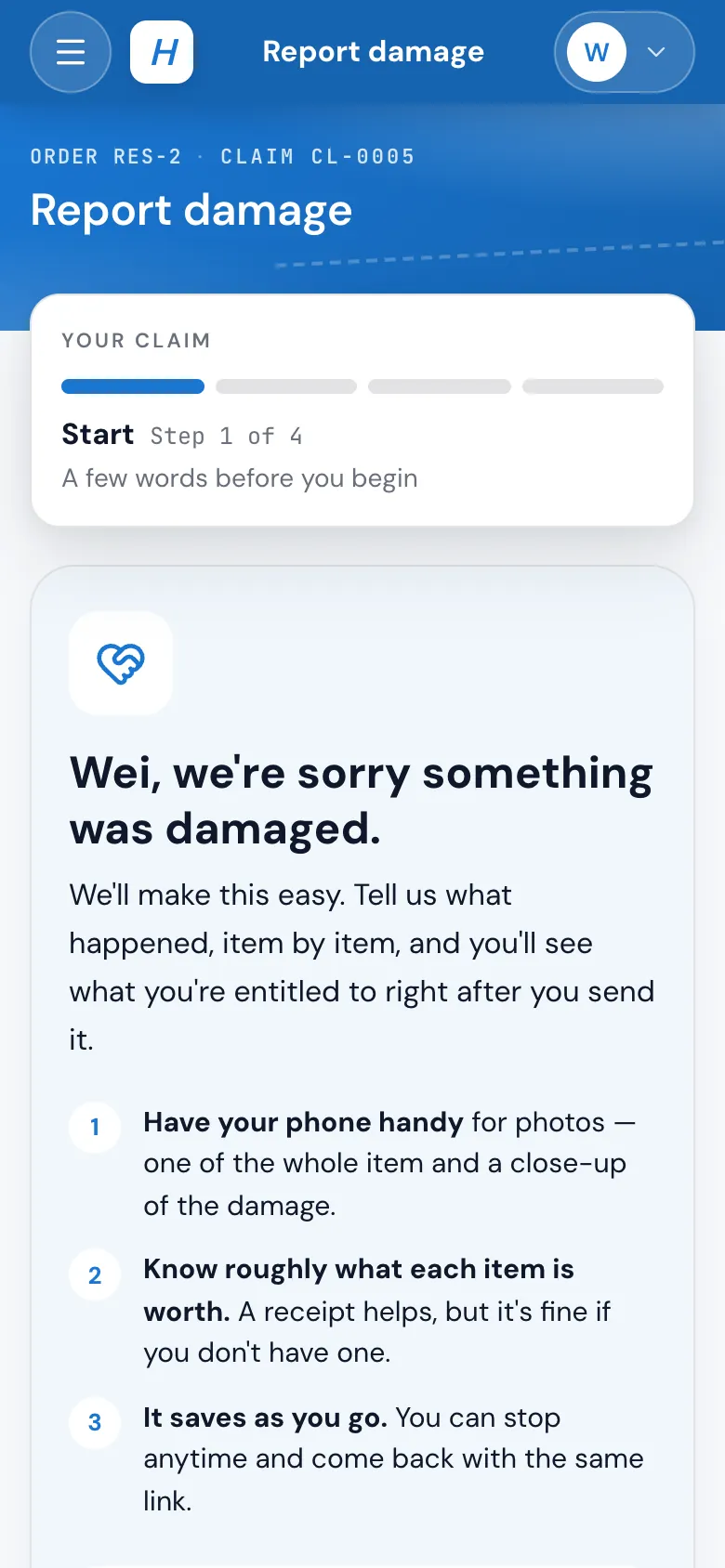
A claim page that works on a phone.
One press sends the customer their claim link, or they choose Report damage in their portal if you allow it. They add each damaged item with what happened, when, who packed it, what it's worth, its weight and photos, or damage to the home with the repair cost or a contractor's estimate. It saves as they go.
- The filing deadline from your settings, shown on the first screen
- Each item lists what's still needed before it can be sent
- An email the moment it's received, with a button to see the claim
- Or file it for them over the phone from the office
02 / What is owed
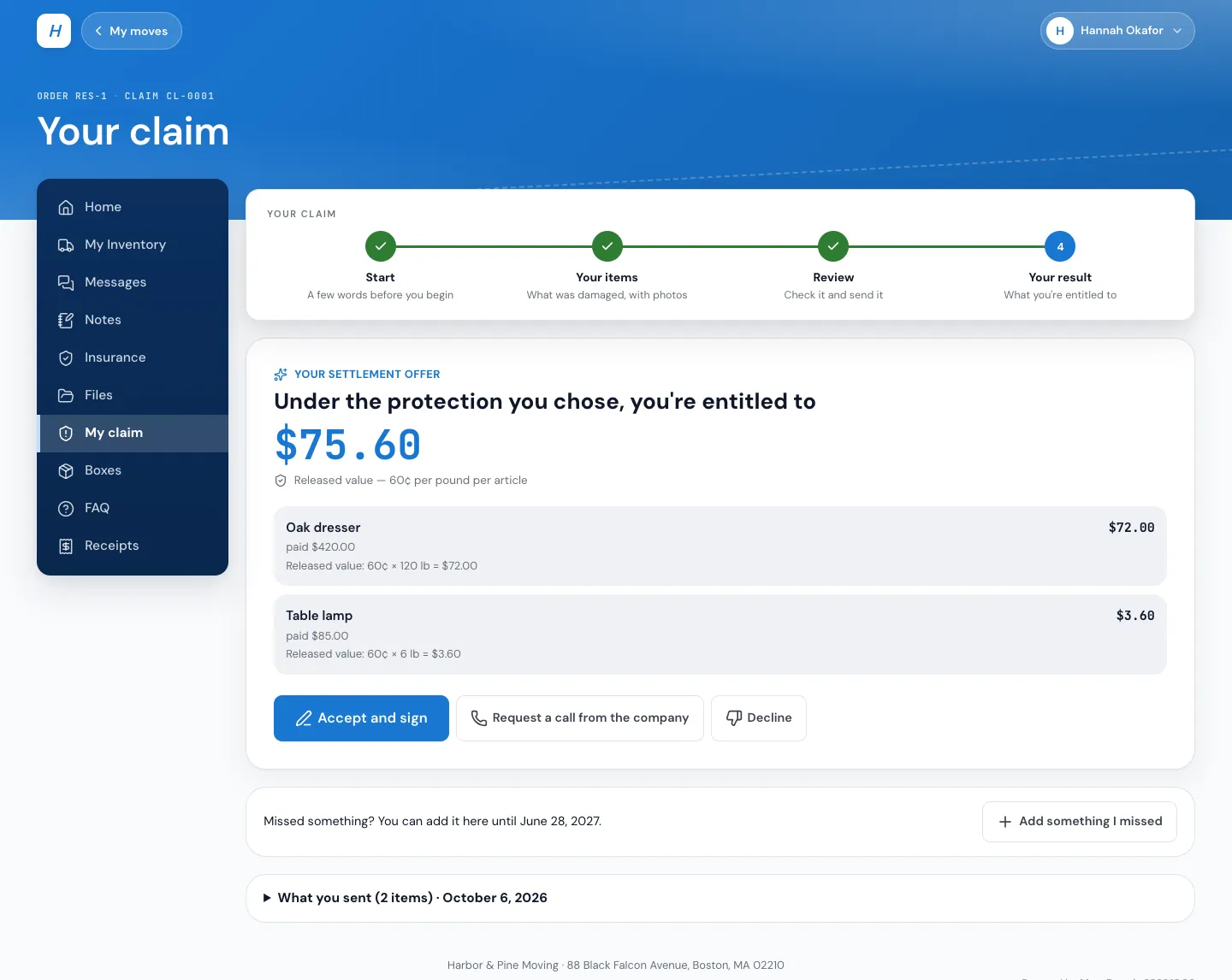
The settlement, worked out item by item.
Released value pays by weight at your rate per pound. Full Value Protection pays the repair estimate or the amount claimed, less the deductible once, up to the declared value. Anything the rules can't price, like property damage, items the customer packed, a missing weight or a late filing, waits for a person.
- Show the offer right away, or only after the office reviews, per protection
- The customer accepts and signs, asks for a call, or declines if you allow it
- Revised offers until the customer signs
03 / The claim window
Everything about one claim, in its own window.
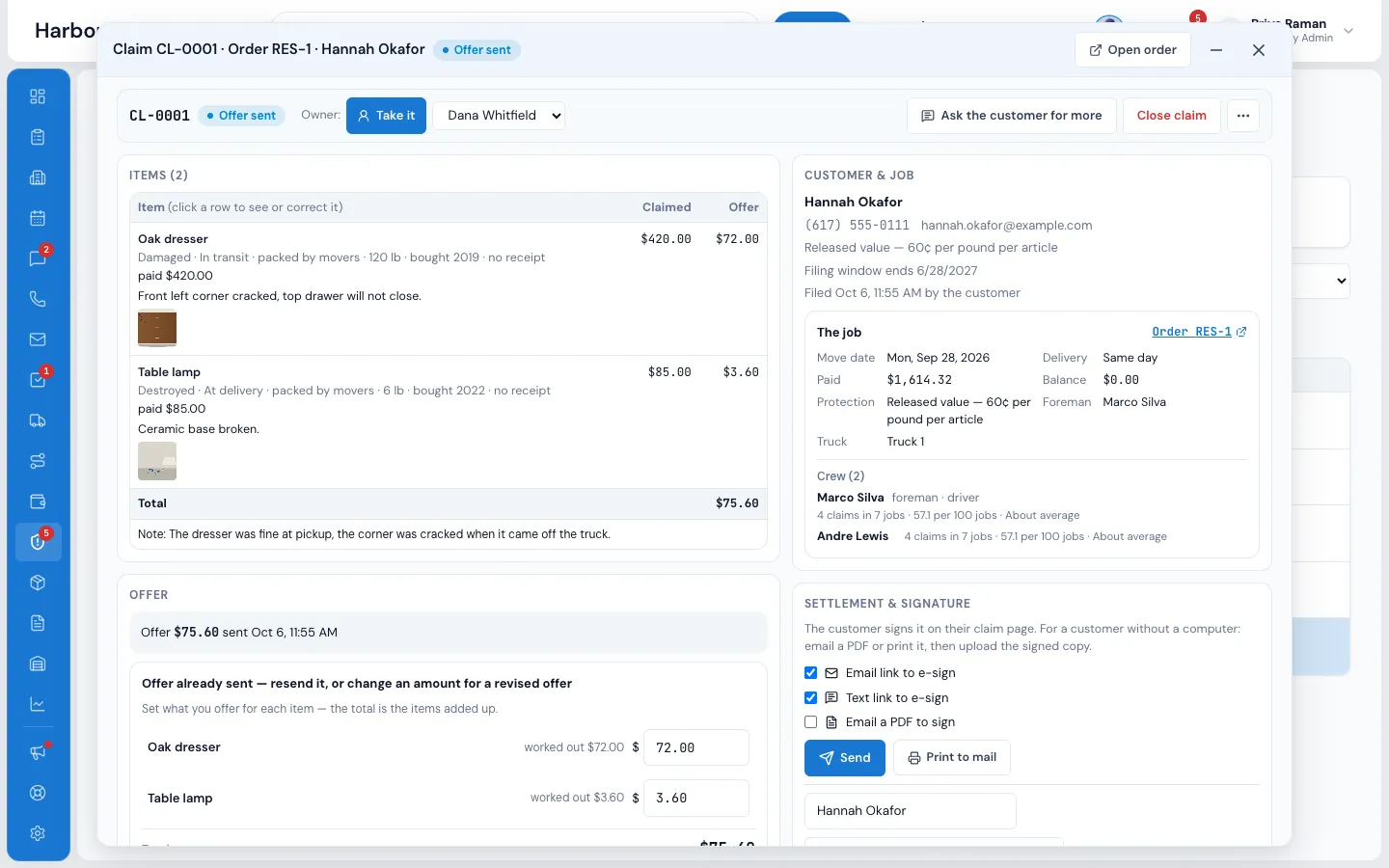
Double-click a claim to open it: the items with what was claimed and offered, the customer and the job, the crew who worked it, tasks, notes and the full activity. Ask the customer for more, correct an item and say why, send the offer, or close the claim with a reason.
- New claims go to your Claims person, never the salesperson
- The owner gets one task whenever the customer does something
- Who signed, recorded plainly, even when the office helped
04 / Signed and paid
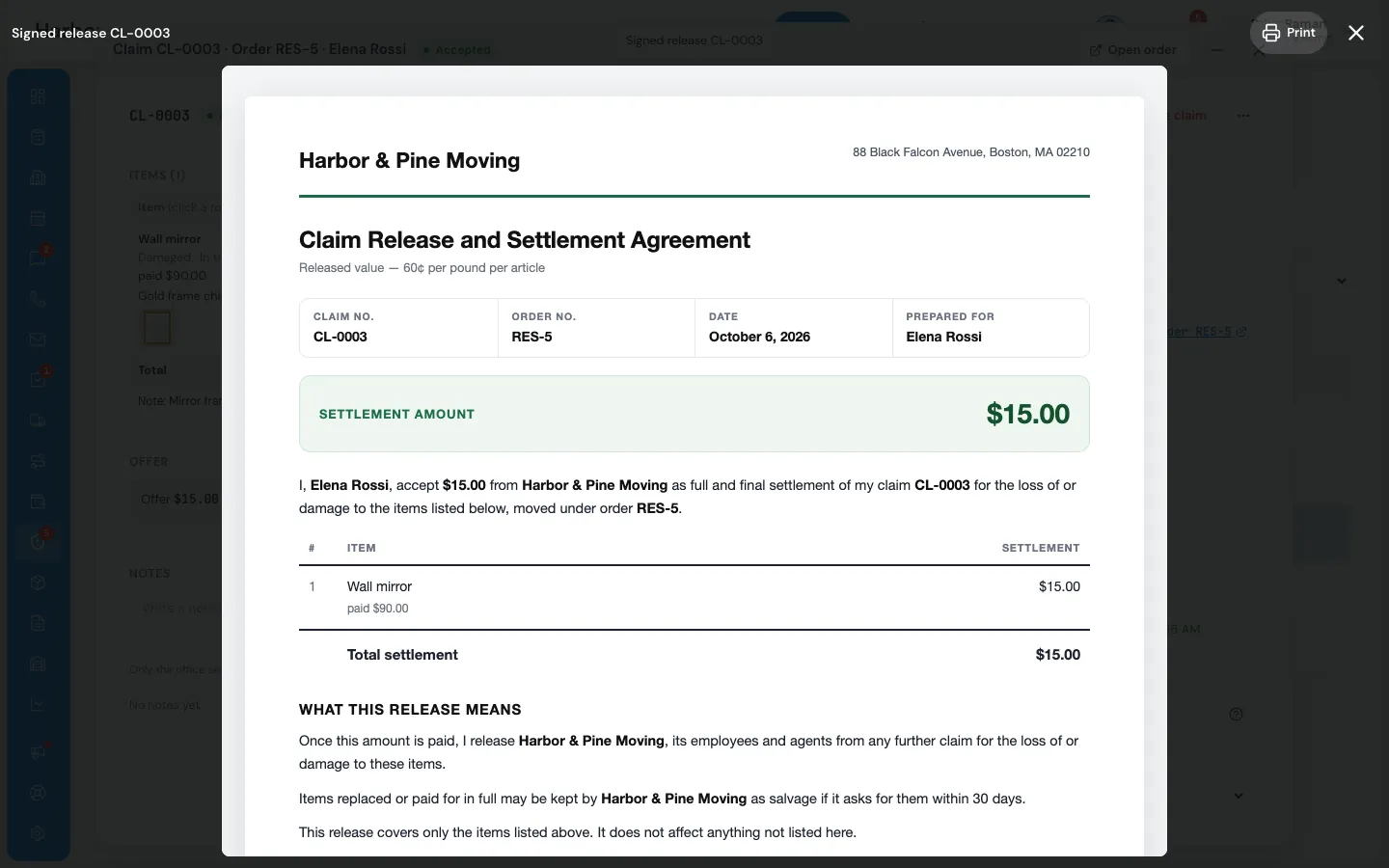
A real release, then a real payment.
The customer signs a Claim Release and Settlement Agreement online. Then mark the claim paid by check, ACH, refund to card, Zelle, cash or other, with the date and a reference. Your settings decide whether that's recorded on the claim only, or written into the order's payments as a refund.
- Refund to card goes through the normal refunds flow
- Paid in plain words: Paid $270.00 by check #1587 on Oct 5
- The order log says the same, with who marked it paid
05 / Crew Claims Score
Know who to trust with the fragile jobs.
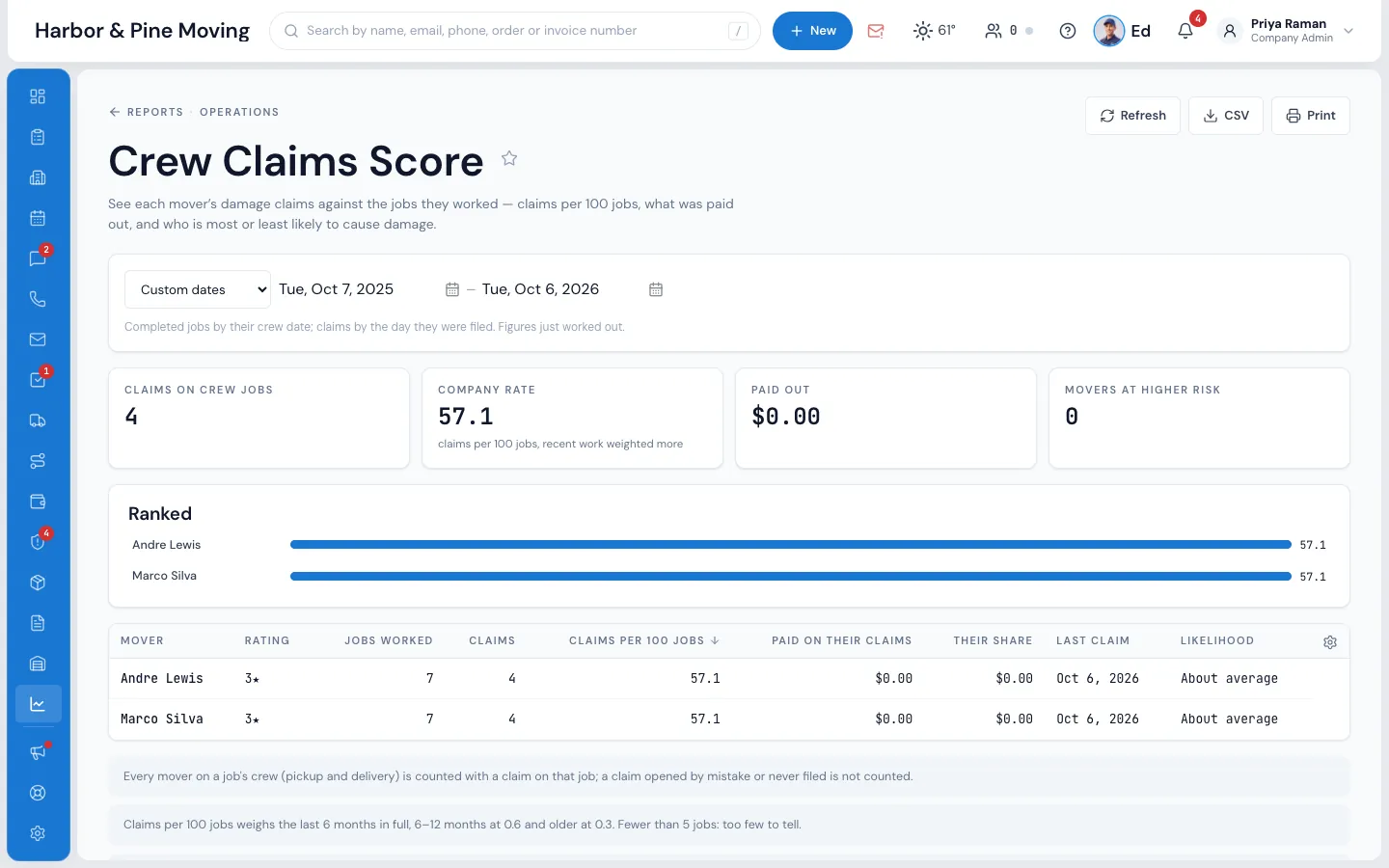
Every mover on a job's crew is counted with any claim on that job. The Crew Claims Score report ranks your movers by claims per 100 jobs, with recent work counting more, and marks who is at higher or lower risk than your own company's rate.
- Jobs worked, claims, dollars paid and each mover's share
- The same record on the person's Claims tab
- Beside each crew member on a claim
“The foundation and direction of this software puts it top of the class. I am impressed with the feature set from the beginning.”
By the numbers
120
Days to decide, counted on every claim
Acknowledged within 30 days the moment it's submitted, a decision due by 120, then a status letter every 60 days while it's open.
How does a customer file a claim?
You send them their claim link from the order, or they press Report damage in their customer portal if you allow it. They add each item with photos, value and weight on their own page, which saves as they go.
How does MoveBoard work out what's owed?
From the protection the customer chose. Released value pays your rate per pound (60¢ unless you set your own). Full Value Protection pays the repair estimate or the amount claimed, less the deductible, up to the declared value. Items the rules can't price wait for the office.
Which deadlines does it track?
Acknowledge within 30 days (met at once by the automatic email), decide within 120 days (adjustable in settings), then a status letter every 60 days. The customer's filing window, 9 months by default, is shown on their page.
Can the customer see the offer straight away?
If you choose. For released value and for Full Value Protection separately, the offer shows right away or only after the office reviews. Claims that need a person always wait for the office.
What about damage to the home?
Damage to the home or building is never priced by valuation. The customer gives the repair cost or a contractor's estimate, or sends it later, and the office decides the amount.
Does paying a claim change the order's money?
Your choice in the Claims settings: record it on the claim only, send card refunds through the refunds flow, or write every claim payment into the order's payments as a refund.
See your company on MoveBoard.
A live demo built around your own kind of moves: your service area, your pricing, your crews.