
Third-party payment link for movers: Someone else is paying? Send them the bill.
When an employer, a family member or a relocation company pays for the move, the crew taps Send to pay on the bill of lading, or the office sends it from the closing. The payer gets a text and an email, sees the bill of lading they can't change, adds a tip if they like, confirms with their name and signature, and pays by card. The payment lands on the crew's bill and the closing the moment it goes through.
- logins for the payer: the link opens the bill
- 0logins for the payer: the link opens the bill
- steps before Pay: name, tick and signature
- 3steps before Pay: name, tick and signature
- overpaid: each link asks only for what is left
- $0overpaid: each link asks only for what is left
Off until you turn it on in Settings, per branch, and the office can switch it for one move. Works on local bills of lading, card only, through your own card processor.
What it fixes
The day before Send to pay, and the day after.
The relocation company pays, so the crew waits on the driveway while the office emails an invoice.
The foreman sends the link from the bill; the payer pays from their own phone before the truck leaves.
A parent pays by phone, reads a card number out loud, and nobody can show they agreed to the amount.
The payer types their name, ticks the exact sentence and signs; all of it is kept with the payment.
Two people pay the same balance and someone has to refund the difference.
Each link checks what is still owed when it opens and again at Pay, so nobody can pay twice.
How it works
Send to pay, screen by screen.
01 / On the bill of lading
PAY on the left, Send to pay on the right.
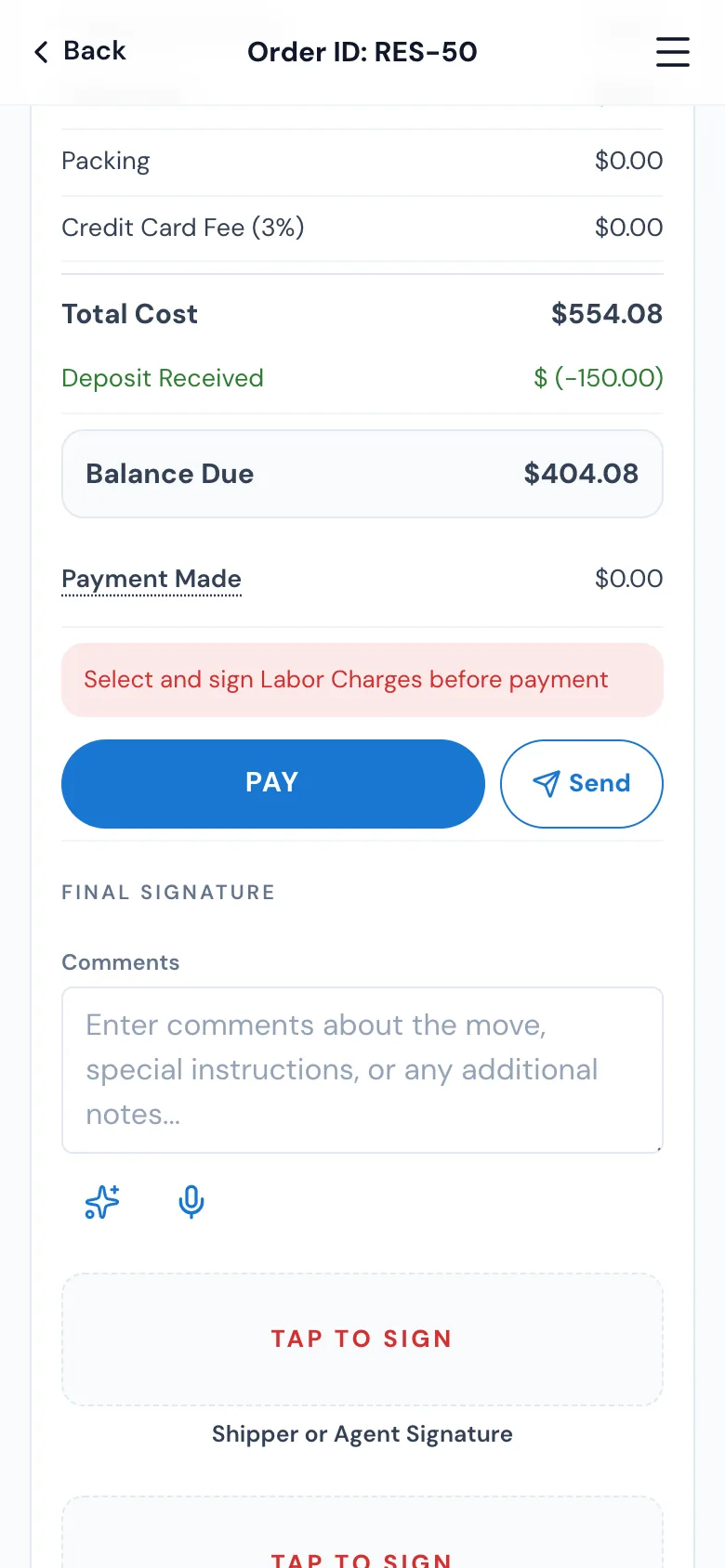
With Send to pay on, the crew's bill of lading shows it on the same line as PAY: PAY takes the payment here as always, Send to pay sends the bill to whoever is paying. Once nothing is owed, only PAID shows. A link can be sent at any time in the day, not only at the end.
- One line: PAY about three quarters, Send to pay a quarter
- Off for the move? PAY alone, as before
- Don't see it? The office hasn't turned it on for this move
02 / Send the link
The payer's phone and email, the amount, Send link.
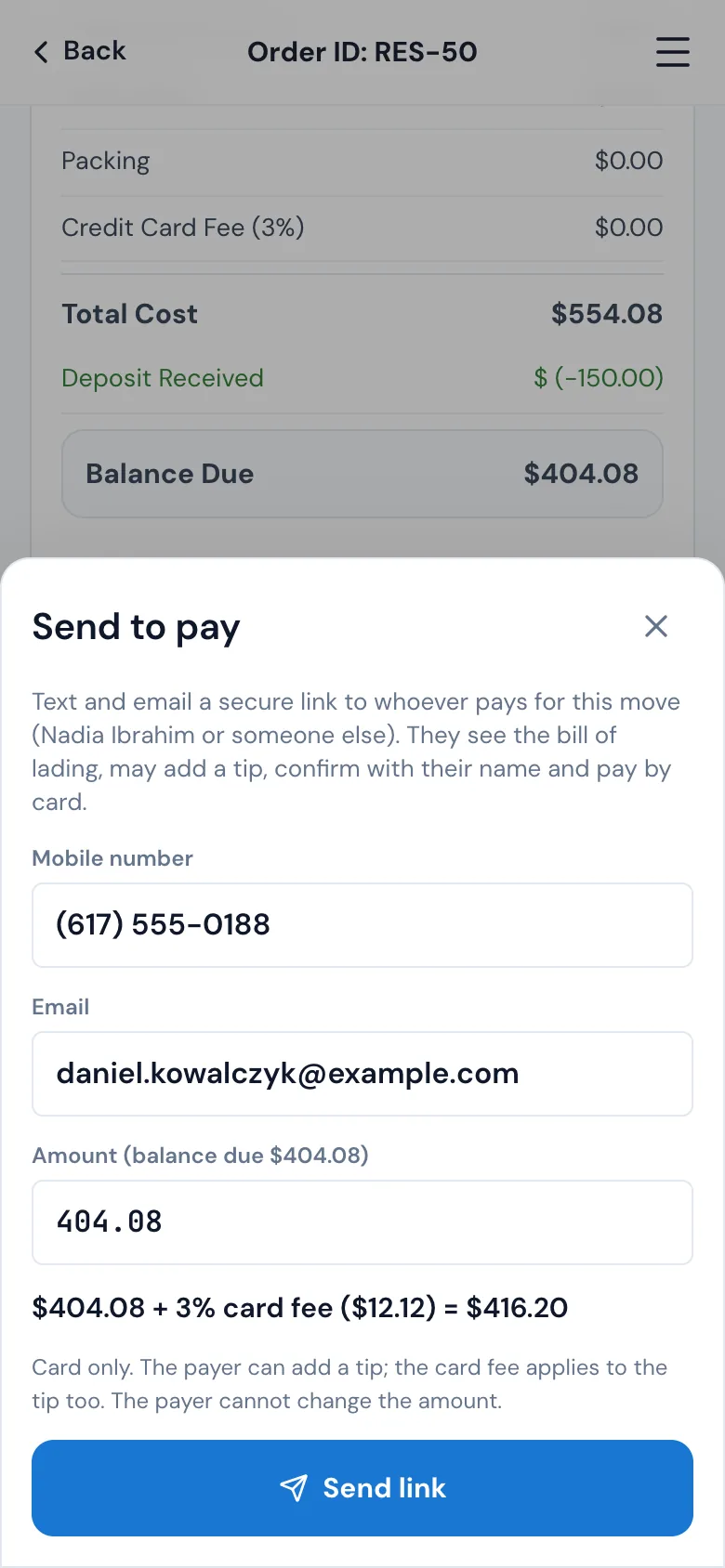
Send to pay fills in the customer's mobile and email; change them to the payer's. The amount starts at the balance due and can be lowered, never raised. With a card fee the window shows it at once, like $1,000.00 + 5% card fee ($50.00) = $1,050.00. Send link texts it from your company's number and emails a Review and pay button, and the link is on your company's own website address.
- Send by text, by email, or both
- The payer can't change the amount
- The order log says who sent which link, to whom and for how much
03 / What the payer does
Review the bill, tip the crew, sign and pay.
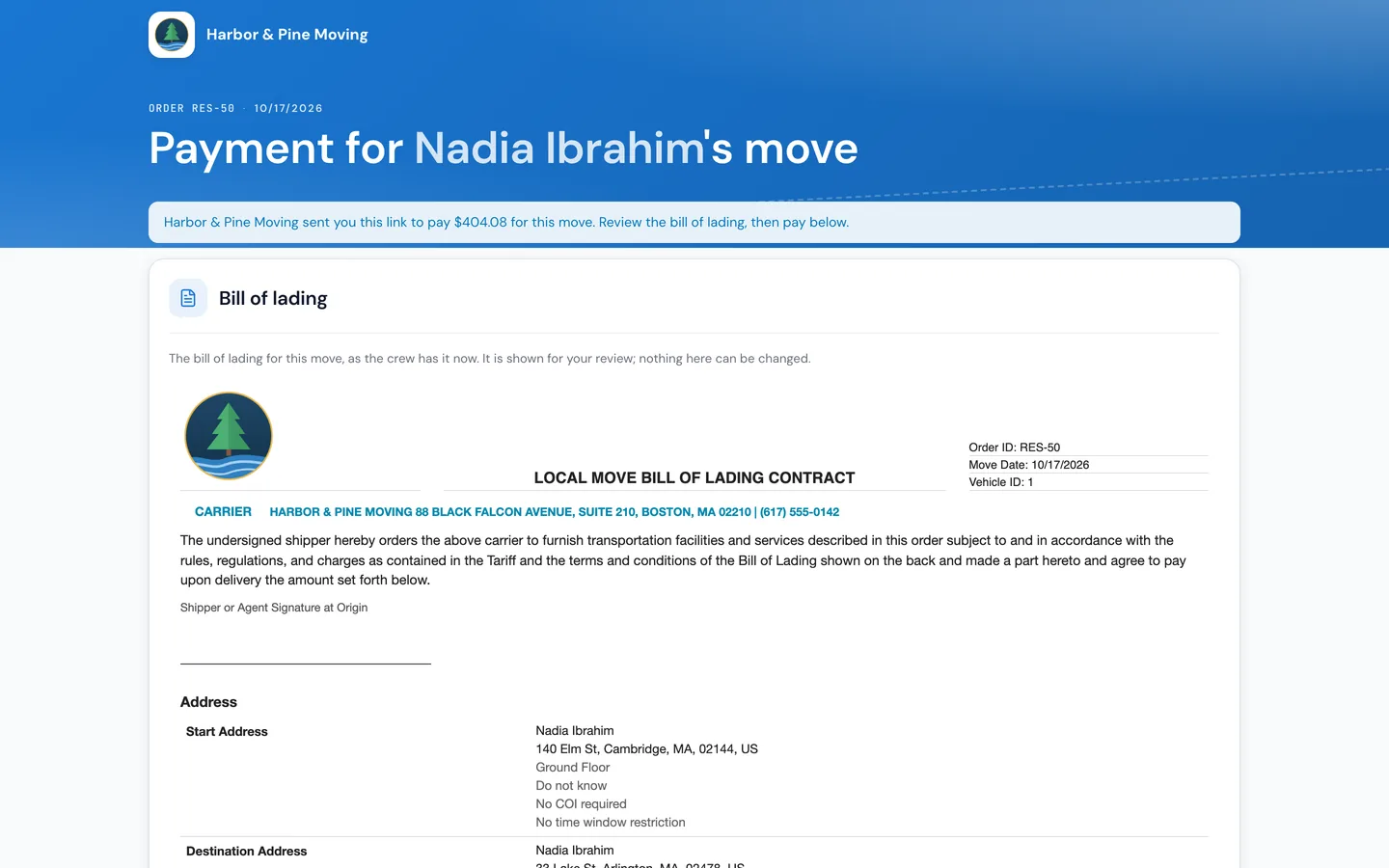
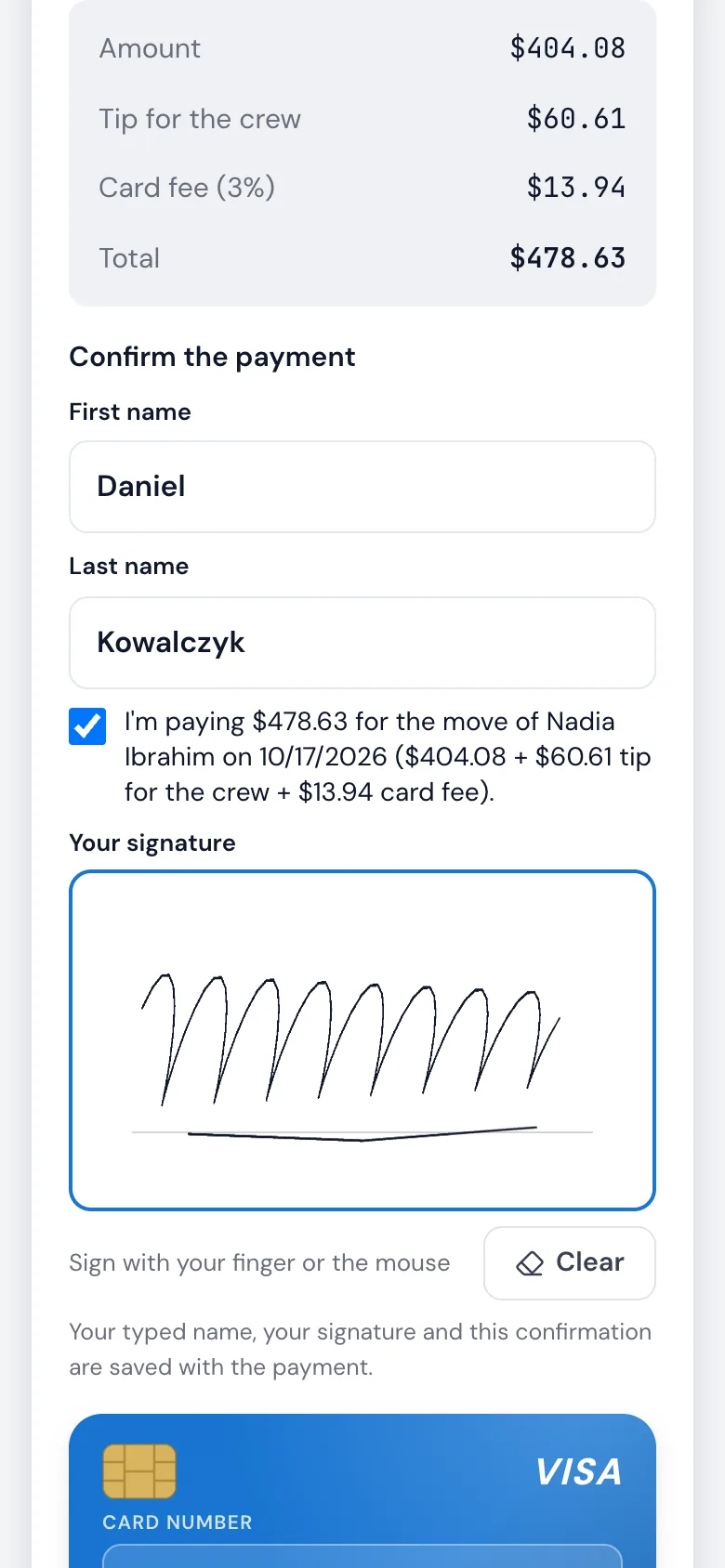
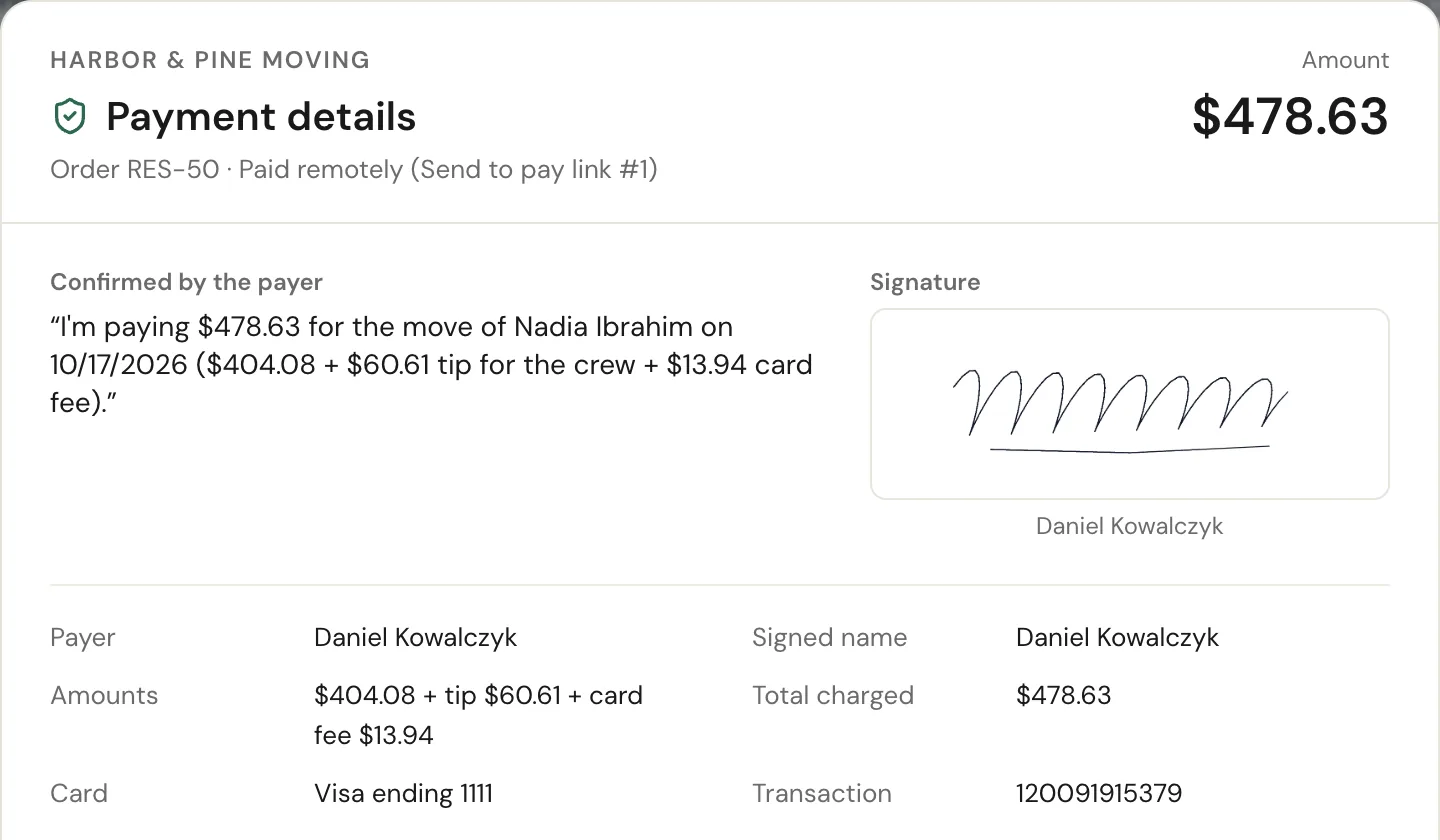
The link opens with no sign-in: who sent it and how much is due, then the bill of lading exactly as the crew has it, for review only. The payer may tip the crew, 10%, 15%, 20%, 25%, their own or none, and sees the amount, tip, card fee and total. Before Pay lights up they type their first and last name, tick the sentence with the exact figures, like I'm paying $478.63 for the move of Nadia Ibrahim on 10/17/2026 ($404.08 + $60.61 tip for the crew + $13.94 card fee), and sign with a finger or the mouse.
- The whole tip goes to the crew; the card fee follows your bill's rule, on the tip too
- If the balance changed while they were on the page, Pay shows the new amount instead of charging
- The payer's card is never saved on your customer's file
04 / Live on the bill
Paid remotely, before the crew packs up.
While a link waits, the bill reads Link for $404.08 sent · waiting for payment and checks every few seconds. When the payer pays, it turns green: Paid remotely by Daniel Kowalczyk, with the time, the total and the tip. The payment, the tip and the card fee sit on the bill and the closing exactly like a card payment the crew took, and the foreman finishes the signatures.
- Nobody can pay twice: each link asks for what is left
- The office's closing shows the same green line, live
- The tip goes to the crew and on to payroll
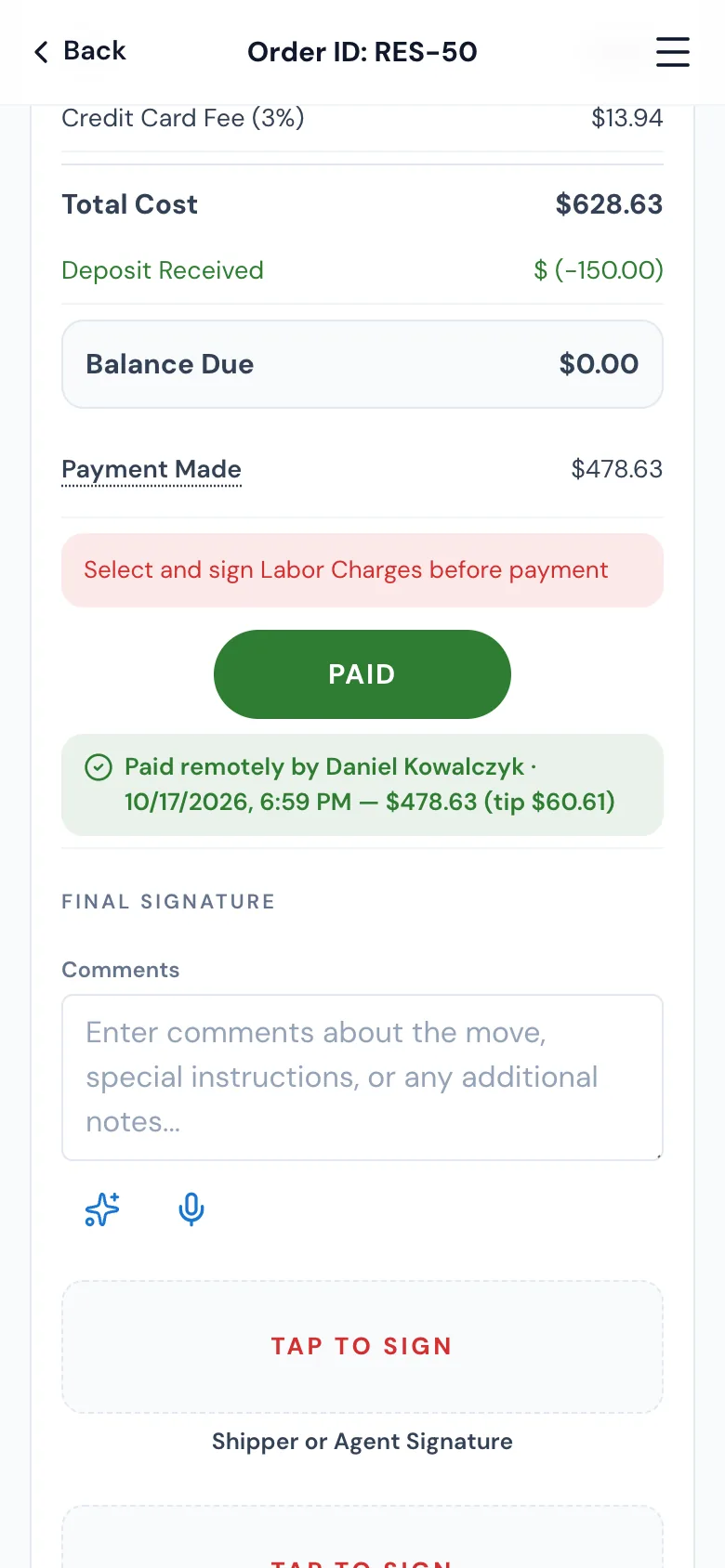
05 / The proof
Everything they agreed to, kept with the payment.
Each remote payment keeps its evidence: the drawn signature, the typed name, the exact sentence, the amounts, the card's brand and last four digits, the processor's transaction number, when the page was opened, the box ticked and the card paid, the IP address, device, browser and system, and who sent the link to which phone and email. In the Payments window the payment is marked Paid remotely; double-click it for Payment details, laid out like a receipt, with Print.
- Never the full card number
- The customer's own receipt doesn't show the payer's IP or device
- Links still waiting are listed in the Payments window
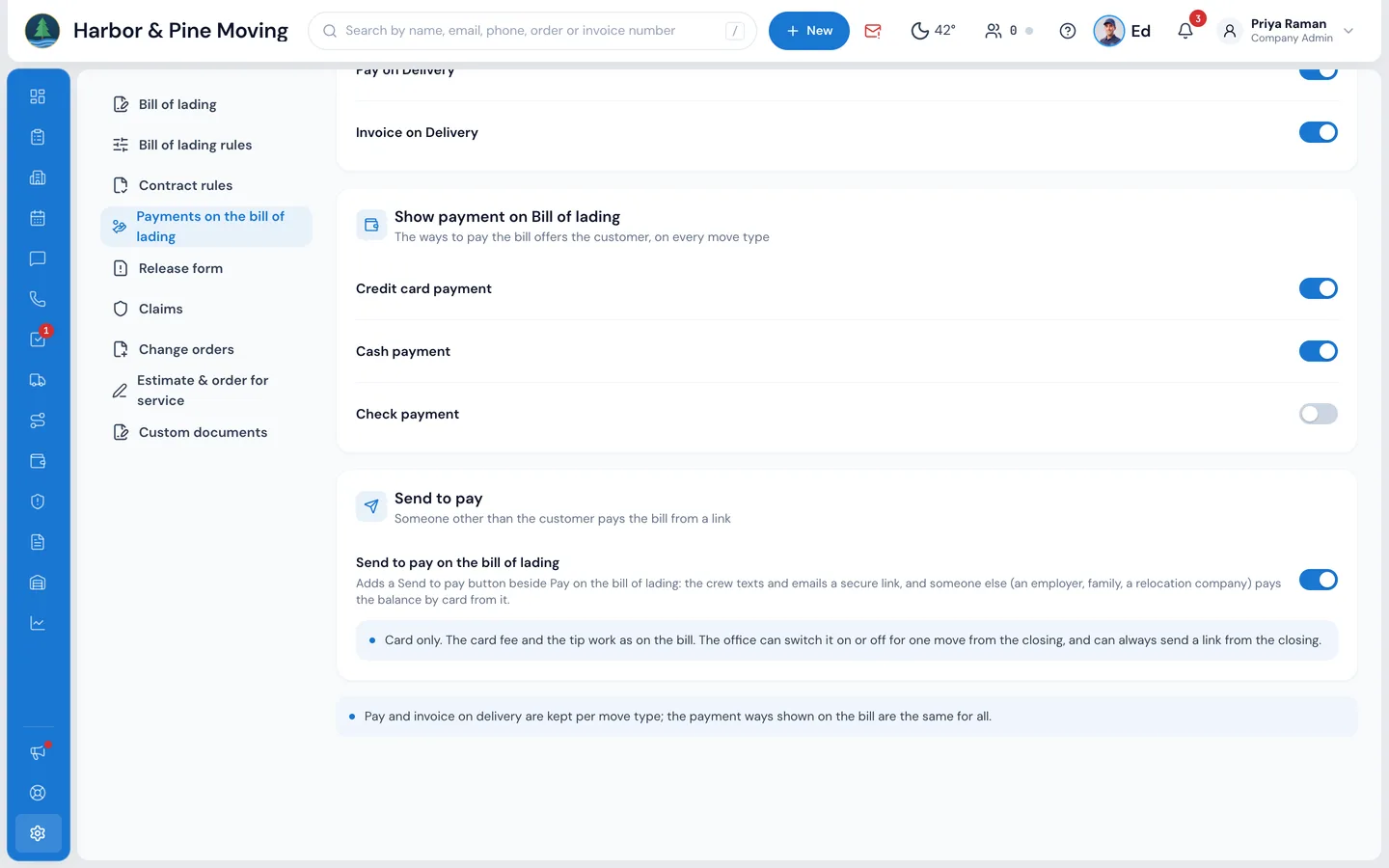
06 / Your rules
On for the company, or just this move.
Turn it on in Settings › Documents & bill of lading › Payments on the bill of lading › Send to pay, branch by branch. For one move, the closing's Payments window has its own switch, Send to pay enabled on the bill of lading, with Use company setting to put it back. Whatever the setting, the office can always send a link from the closing with the small Send to pay link under Payments Made.
- Local bills of lading; a long-distance bill takes payment on the bill itself
- An order invoiced on delivery gets an invoice instead
- Card only, through your branch's card processor
“Mostly time, it's saves you all headache, everything is digital, invoices, booking and everything else.”
By the numbers
1
Payment, whoever pays
A remote payment is recorded as the bill's own card payment, with the crew's tip and the card fee, so the closing, payroll and reports need nothing extra.
Who can pay with Send to pay?
Anyone the crew or the office sends the link to: an employer, a family member, a relocation company. They don't need an account or a password; the link opens the bill of lading and the payment on your company's website address.
Can the payer change the amount?
No. The amount is set by whoever sends the link, never more than the balance due. The payer can only add a tip for the crew, and the card fee follows your bill's own rule.
What proof do I have that they agreed?
The payer types their first and last name, ticks a sentence with the exact amounts and signs. MoveBoard keeps all of it with the payment, with the times, IP address, device and browser, the card's brand and last four digits and the transaction number. Payment details in the Payments window shows it and prints it on one page.
Can two people pay the same balance?
No. Each link asks for what is still owed when it opens and again when the payer presses Pay. If someone already paid part, the payer is offered the lower amount; if nothing is owed, the link says already paid.
Where does the tip go?
To the crew, exactly like a tip taken on the bill of lading: on the bill, the closing and payroll.
Does it work on long-distance moves?
Send to pay is for local bills of lading. A long-distance bill takes its payments on the bill itself, and an order invoiced on delivery gets an invoice.
Is the payer's card saved?
No. The card is charged once through your branch's card processor and is not filed on your customer's account.
Works with
Send to pay hands the work to the next screen.
See your company on MoveBoard.
A live demo built around your own kind of moves: your service area, your pricing, your crews.