
Moving company e-signature documents: Your waivers and releases, signed online.
Write your own documents to sign, a damage waiver, a stairs release, a packing waiver, right in MoveBoard, with fill-in fields and the order's details filled in for you. Send one from the order or let a workflow send it, remind the customer until it's signed, and make the crew get it signed before they take payment. The signed PDF files itself on the order.
- kinds of fields: signature, initials, checkbox, choices, yes/no, text, date
- 7kinds of fields: signature, initials, checkbox, choices, yes/no, text, date
- logins for the customer: their link signs them in
- 0logins for the customer: their link signs them in
- PDF of every signed copy, on the order
- 1PDF of every signed copy, on the order
What it fixes
The day before Custom documents, and the day after.
The stairs release lives in a drawer, and the crew forgets to bring it.
It goes out by email or text before the move, and the bill of lading won't let the crew skip it.
Nobody knows whether the customer ever signed the waiver.
The order shows Sent, Opened and Signed live, and reminders follow up until it's signed.
A signed paper gets scanned, lost or never filed.
The signed PDF lands in the order's attachments by itself.
How it works
Custom documents, screen by screen.
01 / Write it
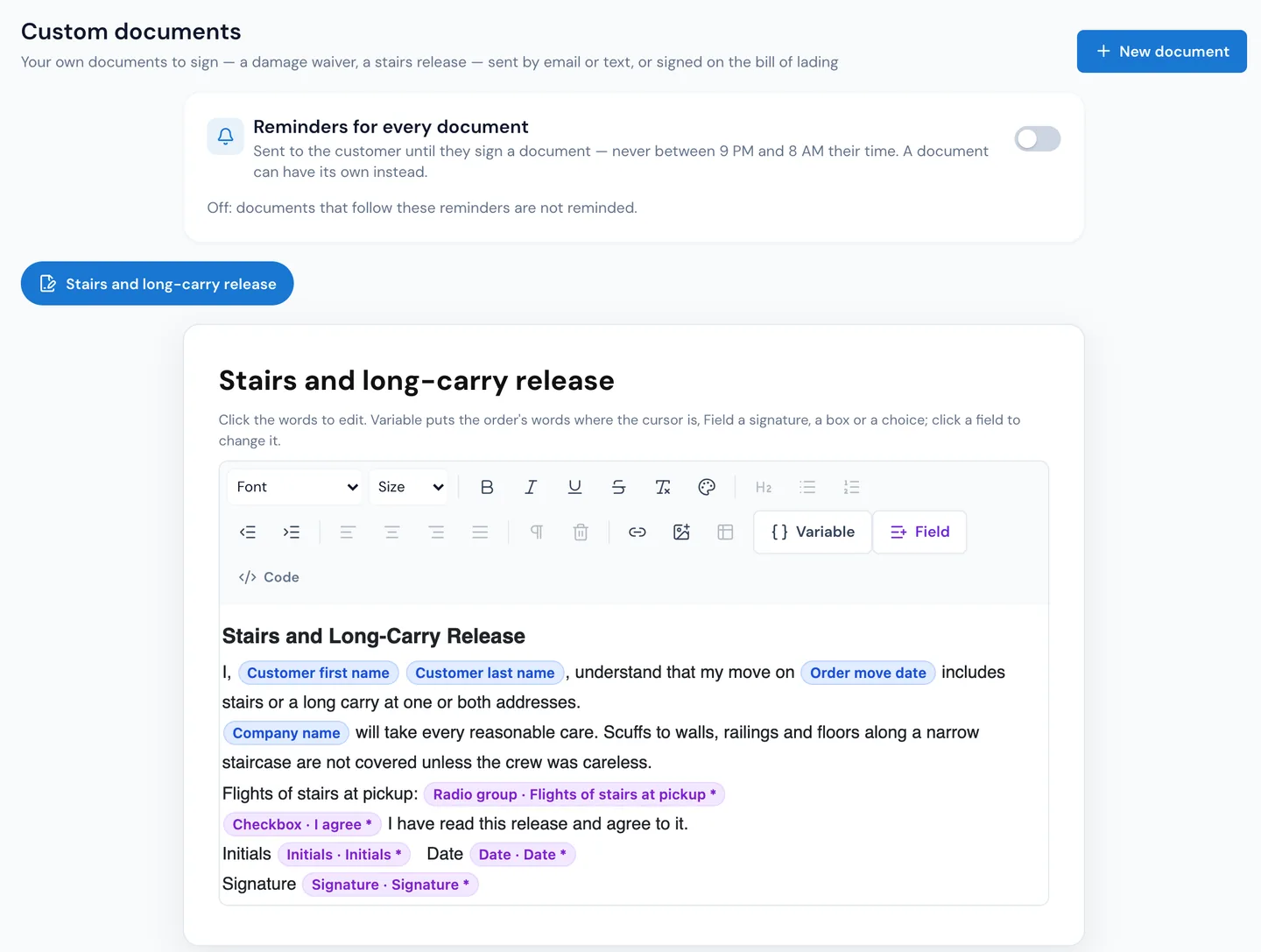
Type it the way the customer will read it.
In Settings › Documents & bill of lading › Custom documents, press New document and write on the page itself. Variable drops in the order's details, like the customer's name, the move date or the addresses. Add the fields the customer fills: Signature, Initials, Checkbox, Radio group, Yes / No toggle, Text box and Date, each one required or not.
- Who it is for: by service, move type and estimate type
- In use or Off, with one switch
- Editing saves a new version; documents already sent keep their words
02 / Send it
From the order, or by a workflow.
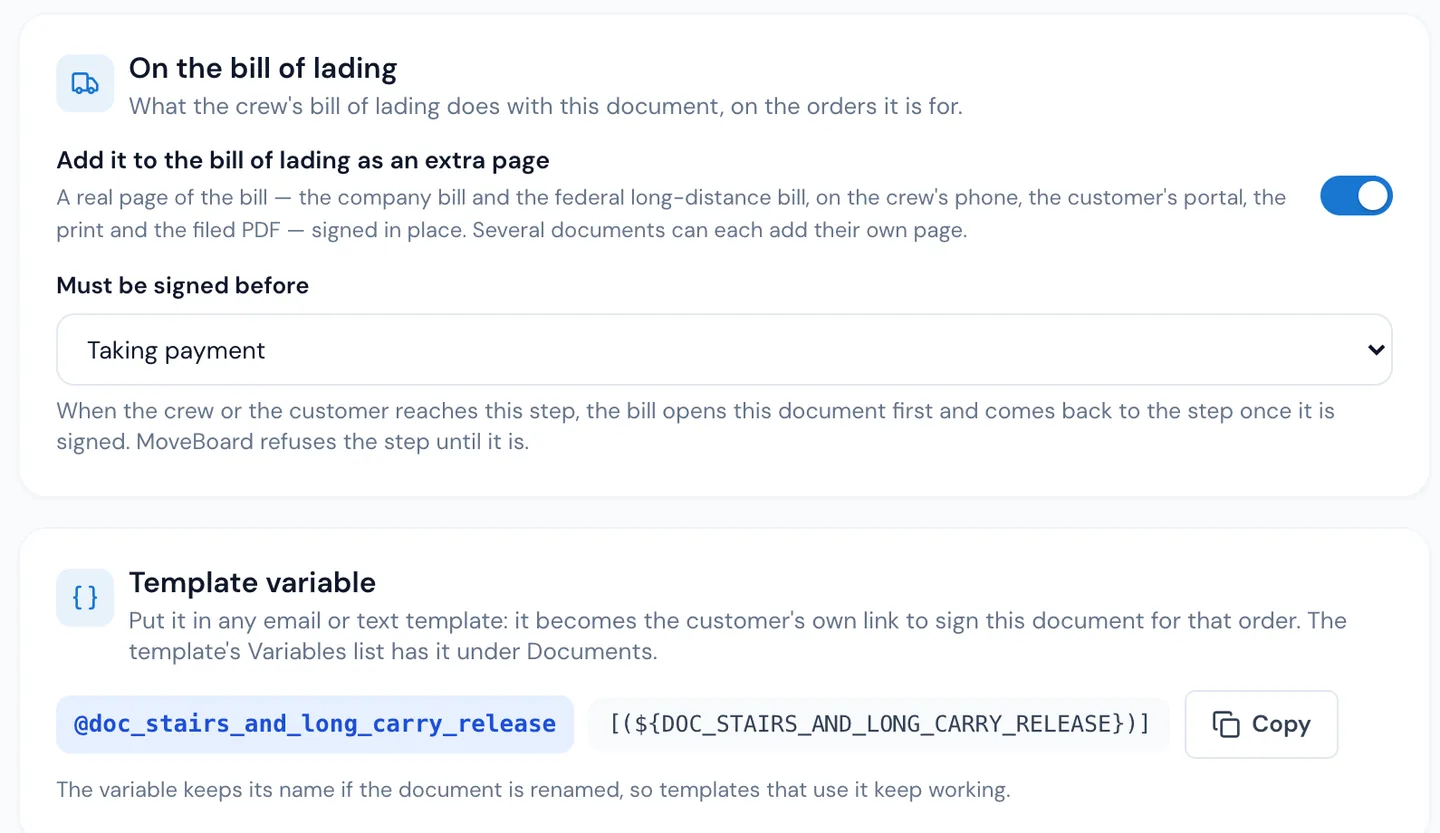
On the order, the menu's Documents panel sends one by email or text with your message, and Sent on this order shows Sent, Opened and Signed as it happens. Or a workflow's Send a document to sign step sends it by itself, for example the waiver whenever a piano is booked. Each document also has its own variable for any email or text template, which becomes the customer's personal signing link.
- Signed copy opens the signed version
- Cancel a sent document until it's signed
- Signed on the crew's device shows too
Documents · #RES-1176
Send a document
Hi Dana, please read and sign the stairs release for your move on Oct 20 before the crew arrives.
Send document
Sent on this order
- Damage waiverSignedSigned copy
- Stairs releaseOpenedCancel
03 / Until it's signed
Reminders that stop the moment they sign.
Set reminders once for every document, or give one document its own: the first after so many hours, then every so many hours, up to ten times, by email, text or both. They're never sent between 9 PM and 8 AM on the customer's clock, and once the customer signs, the reminders stop and the signed copy is filed on the order.
- Your own reminder template, or the ready one
- Only documents sent to the customer are chased
- New companies start with reminders off
Reminders for every document
Never sent between 9 PM and 8 AM, the customer's time. Reminders stop the moment it's signed.
04 / On the bill of lading
No signature, no payment.
Make a document an extra page of the crew's bill of lading, and choose what it must be signed before: taking payment, any signature on the bill, or a particular one. When the crew or the customer reaches that step, the bill opens the document first and comes back once it's signed. Set before taking payment, it opens when the crew taps PAY, before any money is taken, and the bill can't be submitted while it's unsigned.
- Signed on the crew's phone or tablet, filed like any other
- SUBMIT PICK UP, SUBMIT DELIVERY and SUBMIT CONTRACT wait for it
05 / Where customers sign
A link, no password.
The customer's link opens the document straight away, no sign-in. They fill the fields, press Finish and sign, and see Thank you — it is signed, with the signed copy to print or save. In their portal, Documents lists what's waiting for their signature, and a long-distance move's documents can sit beside the bill of lading they sign before pickup.
- Works on any phone
- The signed PDF lands in the order's attachments
Harbor & Pine Moving · move on Oct 20
Stairs and long-carry release
Waiting for your signature
I, Dana Ruiz, understand that my move on Oct 20, 2026 includes stairs or a long carry at one or both addresses.
Flights of stairs at pickup
I have read this release and agree to it.
Finish and sign
“Mostly time, it's saves you all headache, everything is digital, invoices, booking and everything else.”
By the numbers
PAY
Waits for the signature
A document set to be signed before taking payment opens when the crew taps PAY on the bill of lading, before any money is taken.
What documents can I make?
Anything you want customers to read and sign: a damage waiver, a stairs or elevator release, a storage agreement, a packing waiver. You write the words, drop in the order's details and add signature, initials, checkbox, choice, yes/no, text and date fields.
How does the customer sign?
From the link in your email or text, with no password: they fill the fields and press Finish and sign. It also waits under Documents in their portal. On move day it can be signed on the crew's device as a page of the bill of lading.
Where does the signed copy go?
A PDF of the signed document is filed in the order's attachments by itself, and the order's Documents panel shows it as Signed with the signed copy one press away.
Can a workflow send it?
Yes. A workflow's Send a document to sign step sends it when its rule matches, for example a waiver when a piano is on the order, and the reminders follow up until it's signed.
Can the crew be stopped from taking payment until it's signed?
Yes. Set the document's Must be signed before to Taking payment, and the bill of lading opens it when the crew taps PAY, before any money is taken. The bill can't be submitted while a required document is unsigned.
What if I change the words later?
A change saves a new version. Documents already sent keep the words they were sent with.
Works with
Custom documents hands the work to the next screen.
See your company on MoveBoard.
A live demo built around your own kind of moves: your service area, your pricing, your crews.