
Estimates & pricing
Why the quote is a range
Labor spread widens a long job's hours into a range — the low end comes down, the high end goes up — so the quote reads like "$1,050 – $1,400".
- 3 min read
- Checked against MoveBoard
- For owners & admins
On this page
An hourly quote is usually two figures: what the job costs if it goes quickly and what it costs if it takes longer. That gap comes from the labor spread: for longer jobs, MoveBoard takes some time off the low end of the labor hours and adds some to the high end.
How the range is made
- The calculator works out one labor time from the size, the crew and the stops (for example 6:00).
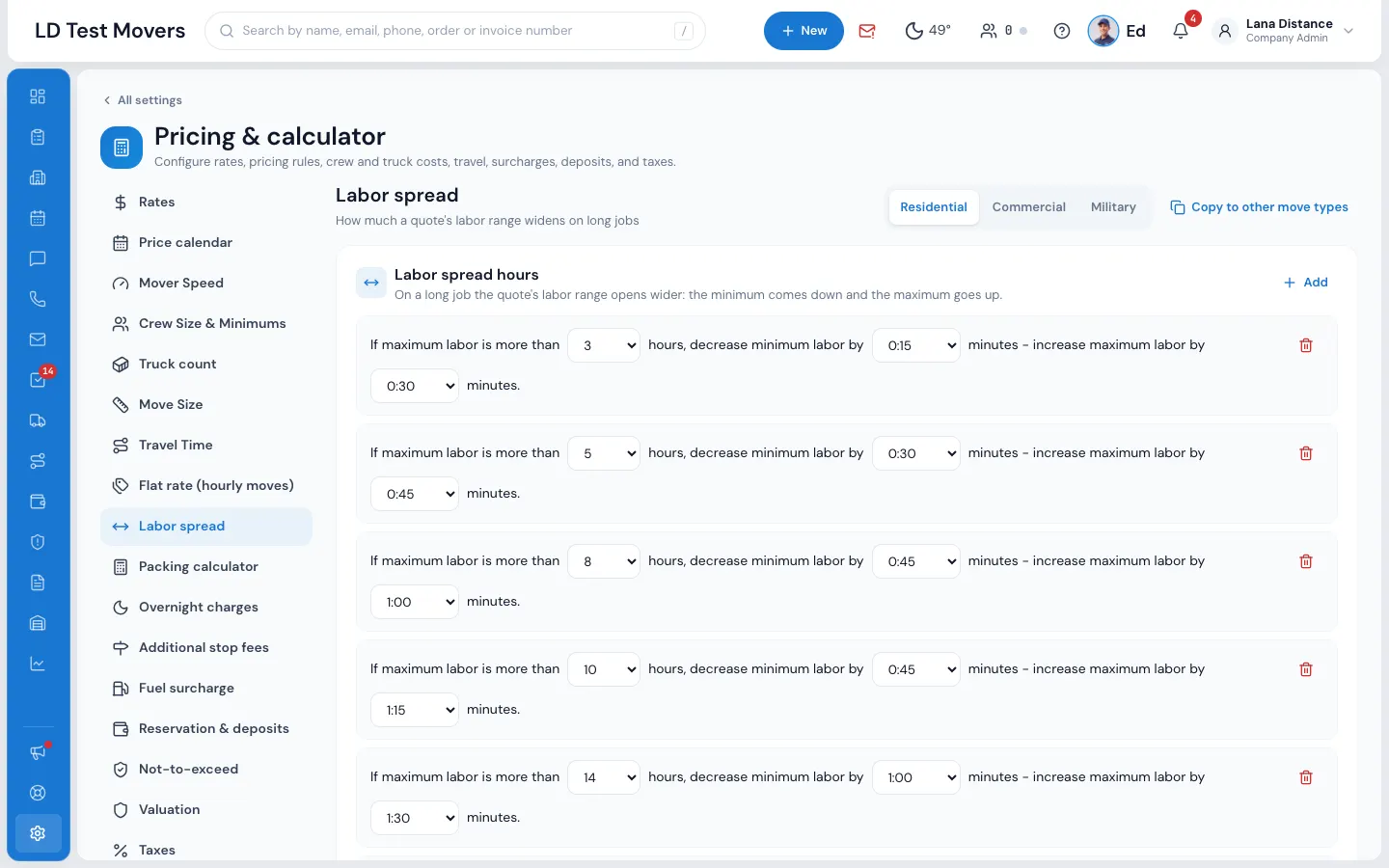
- It looks for the spread row that fits that time. Each row says: "If maximum labor is more than N hours, decrease minimum labor by X – increase maximum labor by Y."
- The row with the highest number of hours that the job reaches is used. A job of 5:45 counts as 5 whole hours when the row is picked.
- The low end comes down by X and the high end goes up by Y: 6:00 with a row of "decrease by 0:30, increase by 1:00" becomes 5:30 – 7:00.
- The minimum hours still apply: if the low end falls below them, it is raised to the minimum.
- Both ends are priced at the hourly rate, so the moving charge, and the grand total, become a range.
If none of your rows applies, MoveBoard uses your company's default spread.
Set your spread
- Open Settings › Pricing & calculator › Labor spread.
- Pick the move type at the top. Each move type has its own rows.
- Press Add for a new row (a row needs at least 1 hour to apply), and pick its three values: the hours, how much to decrease the minimum labor, and how much to increase the maximum labor. The amounts go from 0:15 to 4:00, in quarters of an hour.
- To remove a row, press its bin and confirm with Yes, Delete. It isn't removed for good until you press Save.
- Press Save.
Copy to other move types gives the other move types the same rows; they are saved with the next Save.
What changes and what doesn't
- The closing and the bill of lading use the hours the crew actually worked, so the bill is one figure.
- Long-distance and flat rate quotes are not priced by the hour, so the spread doesn't change their price.
Try a change in the test calculator: its Labor Time row shows the range.
If something goes wrong
- The hours after which a spread applies must be a whole number from 0 to 100.
- A spread is chosen from 0:15 to 4:00, in quarters of an hour.
Related guides
- Estimates & pricingHow MoveBoard prices a moveThe chain behind every hourly quote — size, crew, speed, labor time, travel, minimums, add-ons and taxes — with a worked example.
- Estimates & pricingHow many moversHow MoveBoard picks the crew size from the size of the move and the entrances, and how minimum crew, minimum hours and single-item moves work.
- Estimates & pricingTyped values vs calculated valuesWhat the red figures and the ↺ arrow on an order mean, which values you can set by hand, and how to hand them back to the calculator.
- Estimates & pricingTry a price with the test calculatorPrice a pretend move with your current settings — nothing is saved, no order is made.
Still stuck? A person will help.
Open a ticket from Support inside MoveBoard, or email us — we usually reply within one business day.