
Estimates & pricing
Taxes
Set the tax on labor, travel, long-distance linehaul and packing materials — or one tax on the whole order — and change it on a single order.
- 2 min read
- Checked against MoveBoard
- For owners & admins
MoveBoard can add tax to a quote in two ways: a separate rate for each kind of charge, or one rate on the whole order. The Taxes row in Quote Details shows the total tax.
The five tax rates
| Rate | What it is charged on |
|---|---|
| Labor Hourly Tax | The labor charge of an hourly move |
| Travel Hourly Tax | The travel time charge of an hourly move |
| Long Distance Linehaul Tax | The linehaul of a long-distance move |
| Packing Materials Tax | The packing materials on the quote |
| Order Total Tax | Everything on the quote — moving charge, fuel, materials, services, fees and storage |
Order Total Tax is all or nothing: while it is above zero, the other four are greyed out and not charged. Set it to 0 to use the four separate rates.
Taxes are added before the discount comes off and before valuation is added. Valuation is not taxed.
Set your rates
- Open Settings › Pricing & calculator › Taxes.
- Pick the move type at the top. Each move type has its own rates.
- Type each rate as a percent (8.25 means 8.25%).
- Press Save. Copy to other move types gives the other move types the same rates; they are saved with the next Save.
New quotes use these rates.
Change the tax on one order
- Open the order and click Taxes in Quote Details.
- Type a different rate in any row. Each row shows the tax it adds.
- Press Done, then SAVE on the order.
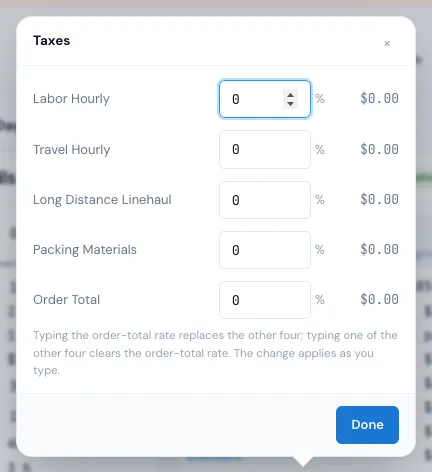
Typing the Order Total rate replaces the other four; typing one of the other four clears the Order Total rate. The quote follows as you type.
Related guides
- Estimates & pricingHow MoveBoard prices a moveThe chain behind every hourly quote — size, crew, speed, labor time, travel, minimums, add-ons and taxes — with a worked example.
- Estimates & pricingFuel surchargeHow MoveBoard adds fuel to a quote — by distance range, as a percent, or per mile — and how to change it on one order.
- OrdersQuote Details cardEvery line of the price — deposit, charges, fees, discount, taxes, total, payments and balance — and how to change each one.
Still stuck? A person will help.
Open a ticket from Support inside MoveBoard, or email us — we usually reply within one business day.