
Estimates & pricing
Travel time and truck speed
How MoveBoard measures the trip to and from a move, charges it, and adjusts Google's drive times for a truck — with every Travel Time setting explained.
- 4 min read
- Checked against MoveBoard
- For owners & admins, sales
On this page
Travel time is the crew's time on the road between your office and the job. Settings › Pricing & calculator › Travel Time decides how it is measured and charged on hourly moves. In the settings, A is the pickup, B the delivery and C your company's address.
Travel Time Charge
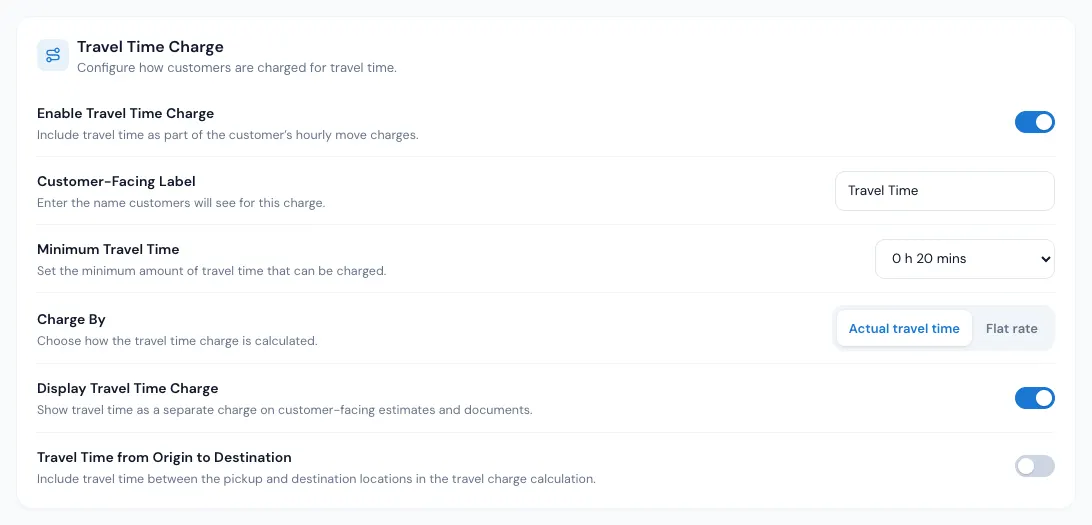
- Enable Travel Time Charge — when on, travel is billed at the travel rate, and the drive between the customer's addresses is added to the labor time.
- Customer-Facing Label — what customers see (for example "Estimated Travel Time").
- Minimum Travel Time — travel is never charged below this.
- Charge By — Actual travel time (measured as below) or Flat rate: a ZIP code, a Radius and a Time. With a flat rate, each started radius of distance from your office to the pickup adds that time. Radius 10 miles, Time 30 minutes, pickup 23 miles away: 3 × 30 = 1:30.
- Display Travel Time Charge — shows the travel as its own line. With travel rates different from labor rates, the Quote Details card then shows Labor Charge and Travel Time Charge instead of one Moving Charge.
- Travel Time from Origin to Destination — the travel charged is the drive from the pickup to the delivery.
How the trip is measured
Pick one way:
| Way | What counts |
|---|---|
| Way 1 | One direction: Shortest, Longest, From C to A or From B to C |
| Way 2 | From C to A plus from B to C |
| Way 3 | All of it: C to A, A to B and B to C |
| Way 4 | From A to B |
Example: office to pickup 20 minutes, pickup to delivery 30, delivery back to the office 25. Way 1 Longest = 0:25; Way 2 = 0:45; Way 3 = 1:15; Way 4 = 0:30.
Truck Average Speed
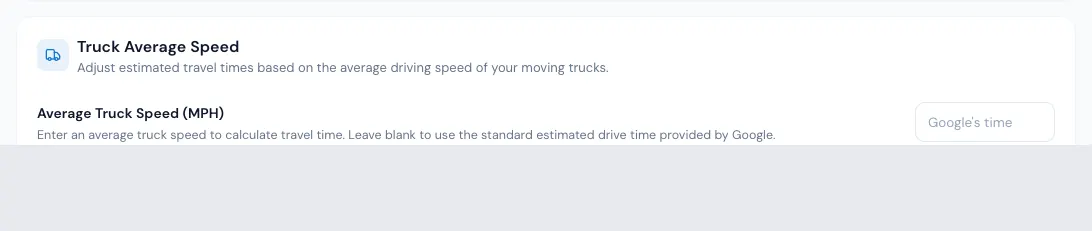
Google's times are for a car. Type your trucks' Average Truck Speed and each leg takes whichever is longer: Google's time, or the distance at your truck's speed. Boston to New York is 215 miles; Google says 3:30, at 45 mph a truck takes about 4:47 — so 4:47 is used. Leave it blank to keep Google's times.
When you save a new speed, the open orders (not Reserved or Booked, not past) are repriced in the background, and the page shows how far it has got. See When a settings change reprices orders.
Driving time and double drive time
- Add Driving to Travel Time — on longer trips, the drive between the customer's addresses goes into the travel time instead of the labor time. Only when the distance is more than sets the trip length (0 = always).
- Use Double Drive Time — the drive between the addresses is charged twice, never below Minimum double drive time. It has its own Label. On an order it shows as its own row under the travel time.
Some switches turn others off: Double Drive Time can't be on with the travel charge, Add Driving or Origin to Destination, and Add Driving and Origin to Destination exclude each other.
Include Travel Time in Minimum Hours lives on Crew Size & Minimums — see How many movers.
The Coming soon card (charging travel by mileage) isn't offered yet.
On an order
The Estimated Travel Time row (or your label) shows the travel. Pick another time to set it by hand: it shows in red with a ↺ that gives the calculated time back. On an open order whose date is today or later, a change of these settings shows as "Updated to 1h 5m from the current travel settings (was 50m) — Save to keep". Reserved and Booked orders keep what the customer agreed.
If something goes wrong
- "ZIP Code is a required field", "ZIP format: 12345" or "Postal format: A1A 1A1" — the flat rate needs your ZIP.
- "Radius must be positive" · "Please select a Time for the flat rate"
- "Distance must be a whole number, 0 or more. Use 0 to always include"
- "Please select a value for Min Double Drive Time"
- "Average truck speed must be a whole number from 10 to 130, or blank for Google's drive time"
Related guides
- Estimates & pricingHow MoveBoard prices a moveThe chain behind every hourly quote — size, crew, speed, labor time, travel, minimums, add-ons and taxes — with a worked example.
- Estimates & pricingHourly rates and price levelsSet what an hour costs for each crew and truck combination at each price level, and how the day's level picks the rate.
- Estimates & pricingWhen a settings change reprices ordersWhich orders MoveBoard updates when you change truck speed, packing or the price calendar — and which it never touches.
- Estimates & pricingKilometres, cubic feet and poundsChoose miles or kilometres, cubic feet or pounds, and how many pounds a cubic foot weighs — and what changes when you switch.
- Estimates & pricingTyped values vs calculated valuesWhat the red figures and the ↺ arrow on an order mean, which values you can set by hand, and how to hand them back to the calculator.
Still stuck? A person will help.
Open a ticket from Support inside MoveBoard, or email us — we usually reply within one business day.