
Estimates & pricing
How MoveBoard prices a move
The chain behind every hourly quote — size, crew, speed, labor time, travel, minimums, add-ons and taxes — with a worked example.
- 3 min read
- Checked against MoveBoard
- For sales, owners & admins
An hourly quote is hours × rate. MoveBoard works out the hours from the size of the move and the stops, picks the rate from the day and the crew, then adds travel, extras and taxes. The calculator is always on: change the size, a stop or the date and the price moves while you look.
The chain, step by step
- Size. The move's cubic feet come from the Size of Move, the inventory, or a custom volume — see Size, inventory or custom volume.
- Crew and trucks. Your crew rules turn the size (and the hardest entrance) into a crew size; the truck table turns the size into trucks. See How many movers and How many trucks.
- Speed. The crew size gives a speed in cubic feet per hour. Stairs, elevators and a long walk from the truck slow it down. See Mover speed.
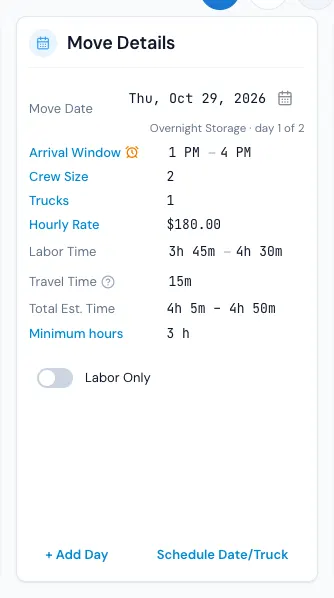
- Labor time. Loading is 60% of the size at the pickup's speed; unloading is 40% at the delivery's speed. Packing and unpacking add their own percent of time.
- The range. Your labor spread widens the hours into a range (for example 4:00 – 5:00). See Why the quote is a range.
- Driving between stops. When you charge travel time, the drive between the customer's stops is added to the labor time.
- Minimum hours. If the hours come out below the minimum (the company's, or the day's on the price calendar), the minimum is used.
- Rate. The move date's price level (Regular, Peak…) and the crew and trucks pick the hourly rate from your Rates grid. See Hourly rates and price levels.
- Travel. The trip from your office and back is measured the way your Travel Time settings say and charged at the travel rate. See Travel time and truck speed.
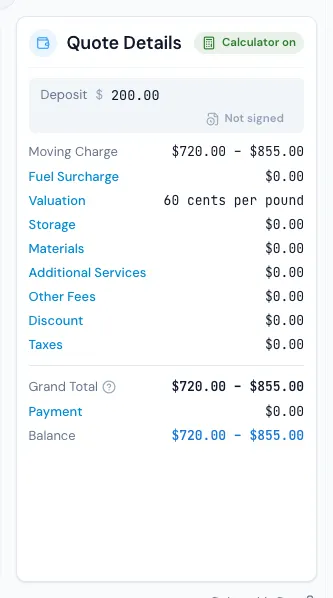
- Add-ons. Fuel, valuation, storage, materials and packing, additional services and other fees are added; the discount comes off; taxes go on.
A worked example
These numbers are made up to show the arithmetic — yours come from your settings.
| Step | Figure |
|---|---|
| Size | 1,000 cu ft → 3 movers, 1 truck |
| Speed for 3 movers | 250 cu ft an hour |
| Pickup: 2nd floor by stairs (20% slower) | 200 cu ft an hour |
| Loading: 600 cu ft ÷ 200 | 3:00 |
| Unloading at a ground-floor house: 400 cu ft ÷ 250 | 1:36 |
| Spread of half an hour either way | 4:06 – 5:06 |
| Drive between the two addresses | + 0:30 → 4:36 – 5:36 |
| Minimum hours (3) | already above it |
| Regular day, 3 Movers + Truck at $150 | labor $690 – $840 |
| Travel: 20 min out + 25 min back at $150 | $112.50 |
| Moving Charge | $802.50 – $952.50 |
Then the Quote Details card adds the rest down to the Grand Total.
The same number everywhere
The order window prices every change as you make it, and when you press SAVE the server works the price out again with the same calculator. What you saw is what is saved, and what the customer sees on their quote.
Flat-rate and long-distance days are priced differently — see Flat rate local moves.
Related guides
- Estimates & pricingHourly rates and price levelsSet what an hour costs for each crew and truck combination at each price level, and how the day's level picks the rate.
- Estimates & pricingHow many moversHow MoveBoard picks the crew size from the size of the move and the entrances, and how minimum crew, minimum hours and single-item moves work.
- Estimates & pricingMover speedHow fast a crew moves cubic feet, how entrances, elevator floors and the walk from the truck slow it down, and how packing adds time.
- Estimates & pricingTravel time and truck speedHow MoveBoard measures the trip to and from a move, charges it, and adjusts Google's drive times for a truck — with every Travel Time setting explained.
- Estimates & pricingTyped values vs calculated valuesWhat the red figures and the ↺ arrow on an order mean, which values you can set by hand, and how to hand them back to the calculator.
- Estimates & pricingTry a price with the test calculatorPrice a pretend move with your current settings — nothing is saved, no order is made.
Still stuck? A person will help.
Open a ticket from Support inside MoveBoard, or email us — we usually reply within one business day.