
Estimates & pricing
Hourly rates and price levels
Set what an hour costs for each crew and truck combination at each price level, and how the day's level picks the rate.
- 3 min read
- Checked against MoveBoard
- For owners & admins
On this page
Every hourly quote takes its rate from the grid in Settings › Pricing & calculator › Rates. A row is a price level, a column is a crew and truck combination. The move date decides the row; the crew and trucks decide the column.
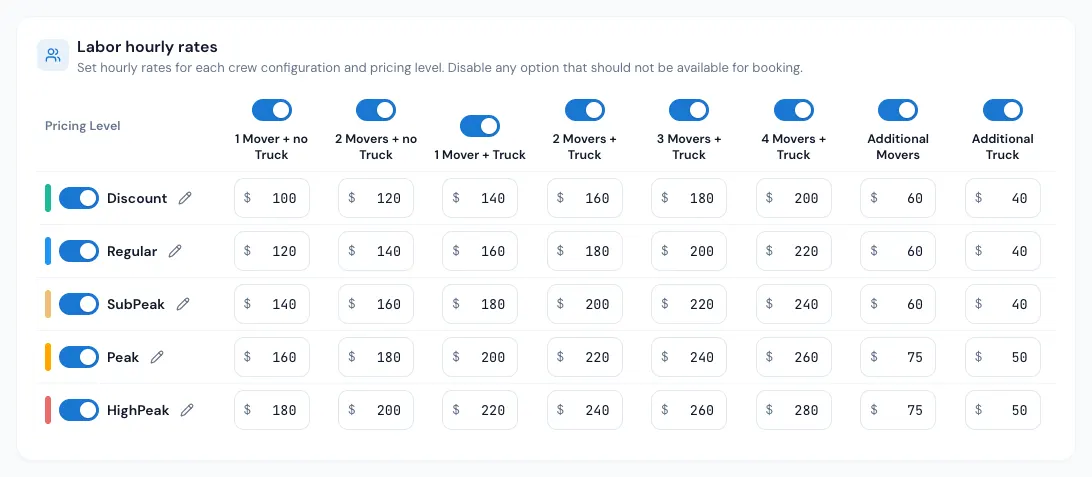
The five price levels
Discount, Regular, Sub-Peak, Peak and High-Peak, each with its own colour. A day is Regular unless you mark it otherwise on the price calendar.
- Press the pencil beside a level to give it your own name (for example "Summer"). The name shows on the price calendar and on the calendar your customers pick a date from.
- The switch beside a level takes it out of the price calendar's menu and the customer's calendar legend. Days already marked with that level keep pricing at its rates.
The columns
1 Mover + no Truck, 2 Movers + no Truck, 1 Mover + Truck, 2 Movers + Truck, 3 Movers + Truck, 4 Movers + Truck, Additional Movers and Additional Truck.
How bigger crews are priced:
- 5 or more movers: the 4 Movers + Truck rate plus Additional Movers for each mover past four.
- More than one truck: plus Additional Truck for each truck past the first.
- No truck and 3 or more movers: the 2 Movers + no Truck rate plus Additional Movers for each mover past two.
Example: 5 movers and 2 trucks on a Peak day, with Peak's 4 Movers + Truck at $200, Additional Movers $45 and Additional Truck $60: $200 + $45 + $60 = $305 an hour.
Travel rates
The Travel hourly rates grid prices the time on the road. With Same rates for travel time on, it follows the labor grid and can't be typed in. Switch it off to set travel rates of your own; the order window then shows a separate Travel Rate row.
Change the rates
- Open Settings › Pricing & calculator › Rates.
- Pick the move type at the top (residential, commercial…).
- Type the new amounts.
- Optional: Copy to other move types fills the other types in with this one's grid.
- Press Save.
Nothing changes until you save. New quotes use the new rates right away.
On an order
The Hourly Rate row on the Move Details card shows the rate in force. Open it to type a different rate (and an expiry date for it); the typed rate shows in red with a ↺ that gives the calculated rate back. The Crew Size list shows what each crew size would cost an hour.
If something goes wrong
- "… is not a rate. Use a number that is not below zero." — a box holds something other than a plain number.
- "… an hour is more than a rate can be." — over $100,000; check for a stray zero.
- "A name can be 256 characters at most." — a level's name is too long.
Related guides
- Estimates & pricingPeak, discount and blocked daysMark days on the price calendar with a price level or minimum hours, block days customers can't book, and update the open orders on them.
- Estimates & pricingHow MoveBoard prices a moveThe chain behind every hourly quote — size, crew, speed, labor time, travel, minimums, add-ons and taxes — with a worked example.
- Estimates & pricingTravel time and truck speedHow MoveBoard measures the trip to and from a move, charges it, and adjusts Google's drive times for a truck — with every Travel Time setting explained.
- Estimates & pricingTyped values vs calculated valuesWhat the red figures and the ↺ arrow on an order mean, which values you can set by hand, and how to hand them back to the calculator.
Still stuck? A person will help.
Open a ticket from Support inside MoveBoard, or email us — we usually reply within one business day.