
Estimates & pricing
How many movers
How MoveBoard picks the crew size from the size of the move and the entrances, and how minimum crew, minimum hours and single-item moves work.
- 3 min read
- Checked against MoveBoard
- For owners & admins
On this page
MoveBoard picks the crew for every quote from Settings › Pricing & calculator › Crew Size & Minimums. Each move type (residential, commercial…) has its own page.
Minimum Requirements
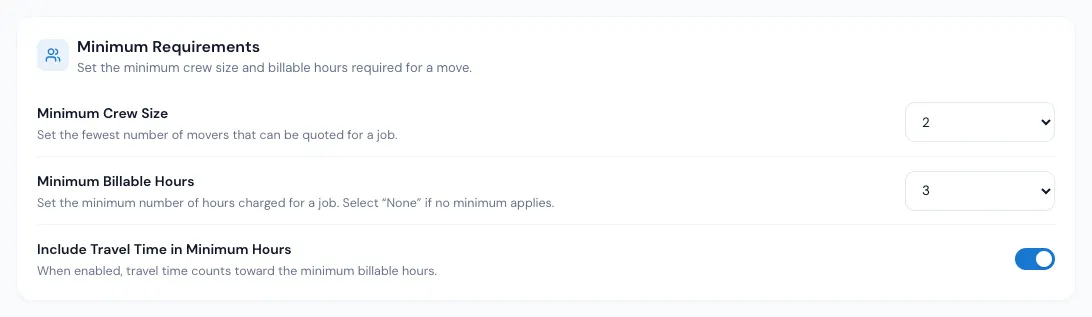
- Minimum Crew Size — the fewest movers a quote can have (1 to 4). Every crew starts here.
- Minimum Billable Hours — the fewest labor hours charged (1 to 5, or None). A day on the price calendar with its own minimum hours uses that instead.
- Include Travel Time in Minimum Hours — when on, the travel time counts toward the minimum. With a 3-hour minimum and 45 minutes of travel, the labor is charged at least 2:15 instead of 3:00.
Crew Size Rules
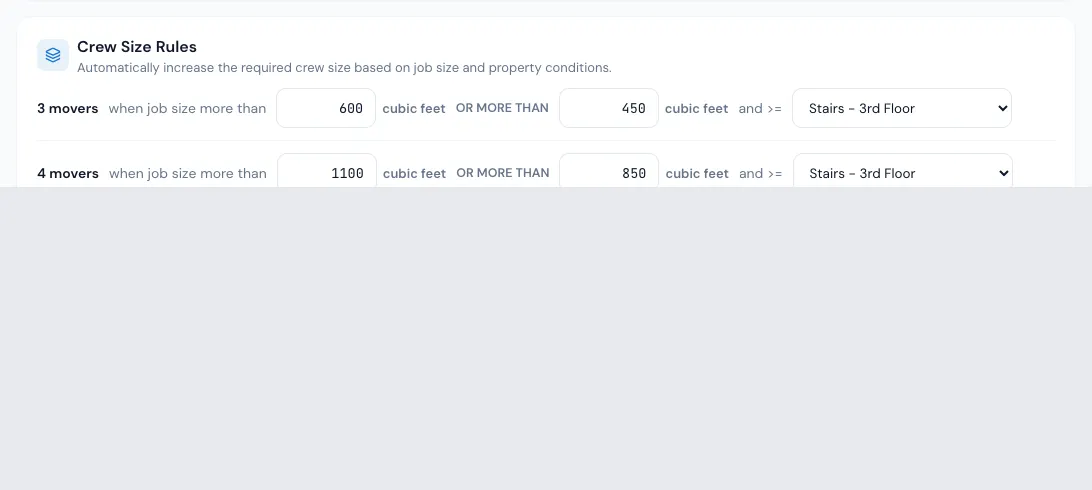
Each rule reads: N movers when job size more than X or more than Y and >= an entrance.
- A job bigger than X gets at least N movers.
- A job of Y or more also gets N movers when the hardest entrance of the customer's stops is at least as hard as the one picked (entrances are ranked in the order of your Mover speed list). A ground floor or an elevator never counts as hard.
- When several rules apply, the biggest crew wins. The crew is never below the minimum crew.
Example: minimum crew 2; rule "3 movers when job size more than 800 cu ft or more than 500 cu ft and >= Stairs - 2nd floor".
| Move | Crew |
|---|---|
| 450 cu ft, any entrance | 2 |
| 600 cu ft, ground floor | 2 |
| 600 cu ft, 3rd floor walk-up | 3 |
| 900 cu ft, anything | 3 |
An inventory with items that need more hands (a piano, for example) can raise the crew further.
Single-item move
Switch Single-item move on to send a smaller crew for one normal item — for every channel: the office, your online forms and the AI receptionist.
- Movers — the crew for such a job.
- Items that still count — up to this many normal items is still a single-item move.
- Minimum billable hours — its own minimum, or Same as the company minimum.
A special item (a piano, a safe, gym equipment, or anything with its own crew in your inventory settings) is never a single-item move: its own movers, fees and minimums apply.
Save
Press Save at the foot of the page. Copy to other move types puts this page's values on the other move types; they too wait for Save.
On an order
The Crew Size row on Move Details shows the calculated crew. Open it to pick another number — it then shows in red with a ↺ that gives the calculator's crew back. The crew can't be fewer than the trucks. Minimum hours can be changed for one order too, with an expiry date if you like. See Typed values vs calculated values.
If something goes wrong
- "Can't include travel time in minimum when minimum hours is set to None" — pick a minimum first.
- "… is not a job size. Job size must be a whole number, 0 or more." — a rule's box holds something else.
Related guides
- Estimates & pricingHow many trucksSet how many trucks a quote needs for the size of the move, and change the trucks on one order.
- Estimates & pricingMover speedHow fast a crew moves cubic feet, how entrances, elevator floors and the walk from the truck slow it down, and how packing adds time.
- Estimates & pricingPeak, discount and blocked daysMark days on the price calendar with a price level or minimum hours, block days customers can't book, and update the open orders on them.
- Estimates & pricingTyped values vs calculated valuesWhat the red figures and the ↺ arrow on an order mean, which values you can set by hand, and how to hand them back to the calculator.
- Estimates & pricingHow MoveBoard prices a moveThe chain behind every hourly quote — size, crew, speed, labor time, travel, minimums, add-ons and taxes — with a worked example.
Still stuck? A person will help.
Open a ticket from Support inside MoveBoard, or email us — we usually reply within one business day.