
Estimates & pricing
How many trucks
Set how many trucks a quote needs for the size of the move, and change the trucks on one order.
- 2 min read
- Checked against MoveBoard
- For owners & admins
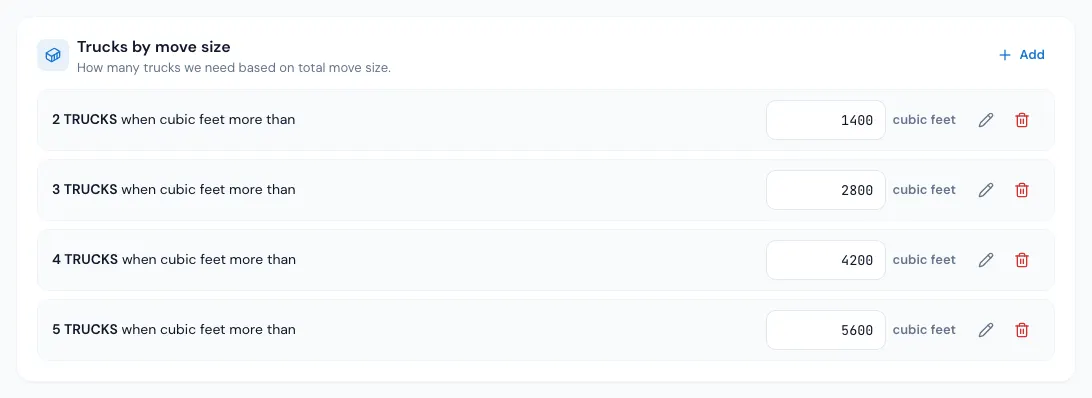
Every quote starts with one truck. Settings › Pricing & calculator › Truck count says when a move is big enough for more.
How the rows work
Each row reads N TRUCKS when cu ft more than a size (pounds, if your company sizes moves in pounds). A move bigger than a row's size gets that many trucks; the biggest row it passes wins.
Example: rows "2 TRUCKS when cu ft more than 1,500" and "3 TRUCKS when cu ft more than 2,800".
| Move size | Trucks |
|---|---|
| 1,200 cu ft | 1 |
| 1,500 cu ft | 1 (not more than 1,500) |
| 1,800 cu ft | 2 |
| 3,000 cu ft | 3 |
Each truck past the first adds the Additional Truck rate to the hour — see Hourly rates and price levels.
Add or change a row
- Open Settings › Pricing & calculator › Truck count and pick the move type.
- Press Add, pick the Number of Trucks and type the Max Load, then press Save in the pop-up. To change a row, type over its size, or press its pencil.
- Press Save at the foot of the page.
Deleting a row asks first, and it's only gone for good when you press Save. Copy to other move types puts this move type's rows on the others (also waiting for Save).
On an order
The Trucks row on Move Details shows the calculated trucks. Open it to pick another number:
- The list shows what each truck count would cost an hour.
- A typed number shows in red with a ↺ that gives the calculator's count back; Back to what the crew calls for in the pop-up does the same.
- Changing the trucks moves the hourly rate (each extra truck adds the Additional Truck rate), not the hours.
- The trucks can't be more than the movers.
If a service doesn't include a truck, the row reads Trucks (not included).
If something goes wrong
- "Max Load is a required field." or "Max Load must be a whole number above zero."
- "There is already a row for 2 trucks." — each number of trucks has one row.
- "Please enter max load more than 1500 and less than 2800" — more trucks must start at a bigger size than fewer trucks.
- On an order: "The number of trucks may not exceed the number of movers. …" — raise the crew first, or pick fewer trucks.
Related guides
- Estimates & pricingHow many moversHow MoveBoard picks the crew size from the size of the move and the entrances, and how minimum crew, minimum hours and single-item moves work.
- Estimates & pricingHourly rates and price levelsSet what an hour costs for each crew and truck combination at each price level, and how the day's level picks the rate.
- Estimates & pricingTyped values vs calculated valuesWhat the red figures and the ↺ arrow on an order mean, which values you can set by hand, and how to hand them back to the calculator.
- Estimates & pricingHow MoveBoard prices a moveThe chain behind every hourly quote — size, crew, speed, labor time, travel, minimums, add-ons and taxes — with a worked example.
Still stuck? A person will help.
Open a ticket from Support inside MoveBoard, or email us — we usually reply within one business day.