
Mover's Portal
The Mover's Portal home
What foremen and movers see when they open MoveBoard on their phone — the jobs waiting for an answer, today's jobs, and where everything else is.
- 1 min read
- Checked against MoveBoard
- For foremen, movers
The Mover's Portal is MoveBoard on your phone. Sign in once at your company's Mover's Portal address — your phone stays signed in.
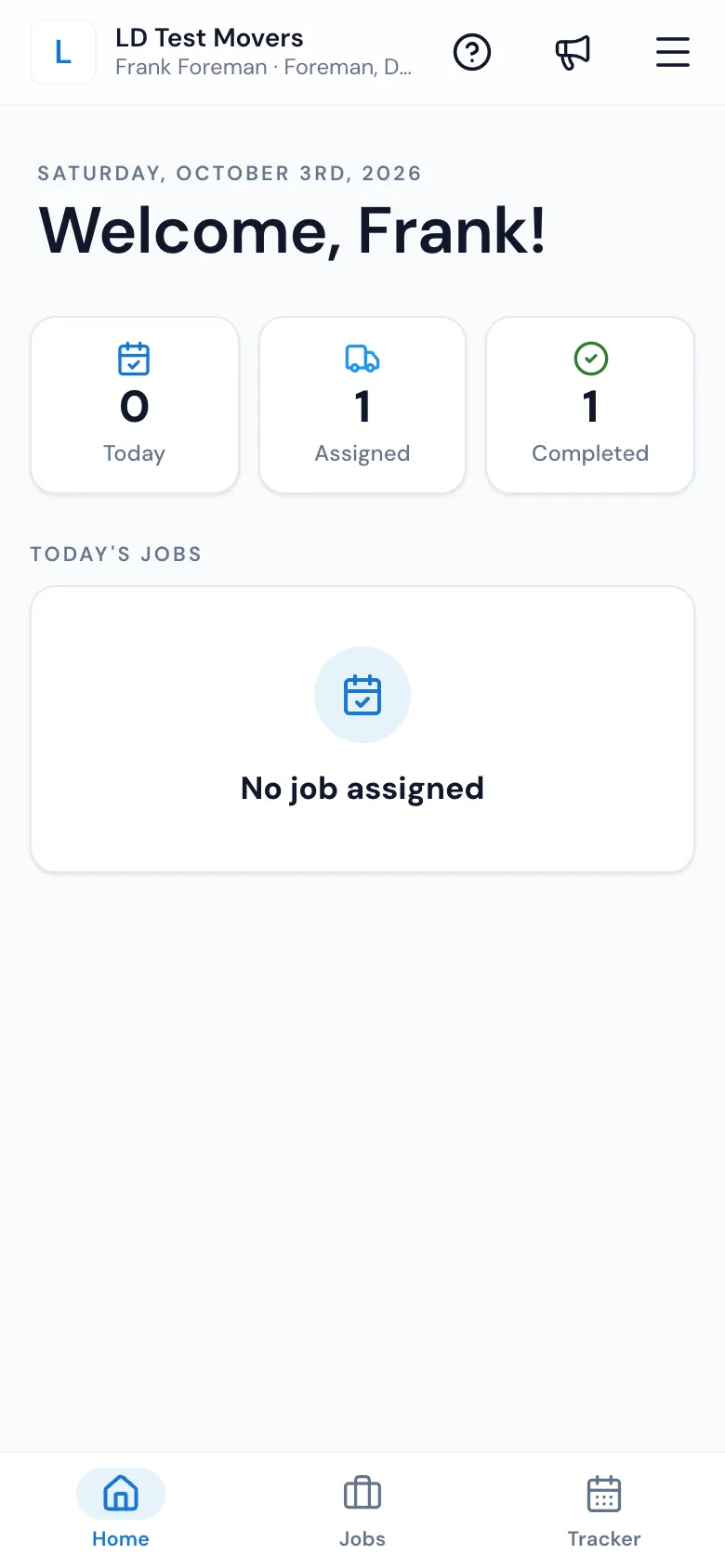
At the top
- Your company, your name and your position.
- ? — the guide for the screen you're on.
- The megaphone — What's new. A red dot means something new.
- The menu — Home, Edit Profile (your details, and changing your password), The office (only if you also work in the office), Logout, and your notifications.
On the home screen
The office is waiting for your answer — a card for each day you're scheduled, with the start time. Press CONFIRM (or DECLINE, if your company allows it). Once you answer, the start time stays on the screen so you can check it.
Foremen also see three counts — Today, Assigned and Completed — and Today's Jobs. Press a job to open it right where your crew left off.
The tabs at the bottom
- Home — this screen.
- Jobs — your jobs (foremen).
- Trips — long-distance trips (drivers on a trip).
- Tracker — your schedule; ask for time off here (if your company allows it).
Related guides
- Mover's PortalSign in to the Mover's PortalSign in on your phone with your Company ID, username and password, reset a forgotten password, and put the Mover's Portal on your home screen.
- Mover's PortalYour jobsThe Jobs tab lists every job you're the foreman on — New ones soonest first, and Past ones if your company allows — each opening right where your crew left off.
- Mover's PortalConfirm or decline a scheduleWhen the office puts you on a crew, answer from your phone — CONFIRM (or DECLINE, if your company allows it) — and the office sees it right away.
- Mover's PortalWorking with no signalWhat the Mover's Portal keeps on your phone when the signal drops — today's jobs to read, and every change on the bill of lading, sent safely when you're back online.
- Moving industry know-howGlossary of moving and MoveBoard wordsEvery word you'll meet in MoveBoard and in the moving business — leads and statuses, pricing, valuation, bills of lading, long distance and storage — in plain English.
Still stuck? A person will help.
Open a ticket from Support inside MoveBoard, or email us — we usually reply within one business day.