
Getting started
The office menu
Every item in the menu down the left, what it opens, what the red numbers mean, and why an item can be missing.
- 3 min read
- Checked against MoveBoard
- For owners & admins, sales, dispatchers
The menu is the dark strip down the left of every office screen. It shows only icons; rest your mouse on it and it opens to show each item's name.
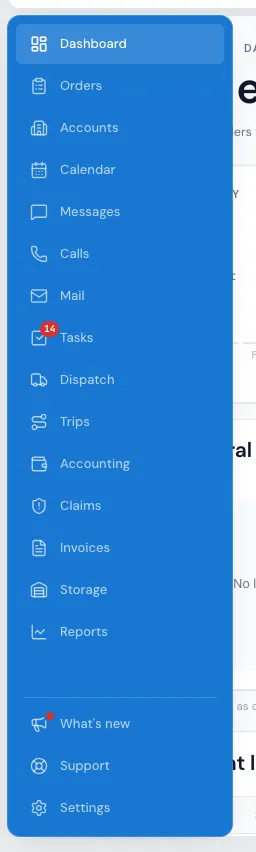
What each item opens
| Item | What it's for | Who sees it |
|---|---|---|
| Dashboard | Today's numbers and what needs attention | Everyone |
| Orders | Every lead and job, by status | Everyone |
| AI Leads | Conversations and leads from the AI receptionist | Companies it's turned on for |
| Accounts | Business accounts and their orders | Its switch |
| Calendar | Moves and trucks by month or day | Its switch |
| Messages | Texts, emails and portal chats with customers | Its switch |
| Calls | Call history, missed calls and voicemails | Its switch |
| Tasks | To-dos, yours and the team's | Everyone |
| Dispatch | Crews and trucks, day by day | Its switch |
| Trips | Long-distance trips | With Dispatch |
| Accounting | Payroll and money in and out | Its switch |
| Claims | Damage claims | Its switch |
| Box deliveries | Every box delivery by status | Its switch, while box delivery is on — and only for people without Dispatch |
| Invoices | Every invoice | Its switch |
| Storage | Storage customers and their billing | Its switch |
| Reports | Every report | Its switch |
Under a thin line at the bottom: What's new (the megaphone), Support and Settings. Support is everyone's; Settings has its own switch.
The red numbers
- Messages — unread messages from customers.
- Calls — missed calls and voicemails nobody has looked at yet.
- Box deliveries — box deliveries waiting to be scheduled.
- Tasks — your open tasks. While it shows, pressing Tasks opens the page on your own tasks.
- What's new — a dot when there's news you haven't read.
Why an item is missing
Administrators see every item. Everyone else sees the items their permissions allow: each item with "Its switch" above has a switch in the Main menu card on the person's Permissions tab (Settings › Users & permissions › Users, then the person). Trips follows the Dispatch switch. Box deliveries shows only while box delivery is switched on; if you can see Dispatch, it isn't in the menu — it's the Box deliveries tab inside Dispatch, with the same red number. AI Leads shows only for companies Elromco has turned it on for.
Mail is off the menu for now, while incoming email is being set up. Your emails still reach each order's conversation.
Permissions can differ from branch to branch, so the menu can change when you work in another branch.
Hiding an item isn't the only protection — every page also checks permissions when it opens, so typing a page's address doesn't get round a missing switch.
On a phone
The menu is behind the three-line button at the top left. It slides in from the left, names every item, and closes as soon as you pick one (or press the dimmed page, or Esc). The button carries the unread-messages number too. See MoveBoard on your phone.
Related guides
- Getting startedThe top barWhat every button across the top of the screen does — search, + New, the phone, weather, customers online, Ed, the bell and the menu under your name.
- Getting startedMoveBoard on your phoneHow the office screens fit a phone — the menu behind the three-line button, the ⋮ menu, full-screen search and windows — and what is roomier on a computer.
- Getting startedYour first day in MoveBoardA ten-minute tour of the screens you'll use every day — the menu, the top bar, the dashboard and order windows.
Still stuck? A person will help.
Open a ticket from Support inside MoveBoard, or email us — we usually reply within one business day.