
Moving company discounts and coupon codes: Give the right price, and send codes that book moves.
Discounts & codes in MoveBoard give every discount its own name or code: Senior, Student, Friends & Family, WINTER10. A percentage, an amount, or free packing materials and services, with dates, limits and your own rules behind a small ?. The office, the customer and the crew can each put it on the order, and your email campaigns carry the code with a Book now button.
- ways onto the order: office, customer portal, crew
- 3ways onto the order: office, customer portal, crew
- discounts per order, your choice
- 1 or manydiscounts per order, your choice
- your rules, one hover or tap away
- ?your rules, one hover or tap away
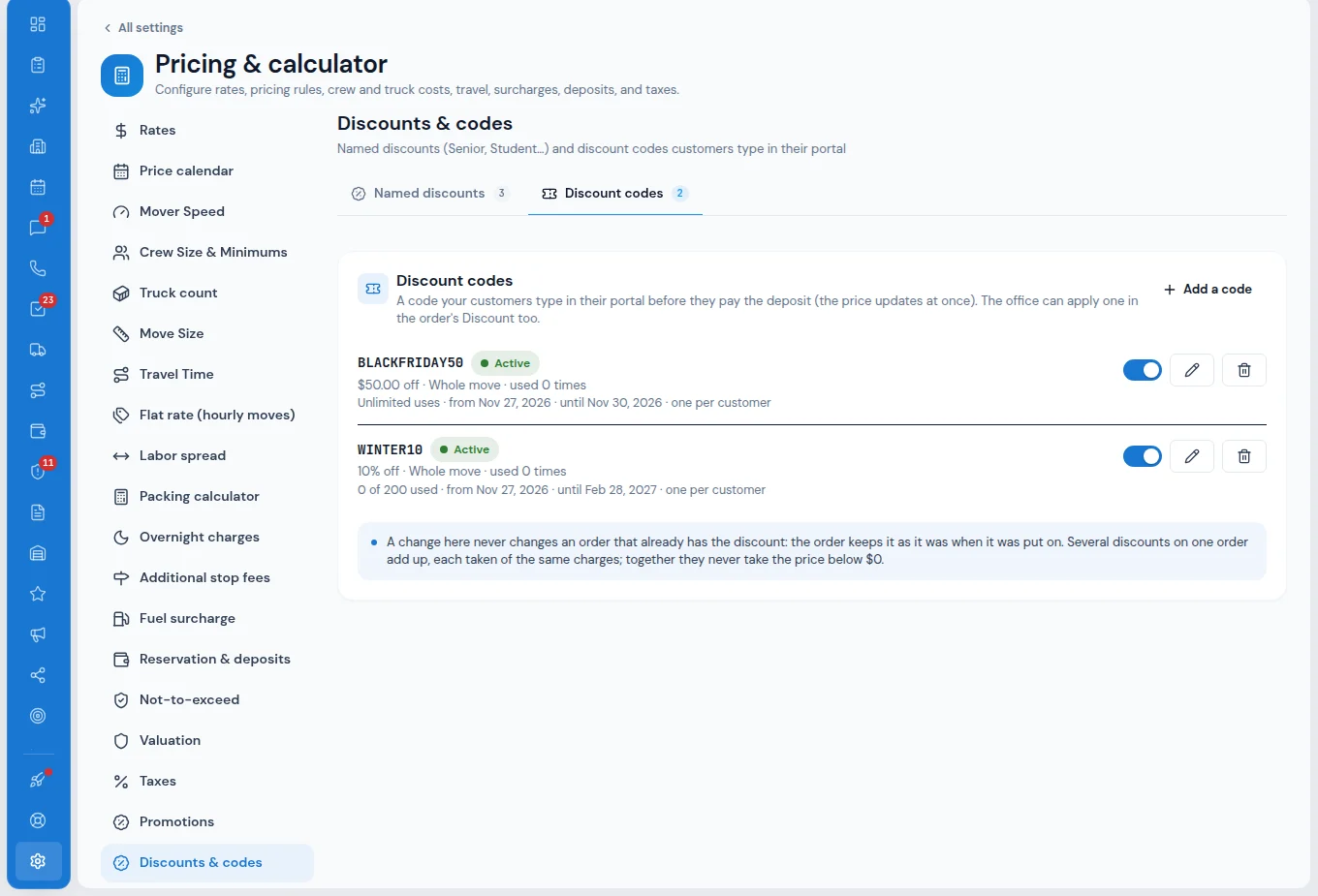
Included in every MoveBoard plan, with no add-ons. Set up in Settings › Pricing & calculator › Discounts & codes.
What are discounts and codes in MoveBoard?
Discounts & codes is where a moving company sets up named discounts, such as Senior or Student, and discount codes, such as WINTER10, once. Each is a percentage, an amount or a coupon for packing materials and services, with dates, limits and rules. The office, the customer in their portal and the crew on the bill of lading can apply it.
What it fixes
What moving company discounts and coupon codes fix.
Every salesperson gives a different discount, and nobody can say later why a move was cheaper.
Named discounts like Senior or Friends & Family, each its own line on the estimate, the documents and the customer's page.
A promo code lives on a flyer, and the office types the money off by hand, if it remembers.
The customer types the code in their portal before they sign, and the price updates at once, with your dates and limits checked.
You send a winter special by email and never learn whether anyone booked with it.
The code goes into the campaign with a Book now button, and the results show the codes used and the revenue they brought.
How it works
Discounts and codes, from Settings to the signed order.
01 / Set them up once
Named discounts and discount codes.
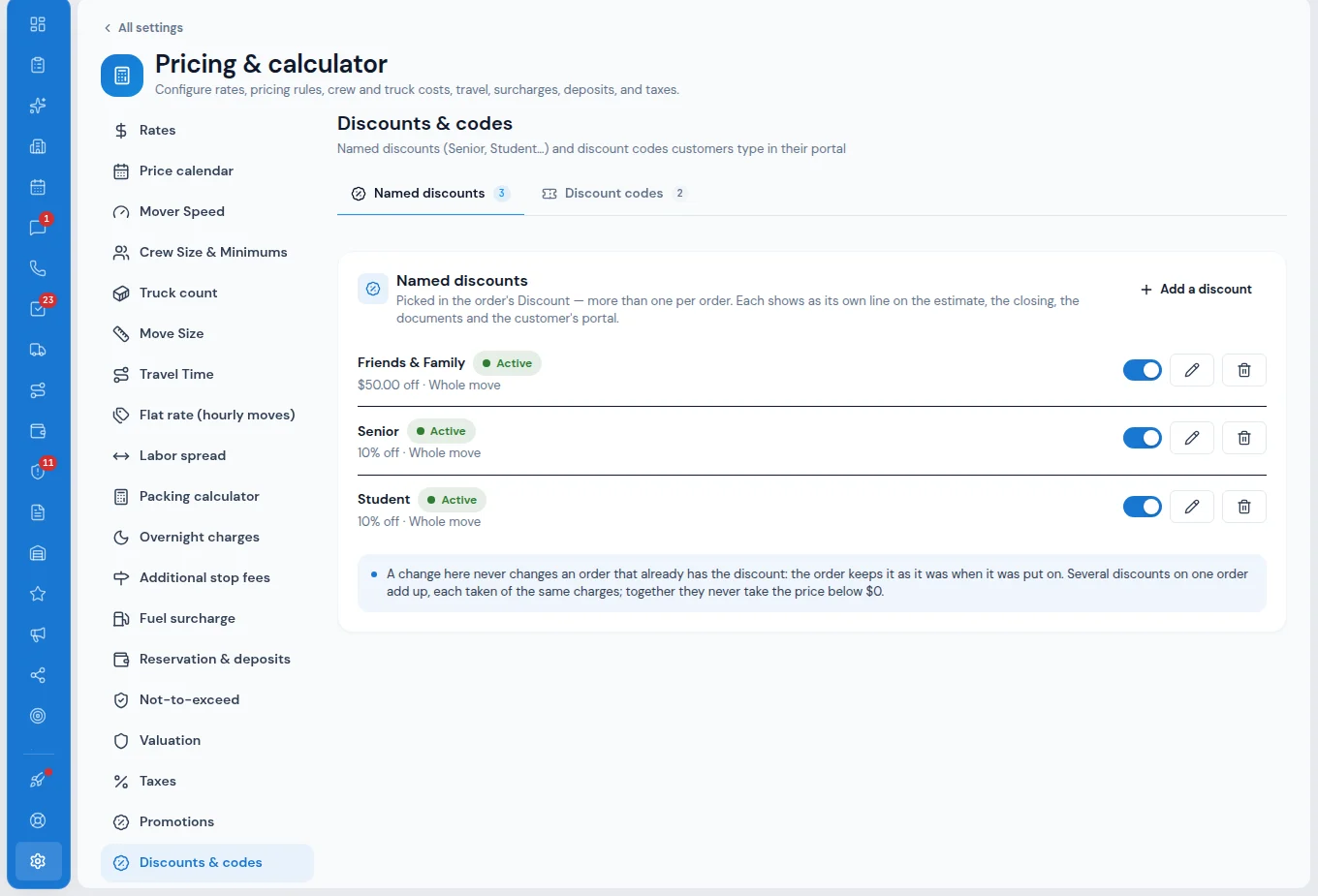
Open Settings › Pricing & calculator › Discounts & codes. Add named discounts like Senior, Student or Friends & Family, and codes like WINTER10 or BLACKFRIDAY50. Each is a percentage or a fixed amount, on the whole move or on one part of it. Give a code a Valid from and Valid until date, a number of uses and one use per customer, and switch any discount off and on again with one click.
- A change never touches an order that already has the discount
- Several discounts on one order add up, and never take the price below $0
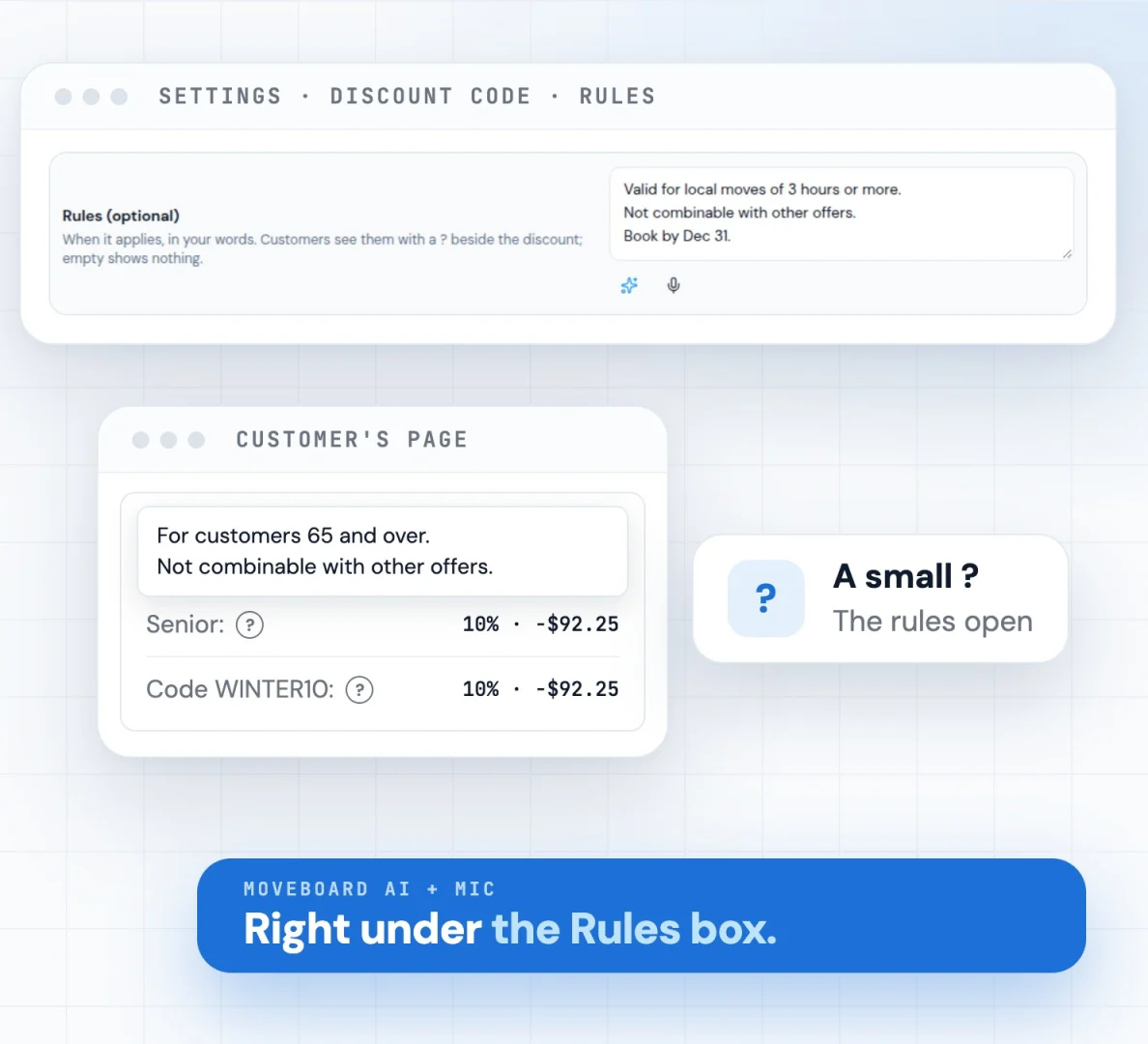
- A percentage shows one amount on the order, like 10% · -$92.25
02 / Rules behind a ?
Write the rules once. Customers see them behind a ?
Every discount and code has a Rules box: write when it applies in your own words, like For customers 65 and over. Not combinable with other offers. MoveBoard AI and the mic sit right under the box. Your customers see a small ? next to the discount or code on their page: hover on a computer, tap on a phone, and the rules open. Your office sees the same ? on the order.
- Leave the box empty and no ? shows
- The same words on the customer's page and the order
03 / Three ways onto the order
The office applies it. Or the customer types the code.
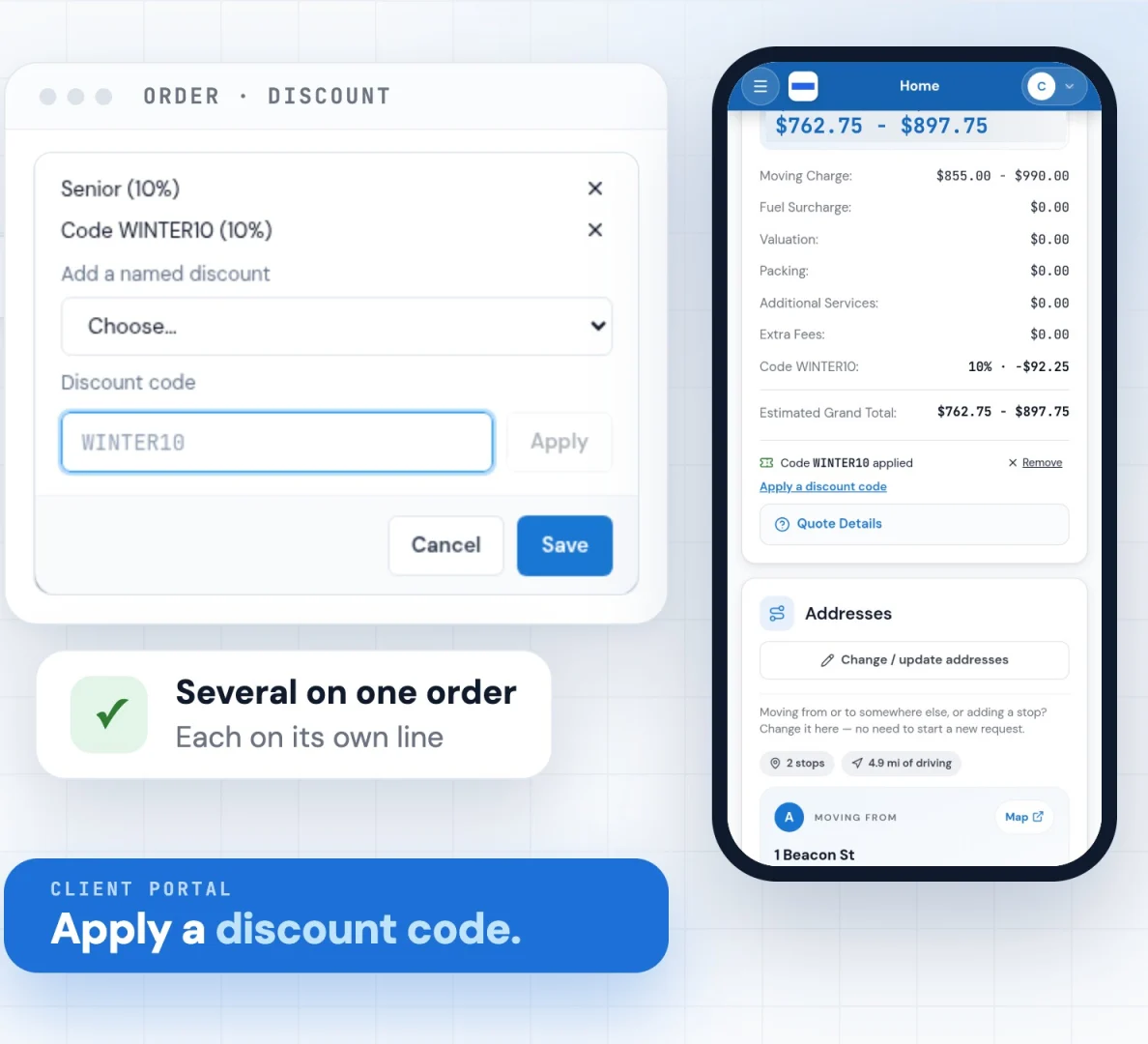
The office picks discounts on the order in Quote Details › Discount: a named discount from the list, a code, or both. Customers type a code themselves in their client portal before they sign, and the price updates at once. Each discount shows as its own line on the estimate, the documents and the customer's page, so everyone sees what they saved.
- Several on one order, each its own line
- A code that has expired, run out or was used before says so
- The customer's Remove takes their code off again
04 / Coupons and the crew
More than money off. The crew can apply it too.
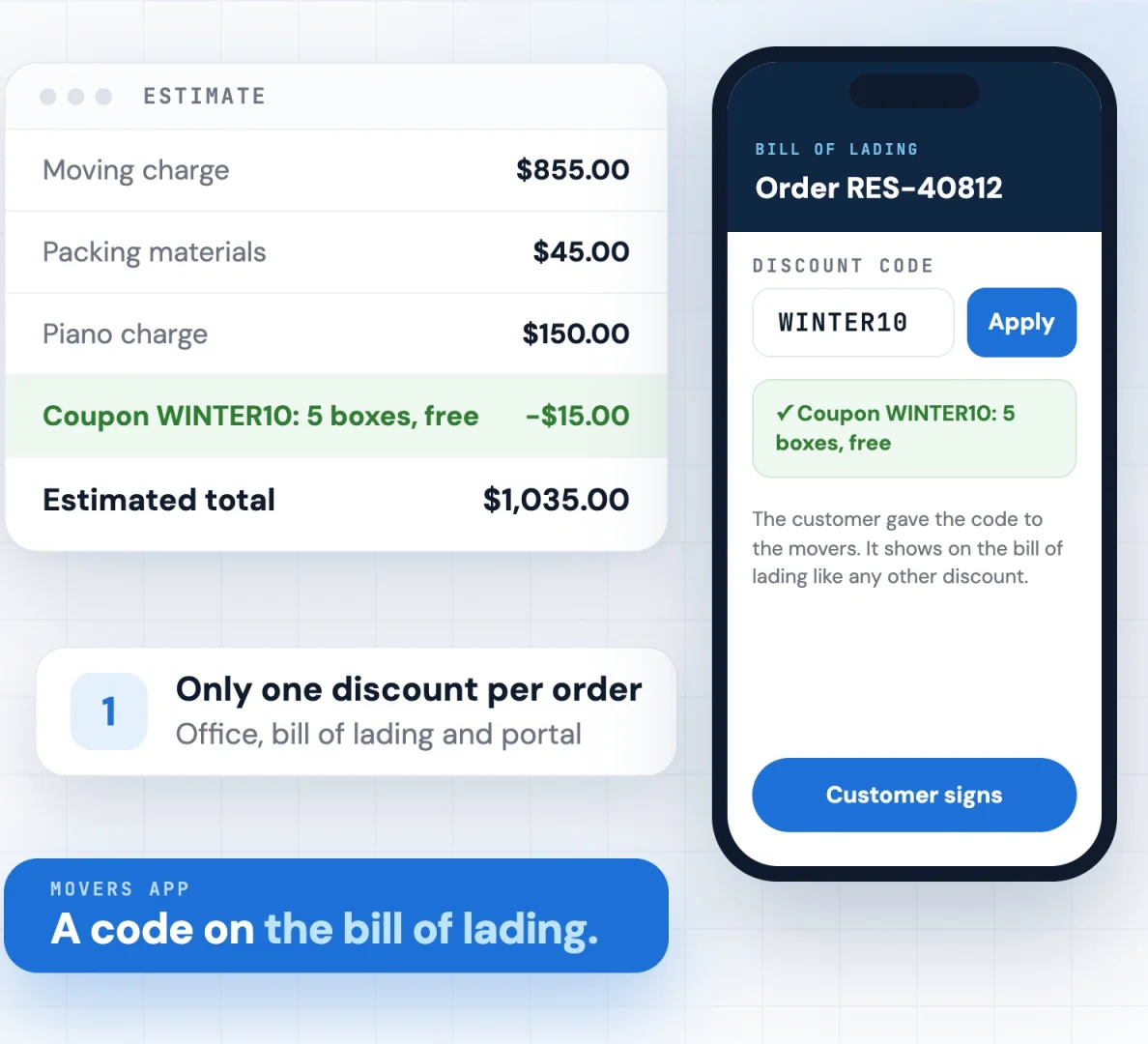
A code can also give packing materials from your own list, free or at a lower price, such as 5 free boxes, 2 mattress covers or a free paper wrap, or take money off additional services: free, a dollar amount or a percentage off, like a free piano charge. It shows as its own line, like Coupon WINTER10: 5 boxes, free. When a customer gives the code to the movers, the crew types it in the Discount code field on the bill of lading in the Movers App.
- Packing materials and additional services from your own price list
- On the bill of lading like any other discount
- Only one discount per order: an order with a discount takes no second code, in the office, on the bill or in the portal
05 / In your email campaigns
A coupon in your email, with Book now.
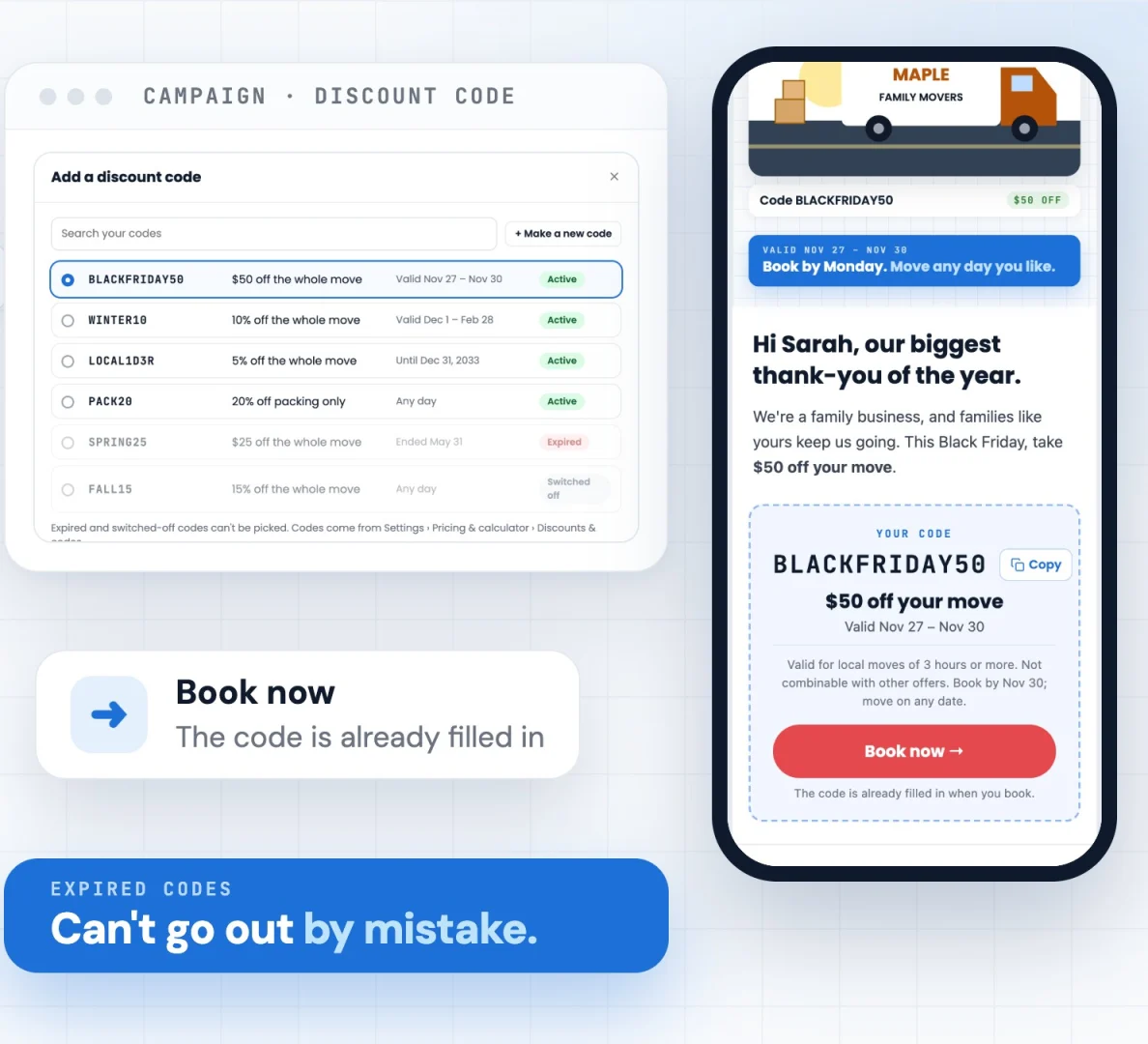
In Marketing › Campaigns, add a discount code to the email. MoveBoard adds a coupon block: the code with a Copy button, the amount, the valid dates, the rules and a Book now button. Book now takes each customer to their own client portal with the code ready, so booking takes seconds. If the code has expired or is no longer active, Send stops and offers three fixes: change the code's dates, pick another code, or take the coupon out.
- Expired and inactive codes can't be picked
- A scheduled campaign is checked again just before it goes out
- Emails not sent yet follow later changes to the discount
06 / See what they bring in
Every code, and the revenue it brought.
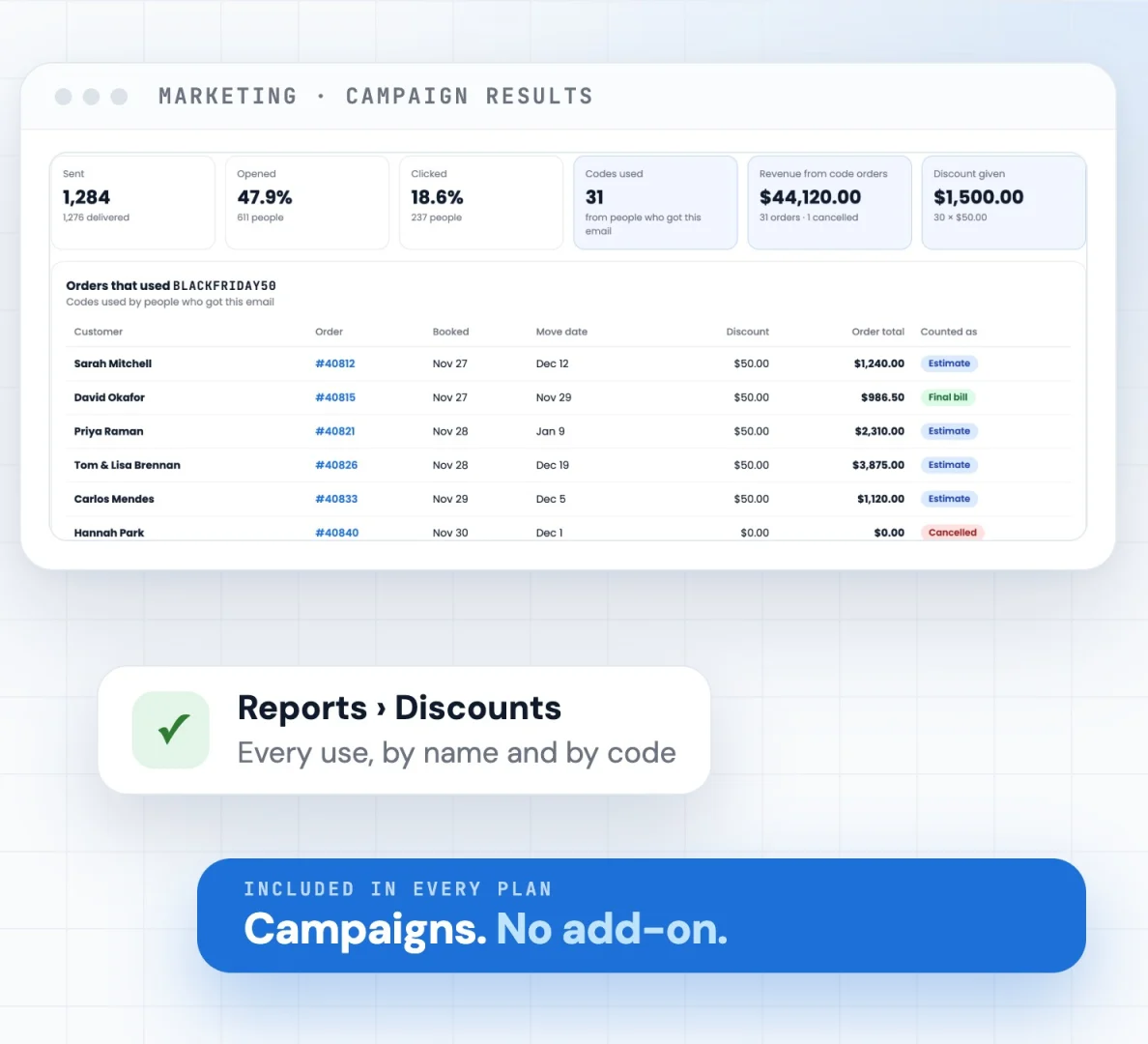
A campaign's results show the codes used, the revenue from the people who got the email and the discount given, order by order. Reports › Discounts shows every discount by name and by code, everywhere it was used: how often, and how much it gave, so you know which offers pay for themselves.
- Revenue follows the move: the estimate while it is upcoming, the final bill once it is done
- A cancelled move counts $0.00
- Filter Reports › Discounts by move type, service, salesperson and source
Discounts + email campaigns, connected
Connect your email campaigns to the discounts you created.
Connect your email campaigns directly to the discounts you created and send them to potential customers. Pick a code in the campaign and the coupon goes straight into the email: the code with Copy, the amount, the dates, your rules and a Book now button that opens each customer's own portal with the code ready.
The coupon stays linked to the discount, so emails not sent yet follow any later change you make to it, and a code that has expired or is no longer active can't go out by mistake. When the campaign has gone, its results show the codes used and the revenue from the people who got it.
- One code for everyone, or a unique code for each customer
- Book now opens the customer's own page, not a blank form
- Write the email yourself or let MoveBoard AI write it
One code or one per customer
One code for everyone, or a unique code for each customer.
You choose when you create the code. One code for everyone: anyone can use it, best for your website, social posts, flyers and the phone. A unique code for each customer: MoveBoard makes one code per person when the campaign goes out, only that person can use it and it can't be shared, best for email campaigns.
Either way, the amount, the dates, the rules and the other limits come from the discount's own settings, so a unique code never gives more than the offer you set up.
“Time relief, organization, all in one location of client files!”
By the numbers
3
Ways a code reaches the order
The office in Quote Details › Discount, the customer in their portal before they sign, and the crew on the bill of lading in the Movers App.
Questions
Moving discount and coupon questions.
Every screen has a step-by-step guide in the help center.
Can I give moving discounts like Senior or Student in MoveBoard?
Yes. Add named discounts in Settings › Pricing & calculator › Discounts & codes, such as Senior, Student, Military or Friends & Family, each a percentage or a fixed amount on the whole move or one part of it. The office picks them on the order in Quote Details › Discount, and each shows as its own line.
How do coupon codes work for my moving company?
Make a code like WINTER10 with its amount, Valid from and Valid until dates, a number of uses and one use per customer if you like. Customers type it in their client portal before they sign and the price updates at once; the office or the crew can apply it too.
Can a code give free boxes or a free service instead of money off?
Yes. A code can give packing materials from your own list, free or at a lower price, like 5 free boxes or 2 mattress covers, or take money off additional services, free or a dollar amount or percentage off, like a free piano charge. It shows as its own line, like Coupon WINTER10: 5 boxes, free.
Can the crew apply a discount code on the job?
Yes. When a customer gives the code to the movers, the crew types it in the Discount code field on the bill of lading in the Movers App, and it shows on the bill like any other discount.
Can an order have more than one discount?
Yes, several, each its own line on the estimate, the documents and the customer's page; together they never take the price below $0. If you prefer, Only one discount per order stops an order that already has a discount from taking another code, in the office, on the bill of lading and in the portal.
Where do customers see a discount's rules?
Behind a small ? next to the discount or code on their page: hover on a computer or tap on a phone and your rules open, in your own words. The office sees the same ? on the order.
Can I send a discount code in an email campaign?
Yes. In Marketing › Campaigns add a code and MoveBoard puts a coupon block in the email, with the code, Copy, the amount, the dates, the rules and Book now, which opens each customer's own client portal with the code ready. Expired or switched-off codes can't go out, and the campaign's results show the codes used and the revenue.
What is the difference between one code for everyone and a unique code?
One code for everyone can be used by anyone who has it, which suits your website, social posts, flyers and the phone. A unique code is made for each customer when the campaign goes out and works only for that customer, so it can't be shared, which suits email campaigns.
How do I see which discounts are used?
Reports › Discounts shows every discount by name and by code: how often it was used and how much it gave, with filters for move type, service, salesperson and source. Each campaign's results also show its codes used and the revenue from them.
Does it cost extra?
No. Discounts & codes, and discount codes in email campaigns, are included in every MoveBoard plan, with no add-ons.
Works with
Discounts work with the rest of MoveBoard.
See your company on MoveBoard.
A live demo built around your own kind of moves: your service area, your pricing, your crews.