
Corporate & affiliate accounts for movers: Realtors, builders, repeat customers.
A business account keeps a company you move for again and again in one place: its orders, invoices, notes and messages, its own discount and payment terms, and a login to its own portal. Corporate clients relocating their staff and affiliates who send you work each get their tab.
- kinds: Corporate, Affiliate, Personal
- 3kinds: Corporate, Affiliate, Personal
- payment options: COD or IOD
- 2payment options: COD or IOD
- send for every unpaid order you tick
- 1send for every unpaid order you tick
Account 1042 · Affiliate
Bayview Realty moved 14 times
Account overview
See their portal
Account manager
What it fixes
The day before Accounts, and the day after.
The realtor who sends you ten moves a year looks like ten strangers.
One account with total orders, booked jobs, total paid, and every move.
Their 10% discount is typed by hand, when someone remembers.
The Account Discount goes onto every order put on the account.
Month-end billing means ten invoices and ten emails.
An Account Invoice makes one balance-due invoice per unpaid order, sent together.
How it works
Accounts, screen by screen.
01 / The Accounts list
Every company you move for.
Accounts in the menu lists your Corporate, Affiliate and Personal accounts, each on its own tab, with the number of orders, the contact, source and salesperson. Filter by account type, salesperson, source, state, status and created date, or press Came back to see the accounts that have had more than one order.
- Send a mass email or text to the accounts you tick
- Assign a salesperson to several accounts at once
- Export the list
- You see the accounts you manage, or everyone's with permission
Accounts · 38 in this list
Accounts, our business with other companies
02 / One account, everything
Its moves, money and messages together.
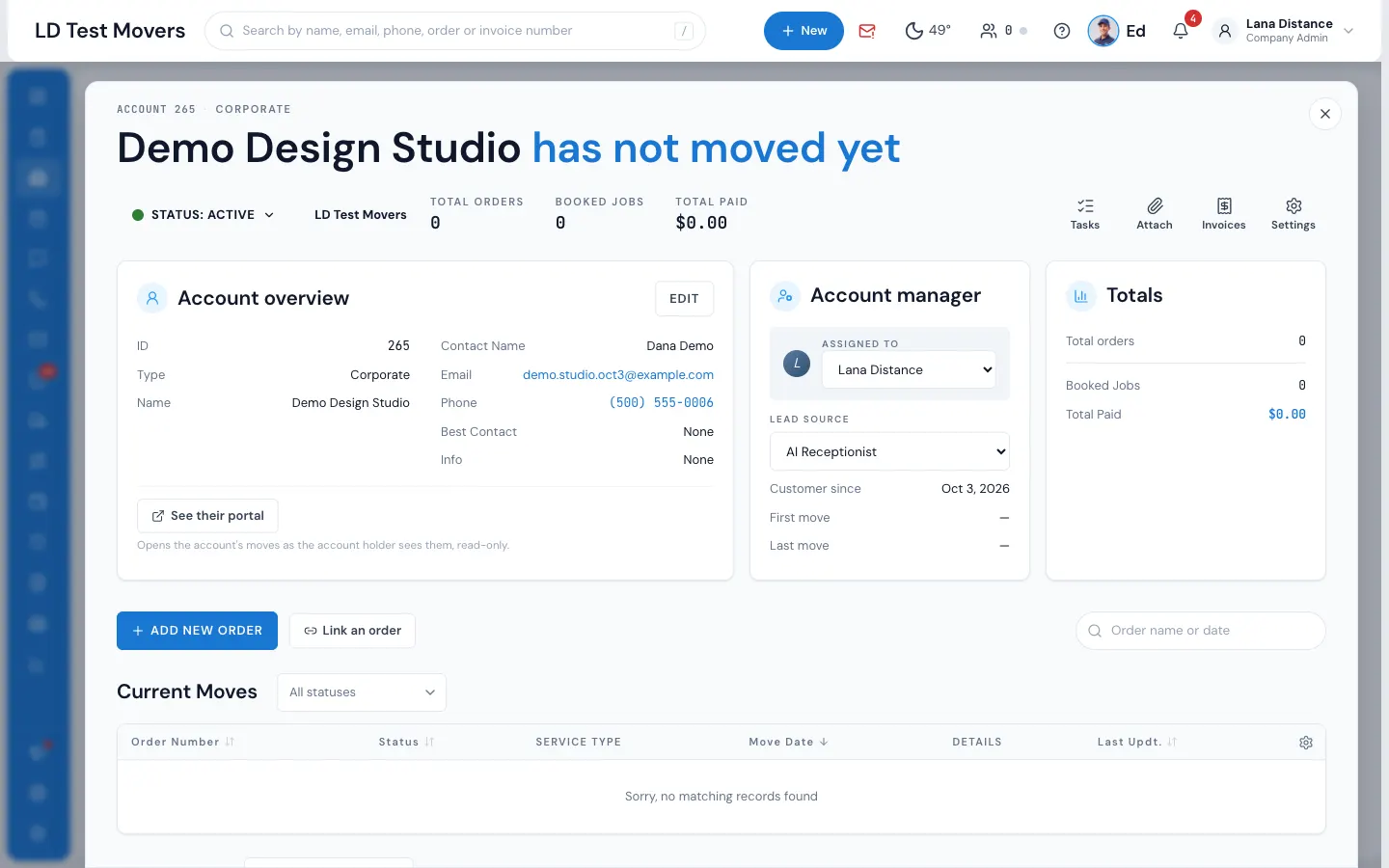
Open an account to see its status, total orders, booked jobs and total paid, the contact and account manager, its current and past moves, notes, and the account log. Messages go to the contact as a text, a portal message or an email, and the emails sent for the account's orders show there too.
- ADD NEW ORDER starts a lead already on the account
- Link an order moves an existing order, with its payments, onto it
- See their portal shows the moves exactly as the contact sees them
- Files shared to the account's portal with one tick
03 / Terms that follow
Their price and terms, on every order.
The account's Settings hold its Account Discount and Payment Option. The discount can be a total discount in percent or dollars, an hourly-rate discount or a set hourly rate. Payment can be COD, collected on delivery, or IOD, invoice on delivery. Both go onto each order put on the account.
- IOD: the crew takes no payment; the office gets an Invoice to send task
- Change the discount or terms on any one order as usual
- Changing the account later doesn't touch orders already on it
Settings · Bayview Realty
Payment Option
COD (Cash, check or credit card on delivery)
IOD (Invoice on delivery)
Account Discount
Total discount
10 %
Hourly-rate discount
—
Set hourly rate
—
Total discount ($)
—
Every order put on this account takes 10% off each day, and the crew sees Invoice on delivery — the office will send an invoice.
04 / Invoices for the account
Bill the company, not each move.
The account's Invoices list shows every invoice on it, with its balance. Make an Account Invoice to send one balance-due invoice for each unpaid order you tick, together, or a Custom Invoice billed to the account itself with no order at all. Each one is paid from its own link.
- A customer can be turned into an account from their history
- The account's contact signs in to the portal with a texted code
- The Customer & Account Value report ranks your best accounts
Bayview Realty · Invoices
One invoice per order, sent together
Account Invoice · tick the unpaid orders
Each one opens from its own link, paid by card in a minute.
“Time relief, organization, all in one location of client files!”
By the numbers
IOD
Invoice on delivery, built in
On an IOD account's jobs the crew takes no payment on the bill of lading, and the office gets an Invoice to send task the moment the job is completed.
What's the difference between corporate and affiliate accounts?
Corporate accounts are for clients who hire you for their own moves, such as a company relocating its staff or a property manager. Affiliate accounts are for partners who send you jobs, such as a realtor or a staging company. Both keep their orders, invoices, notes and messages together, carry their own discount and payment terms, and give their contact a portal login.
Can a corporate account submit job requests through the portal?
The account's contact signs in to the customer portal with a code texted to their phone and sees the account's moves there. Most offices add new moves for them with ADD NEW ORDER on the account, so the account's discount and payment terms come with the order.
How do I track which partner referred which customer?
Put the order on the account, from the account's ADD NEW ORDER or with Link an order. The account then counts it in its total orders, booked jobs and total paid, and the Customer & Account Value report compares your accounts.
Is there a limit to how many accounts I can create?
Accounts are part of MoveBoard on both plans, with no per-account fee. Creating them needs the Can create a Corporate Account or Can Create an Affiliate Account permission.
Can I see all orders from one account in a single view?
Yes. Each account shows its Current Moves and Past Moves, total orders, booked jobs and total paid. Press any move to open it.
See your company on MoveBoard.
A live demo built around your own kind of moves: your service area, your pricing, your crews.